
Mod Menu
Prospector
162.182.321 downloads · 28.272 followers
Minecraft: Minecraft 1.14.4 – 26.3
Runs on: Client
Kategorie: utility
Compatibility by loader
- fabric1.14 – 1.21, 26.1 – 26.3· Latest 21.0.1 (12. Nov. 2026)
- quilt1.18 – 1.21, 26.1 – 26.3· Latest 21.0.1 (12. Nov. 2026)
Required with
Overview
Mod Menu
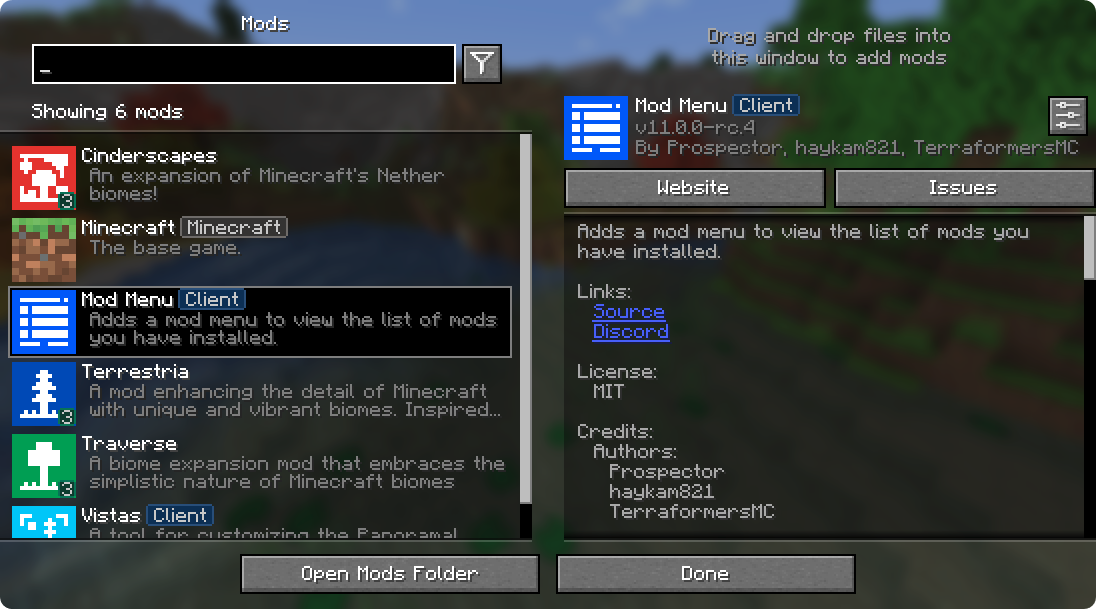
Mod Menu lets you view the mods you have installed and, if supported by the mod, enables quick and easy access to the mod's config screens.
Mod Menu also supports some more advanced features, such as translatable mod names and descriptions, support for QuickText formatting in mod descriptions thanks to Patbox's Text Placeholder API, filters library mods out from regular mods, a mod update checker for mods hosted on Modrinth or that provide their own update sources, and deep configuration for all the features we provide.
Supported Platforms
Mod Menu is currently available for Fabric or Quilt on Minecraft: Java Edition 1.14 or newer.
Developers
Mod Menu includes a number of APIs for developers to improve how their mod appears in Mod Menu. These come in the form of language keys, JSON metadata, and even a Java API.
Translation API
You can translate your mod's name, summary, and description all without touching any Java code. Simply add translation keys in the supported format to any language you'd like.
Translation API Documentation
Here's an example of Mod Menu's translations into Pirate Speak. To create your own, simply replace modmenu at the end (NOT the one in the beginning) of the translation key with your own mod ID, for example modmenu.descriptionTranslation.traverse.
en_pt.json
"modmenu.nameTranslation.modmenu": "Menu o' mods!",
"modmenu.descriptionTranslation.modmenu": "Menu o' mods ye installed matey!",
"modmenu.summaryTranslation.modmenu": "Menu o' mods ye installed matey!"
The summary translation is redundant here and does not need to be included because it's the same as the description, but it was included to show that you may translate the summary (a short, one-sentence description of the mod) separately from the description, even in English!
Fabric Metadata API
There's a number of things you can add just with metadata in your fabric.mod.json.
All of these are added to a custom block in your fabric.mod.json for Mod Menu's metadata. Here's an example usage of many of the features this API provides:
fabric.mod.json
{
  ...
  "custom": {
    "modmenu": {
      "links": {
        "modmenu.discord": "https://discord.gg/jEGF5fb"
      },
      "badges": [ "library", "deprecated" ],
      "parent": {
        "id": "example-api",
        "name": "Example API",
        "description": "Modular example library",
        "icon": "assets/example-api-module-v1/parent_icon.png",
        "badges": [ "library" ]
      },
      "update_checker": true
    }
  }
}
Fabric Metadata API Documentation
Badges ("badges": [ ])
While the Client badge is added automatically to mods set as client-side only (set "environment": "client" in fabric.mod.json to do this.), other badges such as the Library and Deprecated badges require definition here.
Supported values:
library- should be assigned to mods that are purely dependencies for other mods that should not be shown to the user by default unless they toggle them on.deprecated- should be assigned to mods that exist purely for legacy reasons, such as an old API module or such.
Any others will be ignored, and Mod Menu does not support adding your own badges. You may open an issue here if you have a compelling use case for a new badge.
Links ("links": { })
The links object allows mod authors to add custom hyperlinks to the end of their description. If you specify a sources contact in the official fabric.mod.json metadata, it will also be included in the links section.
Any key in the links object will be included in the links section, with the key being used as a translation key. For example, this:
fabric.mod.json
"custom": {
    "modmenu": {
        "links": {
          "modmenu.discord": "https://discord.gg/jEGF5fb"
        }
    }
}
will show as a link with the text "Discord", since "Discord" is the English translation of "modmenu.discord" provided by Mod Menu.
Mod Menu provides several default translations that can be used for links. A full list can be seen in Mod Menu's language file here. All default link translation keys take the form modmenu..
You can also provide your own translations if you would like to add custom links. Make sure to use your own namespace (as opposed to modmenu) for any custom keys.
Parents ("parent": "mod_id" or { })

Parents are used to display a mod as a child of another one. This is meant to be used for mods divided into different modules. The following element in a fabric.mod.json will define the mod as a child of the mod 'flamingo':
fabric.mod.json
"custom": {
    "modmenu": {
        "parent": "flamingo"
    }
}
However, if you want to group mods under a parent, but the parent isn't an actual mod, you can do that too. In the example below, a mod is defining metadata for a parent. Make sure that this metadata is included in all of the children that use the fake/dummy parent. This can also be used as a fallback for an optional parent, it will be replace by the mod's real metadata if present.
fabric.mod.json
"custom": {
    "modmenu": {
        "parent": {
            "id": "this-mod-isnt-real",
            "name": "Fake Mod",
            "description": "Do cool stuff with this fake mod",
            "icon": "assets/real-mod/fake-mod-icon.png",
            "badges": [ "library" ]
        }
    }
}
Dummy parent mods only support the following metadata:
id(String)name(String)description(String)icon(String)badges(Array of Strings)
Disable update checker ("update_checker": false)
By default, Mod Menu's update checker will use the hash of your mod's jar to lookup the latest version on Modrinth. If it finds a matching project, it will check for the latest version that supports your mod loader and Minecraft version, and if it has a different hash from your existing file, it will prompt the user that there is an update available.
You can disable the update checker by setting update_checker to false in your Mod Menu metadata like so:
fabric.mod.json
"custom": {
    "modmenu": {
        "update_checker": false
    }
}
Quilt Metadata API
Since Mod Menu supports Quilt as well, the same APIs in the Fabric Metadata API section are also available for Quilt mods, but the format for custom metadata is slightly different.
Instead of a "modmenu" block inside of a "custom" block, you put the "modmenu" block as an element in the root object. So it should look like:
quilt.mod.json
{
  ...
  "modmenu": {
    // Here's where your links, badges, etc. stuff goes
  }
}
Java API
To use the Java API, you'll need to add Mod Menu as a compile-time dependency in your gradle project. This won't make your mod require Mod Menu, but it'll be present in your environment for you to test with.
build.gradle
// Add the Terraformers maven repo to your repositories block
repositories {
  maven {
    name = "Terraformers"
    url = "https://maven.terraformersmc.com/"
  }
}

// Add Mod Menu as a dependency in your environment
dependencies {
  // Prior to Minecraft 26.x, use "modImplementation" instead
  implementation("com.terraformersmc:modmenu:${project.modmenu_version}")
}
Then, define the version of Mod Menu you're using in your gradle.properties. You can get the latest version number here, but you may need a different version if you're not using the latest Minecraft version. See the versions page for a full list of versions.
gradle.properties
modmenu_version=VERSION_NUMBER_HERE
If you don't want it in your environment for testing but still want to compile against Mod Menu for using the Java API, you can use
modCompileOnlyinstead ofmodImplementation(this will work even if Mod Menu is not updated to the version of Minecraft you're running).
Java API Documentation
Getting Started
To use the API, implement the ModMenuApi interface on a class and add that as an entry point of type "modmenu" in your fabric.mod.json like this:
fabric.mod.json
"entrypoints": {
  "modmenu": [ "com.example.mod.ExampleModMenuApiImpl" ]
}
Mod Config Screens
Mods can provide a Screen factory to provide a custom config screen to open with the config button. Implement the getModConfigScreenFactory method in your API implementation to do this.
The intended use case for this is for mods to provide their own config screens. The mod id of the config screen is automagically determined by the source mod container that the entrypoint originated from.
Provided Config Screens
Mods can provide Screen factories to provide a custom config screens to open with the config buttons for other mods as well. Implement the getProvidedConfigScreenFactories method in your API implementation for this.
The intended use case for this is for a mod like Cloth Config to provide config screens for mods that use its API.
Modpack Badges
Mods can give other mods the Modpack badge by implementing the attachModpackBadges method, such as through the following:
@Override
public void attachModpackBadges(Consumer consumer) {
	consumer.accept("modmenu"); // Indicates that 'modmenu' is part of the modpack
}
Note that 'internal' mods such as Minecraft itself and the mod loader cannot be given the modpack badge, as they are not distributed within a typical modpack.
Static Helper Methods
ModMenuApi also offers a few helper methods for mods that want to work with Mod Menu better, like making their own Mods buttons.
Creating a Mods screen instance
You can call this method to get an instance of the Mods screen:
Screen createModsScreen(Screen previous)
Creating a Mods button Text
You can call this method to get the Text that would be displayed on a Mod Menu Mods button:
Text createModsButtonText()
AI-summarized from the mod's own pages · reviewed by our team
Reviewed for 22.0.0-alpha.3
Machine translated
Source: Modrinth project pageGuide
Summary
Mod Menu bietet einen Bildschirm, auf dem du deine installierten Mods und deren Details durchsuchen kannst. Außerdem kann es Konfigurationsbildschirme für Mods öffnen, die solche bereitstellen, und unterstützte Mods auf Updates prüfen.
Getting started
- Mods-Bildschirm durchsuchen — Öffne den Mods-Bildschirm, um deine installierten Mods anzuzeigen. Der Bildschirm enthält eine Suchleiste und Filter, mit denen du Einträge leichter findest.
- Eintrag ansehen — Wähle einen Mod aus der Liste aus, um seine Details anzusehen. Je nachdem, welche Angaben der Autor bereitstellt, können dazu eine Beschreibung, Autoren, Danksagungen und Links gehören.
- Einstellungen öffnen — Suche im Detailbereich des ausgewählten Mods nach der Schaltfläche für die Konfiguration. Ein Mod muss einen unterstützten Konfigurationsbildschirm bereitstellen, damit Mod Menu ihn öffnen kann.
Key features
Suche und Filter
Verwende die Suche, um die Liste einzugrenzen, und die Filter, um die angezeigten Einträge anzupassen. Bibliotheksmods werden normalerweise von regulären Mods getrennt, daher wird eine Abhängigkeit möglicherweise nicht in der Standardansicht angezeigt.
Mod-Details und Links
Der Detailbereich kann von Mod-Autoren bereitgestellte Informationen anzeigen, darunter Links und Danksagungen. Namen und Beschreibungen können ebenfalls übersetzt sein, sofern Übersetzungen bereitgestellt werden.
Updateprüfung
Mod Menu kann Mods prüfen, die auf Modrinth gehostet werden oder eigene Updatequellen verwenden. Bei Prüfungen über Modrinth wird die installierte Datei mit einer Version verglichen, die deinen Loader und deine Minecraft-Version unterstützt.
Gruppierte Module
Manche Mods werden als Untereinträge unter einem übergeordneten Eintrag angezeigt. So lassen sich zusammengehörige Module gruppieren. Ein übergeordneter Eintrag kann auch nur der Gruppierung dienen und muss selbst kein installierter Mod sein.
Compatibility
Fabric, Quilt · In der Beschreibung wird Minecraft Java Edition 1.14 oder neuer aufgeführt. Wähle eine Mod-Menu-Version, die zu deiner Minecraft-Version passt.
Tips
- Wenn du eine Abhängigkeit nicht findest, überprüfe die Filter und aktiviere die Anzeige von Bibliotheksmods.
- Fehlt ein Konfigurationsbildschirm, bedeutet das nicht, dass der Mod nicht vorhanden ist: Sein Autor oder ein anderer Mod muss einen unterstützten Bildschirm bereitstellen.
- Ein Updatehinweis basiert auf einem abweichenden Datei-Hash für eine passende, unterstützte Version. Die Quellen beschreiben keinen automatischen Installationsvorgang.
- Mod Menu bietet Einstellungen für seine eigenen Funktionen. Prüfe daher den zugehörigen Konfigurationsbildschirm, wenn du sein Verhalten anpassen möchtest.
FAQ
- Warum sind manche Mods in der regulären Liste ausgeblendet?
- Als Bibliotheken gekennzeichnete Mods sind hauptsächlich als Abhängigkeiten gedacht und werden standardmäßig nicht angezeigt. Du kannst ihre Anzeige über die Filteroptionen umschalten.
- Hat jeder Mod eine funktionierende Konfigurationsschaltfläche?
- Nein. Mod Menu kann einen Konfigurationsbildschirm nur öffnen, wenn einer für den jeweiligen Mod bereitgestellt wird.
- Was bedeutet ein als veraltet gekennzeichnetes Symbol?
- Es weist auf einen Mod hin, den sein Autor als für Legacy-Zwecke vorgesehen markiert hat.
Modrinth modrinth
indexable