
Simple Voice Chat
henkelmax
77.149.835 downloads · 14.857 followers
Minecraft: Minecraft 1.12.2 – 26.2
Runs on: Client & server
Kategorie: adventure, bukkit, bungeecord, folia, paper, purpur, social, spigot, utility, velocity, waterfall
Compatibility by loader
- fabric1.16 – 1.21, 26.1 – 26.2· Latest fabric-2.6.22+26.2 (8. Aug. 2026)
- neoforge1.20 – 1.21, 26.1 – 26.2· Latest neoforge-2.6.22+26.2 (8. Aug. 2026)
- forge1.12.2, 1.16 – 1.21, 26.1 – 26.2· Latest forge-2.6.22+26.2 (8. Aug. 2026)
- quilt1.18 – 1.21, 26.1 – 26.2· Latest quilt-2.6.22+26.2 (8. Aug. 2026)
Overview
Modrinth | CurseForge | Discord | Wiki | FAQ | Credits | API
Simple Voice Chat
A proximity voice chat for Minecraft with a variety of addons that offer additional features and functionalities.
⚠️ NOTE This mod requires special setup on the server in order to work. Please read the wiki for more information.
[
](https://discord.gg/4dH2zwTmyX)
*Please join the Discord if you have questions!*
Downloads
Features
- Push to talk
- Voice activation
- Proximity voice chat
- Password protected groups
- Automatic voice activity detection
- Automatic microphone gain adjustment
- Opus codec
- RNNoise recurrent neural network noise suppression
- OpenAL audio
- Cross compatibility between Fabric, NeoForge, Forge, Quilt, Bukkit, Spigot and Paper
- Support for Velocity, BungeeCord and Waterfall
- Compatibility with ModMenu (Use ClothConfig for a better configuration UI)
- Configurable push to talk key
- Microphone and speaker test playback
- Configurable voice distance
- Whispering
- Individual player volume adjustment
- Microphone amplification
- 3D sound
- AES encryption
- Audio recording with separate audio tracks
- A powerful API
- Many addons
Icons
| Icon | Description |
|---|---|
 | You are talking |
 | You are whispering |
 | Player is talking |
 | Player is whispering |
 | Microphone muted |
 | Voice chat disabled |
 | Voice chat not connected |
| Voice chat not installed |
The GUI
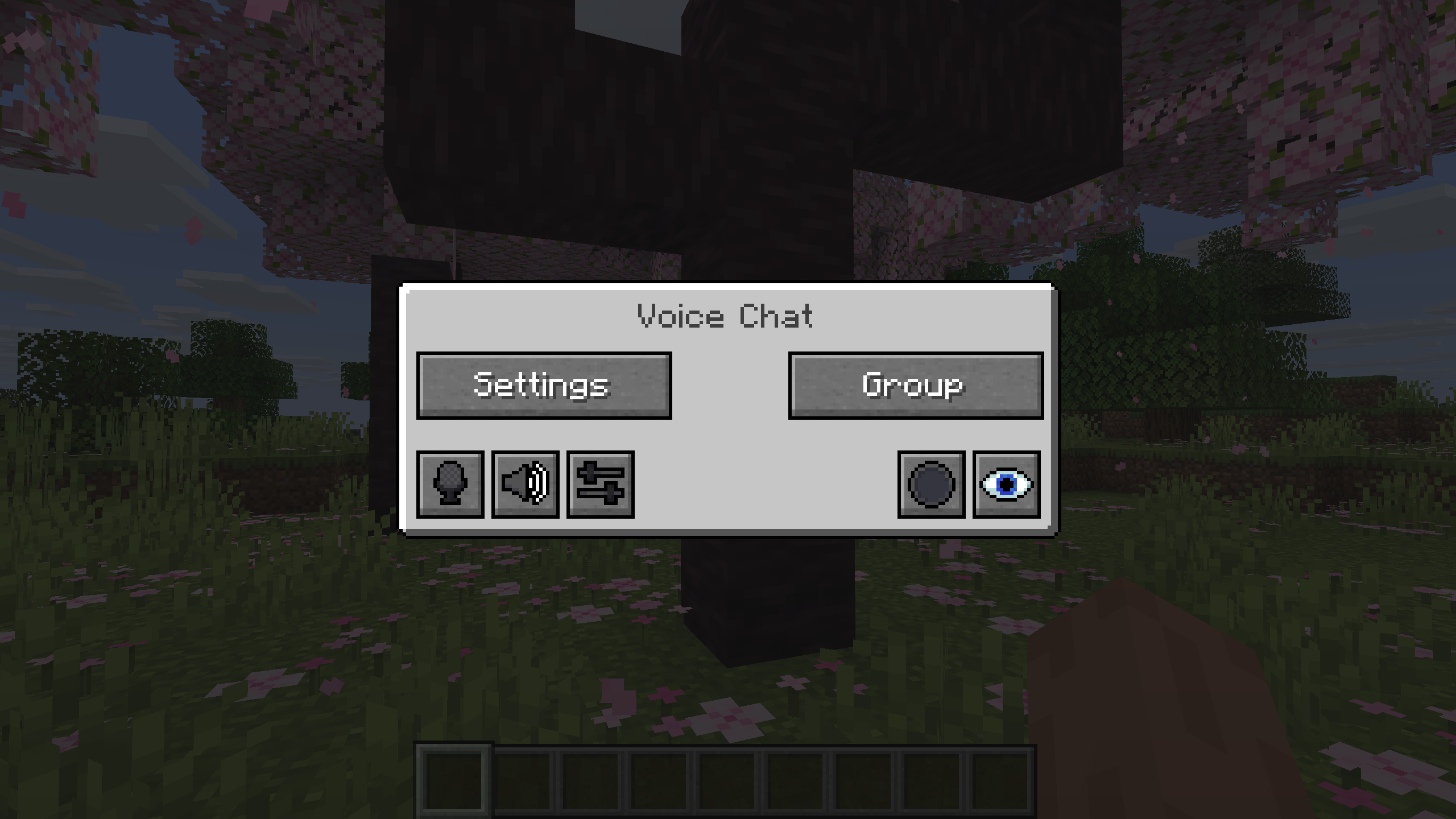
You can open the voice chat GUI by pressing the V key.
This allows you to open the settings, group chats, mute yourself, disable the voice chat, start/stop a recording and hide all icons.
Group Chats
Group chats allow you to talk to players that are not in your vicinity. To open the group chat interface, either press the group button in the voice chat GUI or just press the group key.
To create a new group, just type a name in the text field and press the button at the bottom.
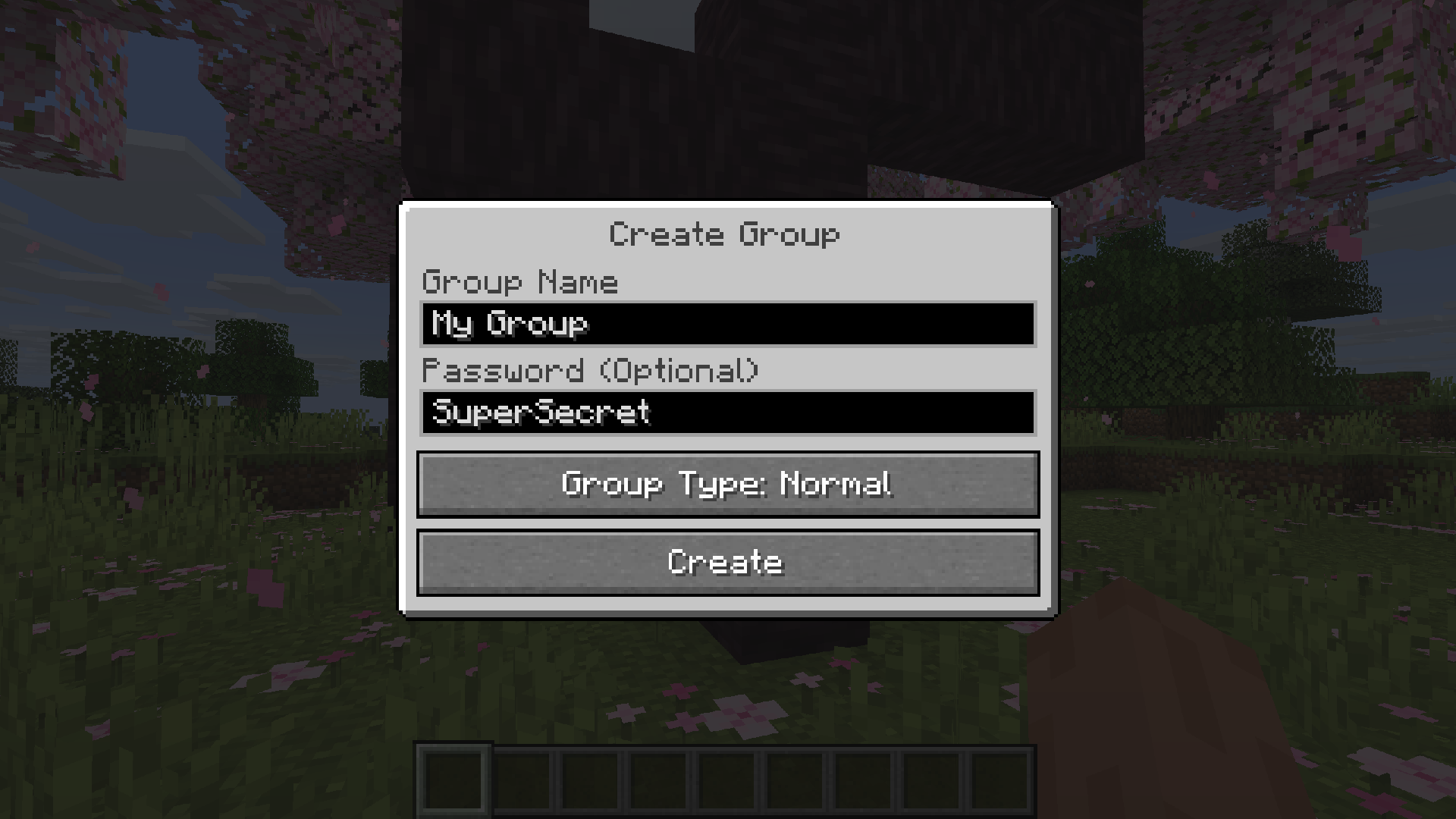
Creating or joining a group will bring you into the group chat interface. You will also see the heads of the group members in the top left corner of your screen. Talking players will be outlined. You can disable these icons by pressing the third button from the left.
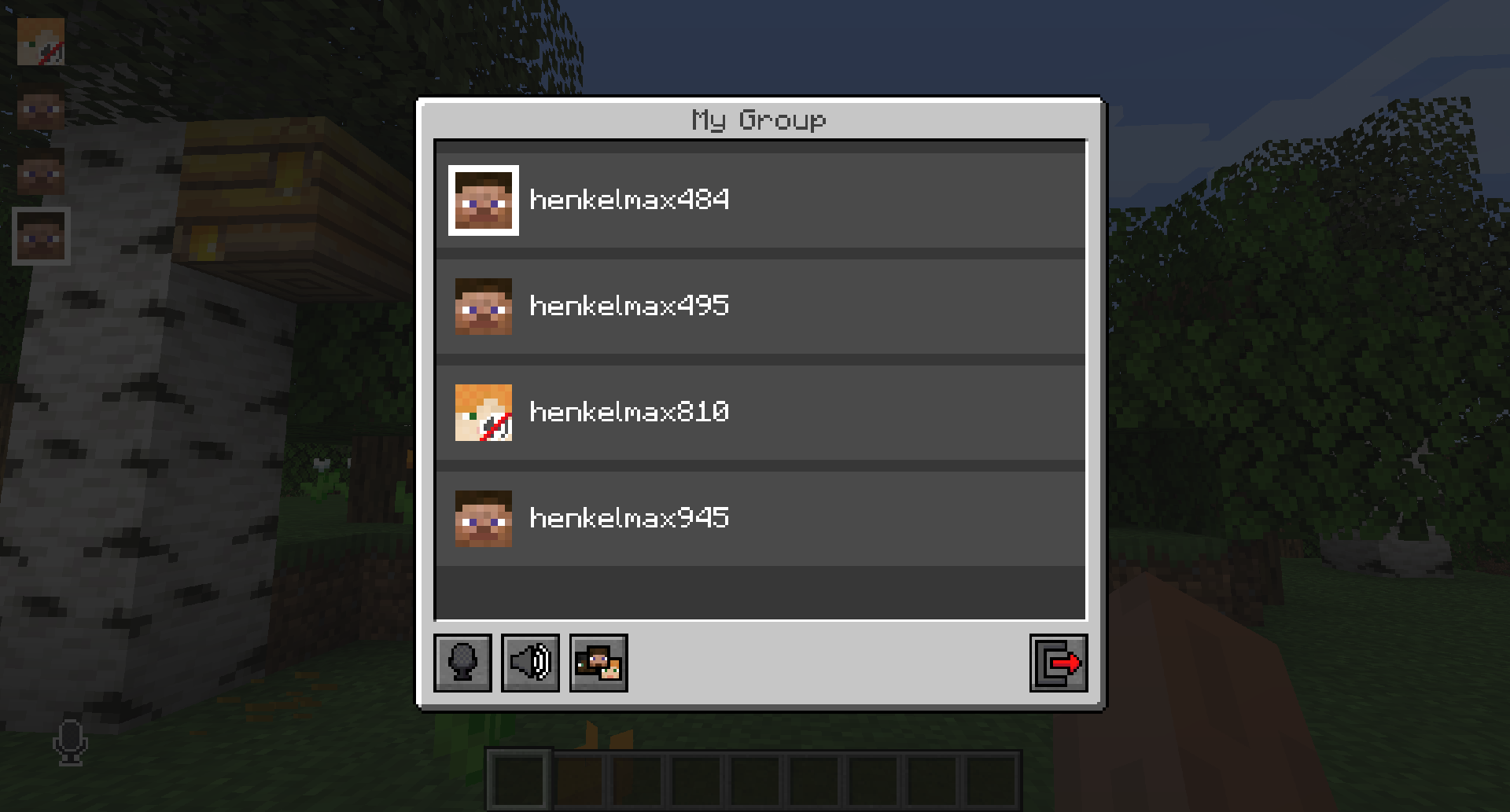
Players that are not in a group will see a group icon next to your head, indicating that you are in a group.
You can invite players to your group chat by entering the command /voicechat invite or from the social interactions screen.
Settings
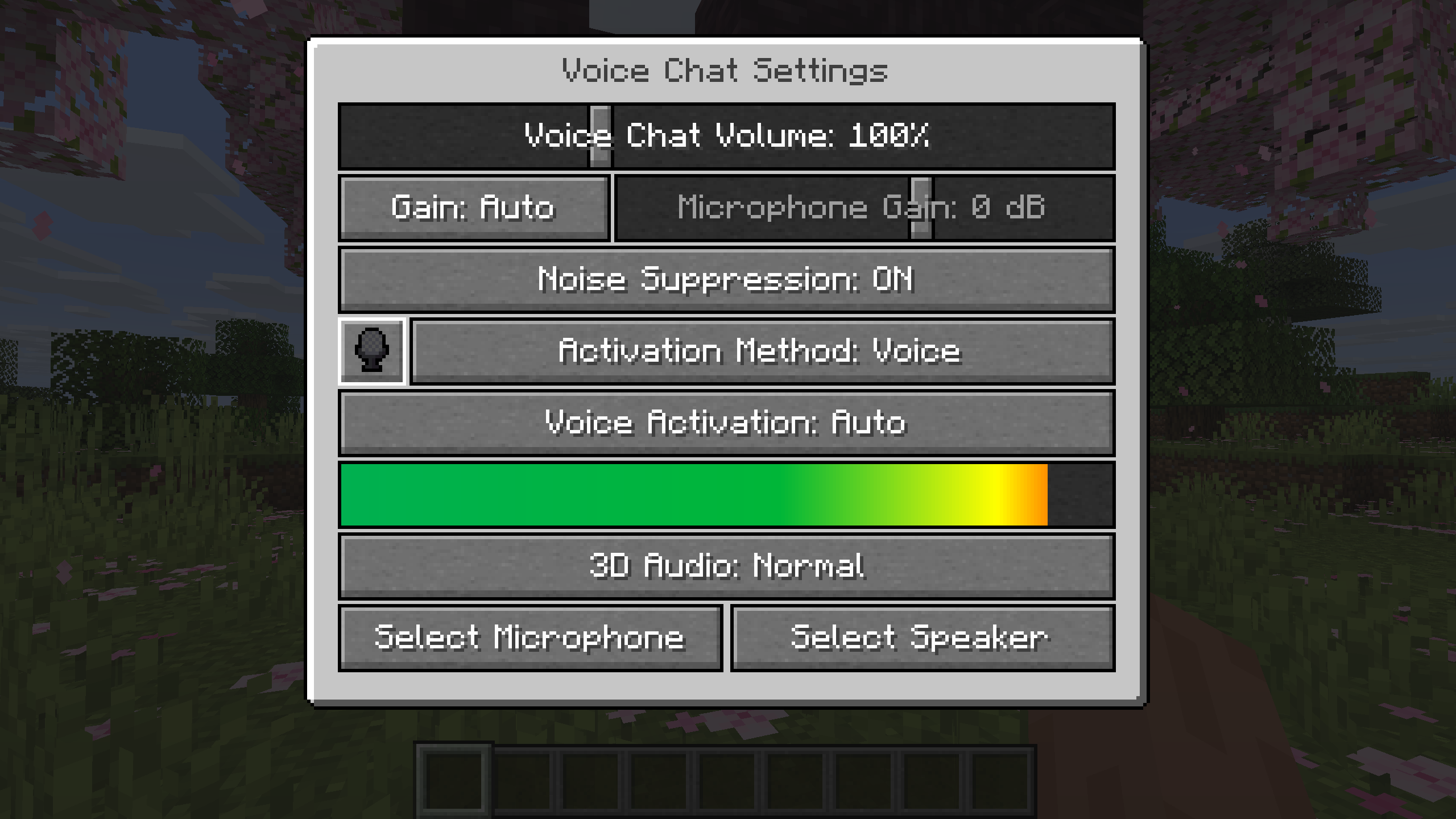
You can access the voice chat settings by pressing the V key and pressing the settings button.
This menu offers the ability to set up your voice chat audio settings.
By clicking the microphone button, you can test your microphone activation.
Important Notes
You need to open a port on the server. This is port 24454 UDP by default.
Without opening this port, the voice chat will not work.
This port can be changed in the server config.
More information here.
The voice chat is encrypted, but we don't guarantee the security of it. Use at your own risk!
AI-summarized from the mod's own pages · reviewed by our team
Reviewed for fabric-2.6.27+26.4-snapshot-7
Machine translated
Source: Modrinth project pageGuide
Summary
Simple Voice Chat fügt Minecraft sprachbasierte Kommunikation in der Nähe hinzu, sodass du mit Spielern in deiner Umgebung sprechen kannst. Außerdem bietet es Gruppenchats für Gespräche über größere Entfernungen, Audio-Steuerungsmöglichkeiten und Aufnahmen. Auf einem Server ist eine spezielle Einrichtung erforderlich, bevor der Sprachchat funktioniert.
Getting started
- Passenden Download installieren — Wähle den Download für deinen Loader oder deine Serverplattform. Das Projekt bietet Mod-Downloads für Fabric, Forge, NeoForge und Quilt sowie Downloads für verschiedene Server- und Proxyplattformen.
- Servereinrichtung überprüfen — Der Serveradministrator muss einen UDP-Port für den Sprachchat öffnen. Standardmäßig ist dies Port 24454, aber die Serverkonfiguration kann den Port ändern.
- Spracheinstellungen öffnen — Drücke V und wähle dann die Schaltfläche für die Einstellungen. Teste mit der Mikrofontaste, ob dein Mikrofon aktiviert wird, und überprüfe deinen Ton mit den verfügbaren Mikrofon- und Lautsprecher-Wiedergabetests.
- Sprechmodus auswählen — Verwende je nach Wunsch Push-to-Talk oder Sprachaktivierung. Die Push-to-Talk-Taste kann geändert werden.
Key features
Gespräche in der Nähe
Mit dem Näherungs-Chat kannst du mit Spielern in deiner Nähe sprechen. Die Sprachreichweite ist konfigurierbar. Außerdem unterstützt die Mod Flüstern und 3D-Sound.
Gruppenchats
In Gruppen kannst du mit Mitgliedern sprechen, die nicht in der Nähe sind. Gruppen können mit einem Passwort geschützt werden. Öffne die Gruppenoberfläche über das V-Menü oder mit der Gruppentaste.
Audio-Steuerung
Passe die Lautstärke einzelner Spieler an oder verstärke dein Mikrofon. Automatische Spracherkennung, Verstärkungsanpassung und Rauschunterdrückung sind ebenfalls verfügbar.
Aufnahmen
Starte oder beende eine Aufnahme über das Sprachchat-Menü. Aufnahmen unterstützen separate Audiospuren.
Compatibility
Fabric, Forge, NeoForge, Quilt
Tips
- Um eine Gruppe zu erstellen, öffne die Gruppenoberfläche, gib einen Namen ein und betätige die Schaltfläche unten. Lade Spieler über den Bildschirm für soziale Interaktionen oder mit /voicechat invite ein.
- Gruppenmitglieder werden oben links als Köpfe angezeigt; beim Sprechen sind sie umrandet. Mit der dritten Schaltfläche von links in der Gruppenoberfläche kannst du diese Symbole ausblenden.
- Über das V-Menü kannst du dich auch stummschalten, den Sprachchat deaktivieren oder alle Sprachchat-Symbole ausblenden. Überprüfe bei Problemen, ob du stummgeschaltet bist oder der Sprachchat deaktiviert ist.
- Der Sprachchat verwendet Verschlüsselung, aber das Projekt garantiert nicht die Sicherheit. Gehe bei vertraulichen Gesprächen entsprechend vorsichtig vor.
FAQ
- Warum ist der Sprachchat nicht verbunden?
- Überprüfe das Statussymbol des Sprachchats und bitte den Serveradministrator, die UDP-Porteinrichtung zu überprüfen. Ohne den erforderlichen geöffneten Port funktioniert der Sprachchat nicht.
- Können Spieler auf verschiedenen Plattformen zusammenspielen?
- Das Projekt führt plattformübergreifende Kompatibilität zwischen Fabric, NeoForge, Forge, Quilt, Bukkit, Spigot und Paper auf. Außerdem werden Velocity, BungeeCord und Waterfall unterstützt.
- Kann ich die Konfigurationsoberfläche verbessern?
- Die Mod unterstützt ModMenu. Für eine verbesserte Konfigurationsoberfläche empfiehlt das Projekt ClothConfig.
Modrinth modrinth
indexable