
Sodium
jellysquid3
255.093.619 downloads · 42.990 followers
Minecraft: Minecraft 1.16.3 – 26.3
Runs on: Client
Kategorie: optimization
Compatibility by loader
- neoforge1.21.1 – 1.21.11, 26.1 – 26.3· Latest mc26.3-0.9.3-neoforge (21. Nov. 2026)
- fabric1.16 – 1.21, 26.1 – 26.3· Latest mc26.3-0.9.3-fabric (21. Nov. 2026)
- quilt1.18 – 1.20· Latest mc1.20.1-0.5.13-fabric (3. März 2025)
Overview
This mod is the result of thousands of hours of development, and is made possible thanks to players like you. If you would like to show a token of your appreciation for my work, and help support the development of Sodium in the process, then consider buying me a coffee.


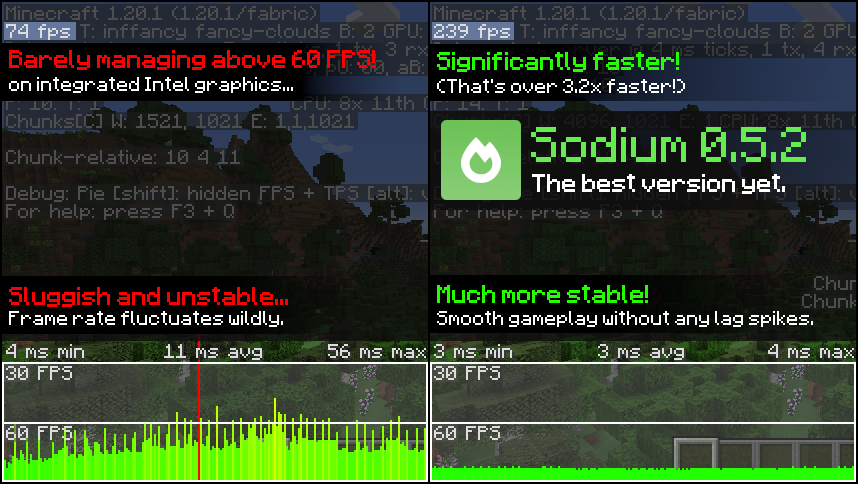
Sodium is a powerful optimization mod for the Minecraft client, which greatly improves frame rates and micro-stutter, while fixing many graphical issues in Minecraft.
Unlike other rendering-focused mods, it boasts wide compatibility with the wider modding ecosystem. And it does so without compromising on how the game looks, giving you that authentic block game feel.


📥 Installation Guide
Sodium is available for multiple mod loaders, but we recommend using Fabric Loader for the most simple and lightweight experience. If you are using a third-party launcher, it probably has built-in functionality to automatically install mod loaders. Once you have installed your mod loader, you can simply place Sodium into your mods folder like anything else.
Not sure if you installed the mod correctly? Check your Video Settings screen in Minecraft, which should show our new and improved user interface for changing settings.
Not sure how to configure the mod? Don't worry, you probably don't need to. By default, Sodium will enable all optimizations which are supported on your system, giving you the best experience possible. You should generally only change video settings related to performance and other advanced features if you are experiencing issues.
Need even more performance? By design, Sodium only optimizes the rendering code of Minecraft. You should also install our other mods, such as Lithium (for MC 1.15+) and Phosphor (for MC <1.19), to optimize the other parts of your game. This is done so that players can pick and choose which mods they want to use, but we generally recommend using our entire collection.
✅ Hardware Compatibility
Android devices (and some Windows-on-ARM devices) which use OpenGL translation layers (such as GL4ES, ANGLE, GLonD3D12 etc) are not supported and will have severe performance issues.
We only provide official support for desktop graphics cards which have up-to-date drivers compatible with OpenGL 4.5 or newer. Most graphics cards released in the past 12 years will meet these requirements, including the following:
- INTEL HD Graphics 500 Series (Skylake) or newer
- NVIDIA GeForce 400 Series (Fermi) or newer
- AMD Radeon HD 7000 Series (GCN 1) or newer
Nearly all desktop graphics cards that are already compatible with Minecraft (which requires OpenGL 3.3) should also work with Sodium. But our team cannot ensure compatibility or provide support for older graphics cards, and they may not work with future versions of Sodium.
If you are running into problems, you should make sure that your graphics drivers are up-to-date. Out-of-date graphics drivers are often the reason for most crashes, rendering bugs, and performance issues.
🐛 How to Report Issues
Please use the issue tracker linked at the top of the page to report bugs, crashes, and other issues. Make sure you include information about the mods you are using, and attach any crash/log files you have.
Note: The level of performance you see while using the Sodium mod will vary depending on exact hardware and software configuration. For all performance comparisons provided on this page, we used a computer with integrated graphics which we believe to be representative of the casual player.
Hardware configuration: Intel Core i7-1165G7 (4c/8t, up to 4.70 GHz) with Intel Xe Graphics (96 EUs, up to 1.30 GHz), 2x16 GB DDR4-3200. Software configuration: Fedora 41, Linux 6.12.4, Mesa 24.3.4, Prism Launcher 9.1, OpenJDK 21.0.7 runtime (as packaged by distribution), Fabric Loader 0.16.10.

AI-summarized from the mod's own pages · reviewed by our team
Reviewed for mc26.3-0.9.3-beta.1-fabric
Machine translated
Source: Modrinth project pageGuide
Summary
Sodium ersetzt die Rendering-Engine des Minecraft-Clients, um die Bildrate zu verbessern und kleinere Ruckler zu reduzieren, ohne das vertraute Aussehen des Spiels zu verändern. Außerdem behebt es einige Grafikprobleme. Wie stark die Verbesserungen ausfallen, hängt jedoch von deiner Hardware und Software ab.
Getting started
- Einen Loader installieren — Wähle Fabric, Quilt oder NeoForge für deinen Minecraft-Client. Für eine einfache, schlanke Einrichtung empfiehlt das Projekt Fabric.
- Sodium hinzufügen — Wähle eine Sodium-Version für deinen Loader und deine Minecraft-Version aus und lege sie dann im Mods-Ordner ab. Einige Launcher von Drittanbietern können den Loader für dich installieren.
- Einstellungsmenü überprüfen — Starte Minecraft und öffne die Videoeinstellungen. Sodiums überarbeitete Einstellungsoberfläche ist ein guter Hinweis darauf, dass die Mod korrekt installiert ist.
- Zuerst die Standardeinstellungen ausprobieren — Sodium aktiviert automatisch die von deinem System unterstützten Optimierungen. In der Regel musst du die Leistungs- oder erweiterten Videoeinstellungen nur ändern, wenn ein Problem auftritt.
Key features
Rendering-Optimierung
Sodium konzentriert sich auf den Code, der für die Darstellung des Spiels zuständig ist. Andere Bereiche von Minecraft werden dadurch nicht optimiert.
Vertraute Optik
Die Mod soll die Leistung verbessern, ohne das wiedererkennbare Aussehen von Minecraft zu verändern, und behebt einige Grafikprobleme.
Oberfläche der Videoeinstellungen
Sodium ersetzt die Oberfläche der Videoeinstellungen. Überprüfe oder ändere dort Einstellungen, falls die Standardkonfiguration Probleme verursacht.
Compatibility
fabric, neoforge, quilt · Zu den aufgeführten Minecraft-Versionen gehören 1.16.3 bis 1.20.6 sowie weitere Versionen. Prüfe, ob die jeweilige Veröffentlichung zu deinem Loader und deiner Spielversion passt.
- Android-Geräte und einige Windows-on-ARM-Geräte, die OpenGL-Übersetzungsschichten verwenden, werden nicht unterstützt und können erhebliche Leistungsprobleme haben.
Tips
- Aktualisiere deine Grafiktreiber, wenn es zu Abstürzen, Darstellungsfehlern oder schlechter Leistung kommt. Veraltete Treiber sind eine häufige Ursache für diese Probleme.
- Offiziell unterstützt werden Desktop-Grafikkarten mit aktuellen Treibern, die OpenGL 4.5 oder neuer unterstützen. Ältere, mit Minecraft kompatible Grafikkarten funktionieren möglicherweise, werden aber nicht offiziell unterstützt und könnten mit zukünftigen Sodium-Versionen nicht mehr funktionieren.
- Wenn du einen Fehler oder Absturz meldest, gib die von dir verwendeten Mods an und hänge den entsprechenden Absturzbericht oder die Protokolldateien an.
FAQ
- Muss Sodium auf dem Server laufen?
- Sodium ist eine clientseitige Mod. Laut den bereitgestellten Projektinformationen wird die serverseitige Verwendung nicht unterstützt.
- Wird dadurch jedes Leistungsproblem behoben?
- Nein. Sodium konzentriert sich auf das Rendering, daher müssen andere Bereiche des Spiels möglicherweise separat optimiert werden. Das Projekt empfiehlt Lithium und für Minecraft-Versionen vor 1.19 außerdem Phosphor.
- Warum fällt die Verbesserung bei mir anders aus als bei anderen?
- Die Leistung hängt von der genauen Hardware- und Softwarekonfiguration ab. Die vom Projekt gezeigten Ergebnisse stammen von einem bestimmten System mit integrierter Grafik und sind keine Garantie für andere Computer.
Modrinth modrinth
indexable