
Sodium
jellysquid3
255.093.619 downloads · 42.990 followers
Minecraft: Minecraft 1.16.3 – 26.3
Runs on: Client
Categoría: optimization
Compatibility by loader
- neoforge1.21.1 – 1.21.11, 26.1 – 26.3· Latest mc26.3-0.9.3-neoforge (21 nov 2026)
- fabric1.16 – 1.21, 26.1 – 26.3· Latest mc26.3-0.9.3-fabric (21 nov 2026)
- quilt1.18 – 1.20· Latest mc1.20.1-0.5.13-fabric (3 mar 2025)
Overview
This mod is the result of thousands of hours of development, and is made possible thanks to players like you. If you would like to show a token of your appreciation for my work, and help support the development of Sodium in the process, then consider buying me a coffee.


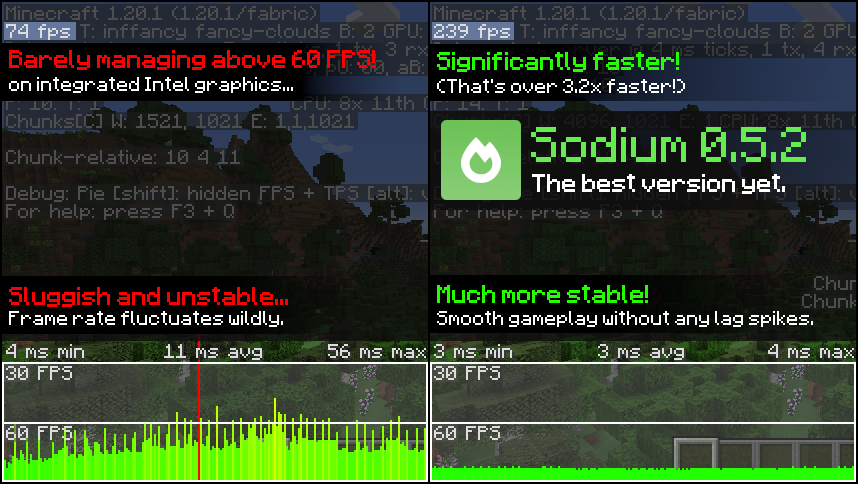
Sodium is a powerful optimization mod for the Minecraft client, which greatly improves frame rates and micro-stutter, while fixing many graphical issues in Minecraft.
Unlike other rendering-focused mods, it boasts wide compatibility with the wider modding ecosystem. And it does so without compromising on how the game looks, giving you that authentic block game feel.


📥 Installation Guide
Sodium is available for multiple mod loaders, but we recommend using Fabric Loader for the most simple and lightweight experience. If you are using a third-party launcher, it probably has built-in functionality to automatically install mod loaders. Once you have installed your mod loader, you can simply place Sodium into your mods folder like anything else.
Not sure if you installed the mod correctly? Check your Video Settings screen in Minecraft, which should show our new and improved user interface for changing settings.
Not sure how to configure the mod? Don't worry, you probably don't need to. By default, Sodium will enable all optimizations which are supported on your system, giving you the best experience possible. You should generally only change video settings related to performance and other advanced features if you are experiencing issues.
Need even more performance? By design, Sodium only optimizes the rendering code of Minecraft. You should also install our other mods, such as Lithium (for MC 1.15+) and Phosphor (for MC <1.19), to optimize the other parts of your game. This is done so that players can pick and choose which mods they want to use, but we generally recommend using our entire collection.
✅ Hardware Compatibility
Android devices (and some Windows-on-ARM devices) which use OpenGL translation layers (such as GL4ES, ANGLE, GLonD3D12 etc) are not supported and will have severe performance issues.
We only provide official support for desktop graphics cards which have up-to-date drivers compatible with OpenGL 4.5 or newer. Most graphics cards released in the past 12 years will meet these requirements, including the following:
- INTEL HD Graphics 500 Series (Skylake) or newer
- NVIDIA GeForce 400 Series (Fermi) or newer
- AMD Radeon HD 7000 Series (GCN 1) or newer
Nearly all desktop graphics cards that are already compatible with Minecraft (which requires OpenGL 3.3) should also work with Sodium. But our team cannot ensure compatibility or provide support for older graphics cards, and they may not work with future versions of Sodium.
If you are running into problems, you should make sure that your graphics drivers are up-to-date. Out-of-date graphics drivers are often the reason for most crashes, rendering bugs, and performance issues.
🐛 How to Report Issues
Please use the issue tracker linked at the top of the page to report bugs, crashes, and other issues. Make sure you include information about the mods you are using, and attach any crash/log files you have.
Note: The level of performance you see while using the Sodium mod will vary depending on exact hardware and software configuration. For all performance comparisons provided on this page, we used a computer with integrated graphics which we believe to be representative of the casual player.
Hardware configuration: Intel Core i7-1165G7 (4c/8t, up to 4.70 GHz) with Intel Xe Graphics (96 EUs, up to 1.30 GHz), 2x16 GB DDR4-3200. Software configuration: Fedora 41, Linux 6.12.4, Mesa 24.3.4, Prism Launcher 9.1, OpenJDK 21.0.7 runtime (as packaged by distribution), Fabric Loader 0.16.10.

AI-summarized from the mod's own pages · reviewed by our team
Reviewed for mc26.3-0.9.3-beta.1-fabric
Machine translated
Source: Modrinth project pageGuide
Summary
Sodium reemplaza el motor de renderizado del cliente de Minecraft para mejorar la tasa de fotogramas y reducir los pequeños tirones, sin alterar el aspecto familiar del juego. También corrige algunos problemas gráficos, aunque la mejora que notes dependerá de tu hardware y software.
Getting started
- Instala un cargador — Elige Fabric, Quilt o NeoForge para tu cliente de Minecraft. El proyecto recomienda Fabric para una configuración sencilla y ligera.
- Añade Sodium — Elige una versión de Sodium compatible con tu cargador y versión de Minecraft, y luego colócala en la carpeta de mods. Algunos lanzadores de terceros pueden instalar el cargador por ti.
- Comprueba la pantalla de ajustes — Inicia Minecraft y abre Ajustes de vídeo. La interfaz de ajustes rediseñada de Sodium es una señal útil de que el mod se instaló correctamente.
- Prueba primero los valores predeterminados — Sodium activa automáticamente las optimizaciones compatibles con tu sistema. Por lo general, solo necesitas cambiar los ajustes de rendimiento o de vídeo avanzados si tienes algún problema.
Key features
Optimización del renderizado
Sodium se centra en el código responsable de dibujar el juego. No optimiza todas las demás partes de Minecraft.
Aspecto familiar
El mod busca mejorar el rendimiento sin cambiar el aspecto reconocible de Minecraft y corrige algunos problemas gráficos.
Interfaz de ajustes de vídeo
Sodium reemplaza la interfaz de ajustes de vídeo. Úsala para revisar o cambiar los ajustes si la configuración predeterminada causa problemas.
Compatibility
fabric, neoforge, quilt · Entre las versiones de Minecraft indicadas se encuentran de la 1.16.3 a la 1.20.6, además de otras versiones. Comprueba que la versión del mod sea compatible con tu cargador y versión del juego.
- Los dispositivos Android y algunos dispositivos con Windows en ARM que usan capas de traducción de OpenGL no son compatibles y pueden tener graves problemas de rendimiento.
Tips
- Actualiza los controladores gráficos si tienes cierres inesperados, errores de renderizado o bajo rendimiento; los controladores desactualizados son una causa común de estos problemas.
- La compatibilidad oficial con hardware abarca tarjetas gráficas de escritorio cuyos controladores actuales admitan OpenGL 4.5 o posterior. Es posible que funcionen tarjetas más antiguas compatibles con Minecraft, pero no cuentan con soporte oficial y podrían dejar de funcionar con futuras versiones de Sodium.
- Si informas de un error o cierre inesperado, incluye los mods que usas y adjunta el informe de fallos o los archivos de registro pertinentes.
FAQ
- ¿Sodium necesita ejecutarse en el servidor?
- Sodium es un mod de cliente. La información proporcionada por el proyecto indica que no se admite su uso en el servidor.
- ¿Mejorará todos los problemas de rendimiento?
- No. Sodium se centra en el renderizado, por lo que otras partes del juego podrían necesitar optimizaciones aparte. El proyecto sugiere Lithium y, para las versiones de Minecraft anteriores a la 1.19, Phosphor.
- ¿Por qué mi mejora es diferente a la de otras personas?
- El rendimiento depende de la configuración específica de hardware y software. Los resultados que muestra el proyecto se obtuvieron con un sistema concreto de gráficos integrados y no garantizan los mismos resultados en otros equipos.
Modrinth modrinth
indexable