
Simple Voice Chat
henkelmax
77 149 835 downloads · 14 857 followers
Minecraft: Minecraft 1.12.2 – 26.2
Runs on: Client & server
Catégorie: adventure, bukkit, bungeecord, folia, paper, purpur, social, spigot, utility, velocity, waterfall
Compatibility by loader
- fabric1.16 – 1.21, 26.1 – 26.2· Latest fabric-2.6.22+26.2 (8 août 2026)
- neoforge1.20 – 1.21, 26.1 – 26.2· Latest neoforge-2.6.22+26.2 (8 août 2026)
- forge1.12.2, 1.16 – 1.21, 26.1 – 26.2· Latest forge-2.6.22+26.2 (8 août 2026)
- quilt1.18 – 1.21, 26.1 – 26.2· Latest quilt-2.6.22+26.2 (8 août 2026)
Overview
Modrinth | CurseForge | Discord | Wiki | FAQ | Credits | API
Simple Voice Chat
A proximity voice chat for Minecraft with a variety of addons that offer additional features and functionalities.
⚠️ NOTE This mod requires special setup on the server in order to work. Please read the wiki for more information.
[
](https://discord.gg/4dH2zwTmyX)
*Please join the Discord if you have questions!*
Downloads
Features
- Push to talk
- Voice activation
- Proximity voice chat
- Password protected groups
- Automatic voice activity detection
- Automatic microphone gain adjustment
- Opus codec
- RNNoise recurrent neural network noise suppression
- OpenAL audio
- Cross compatibility between Fabric, NeoForge, Forge, Quilt, Bukkit, Spigot and Paper
- Support for Velocity, BungeeCord and Waterfall
- Compatibility with ModMenu (Use ClothConfig for a better configuration UI)
- Configurable push to talk key
- Microphone and speaker test playback
- Configurable voice distance
- Whispering
- Individual player volume adjustment
- Microphone amplification
- 3D sound
- AES encryption
- Audio recording with separate audio tracks
- A powerful API
- Many addons
Icons
| Icon | Description |
|---|---|
 | You are talking |
 | You are whispering |
 | Player is talking |
 | Player is whispering |
 | Microphone muted |
 | Voice chat disabled |
 | Voice chat not connected |
| Voice chat not installed |
The GUI
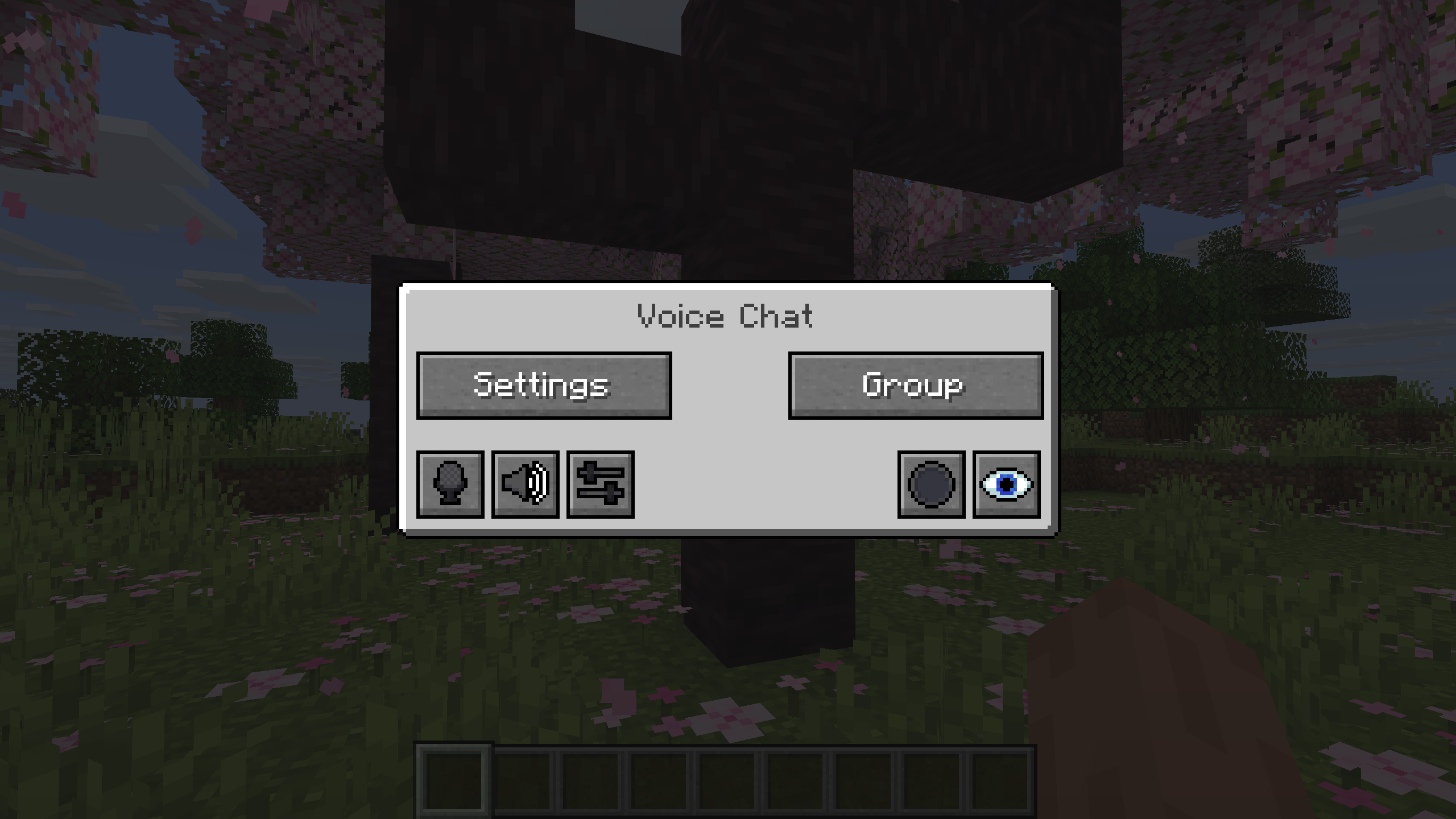
You can open the voice chat GUI by pressing the V key.
This allows you to open the settings, group chats, mute yourself, disable the voice chat, start/stop a recording and hide all icons.
Group Chats
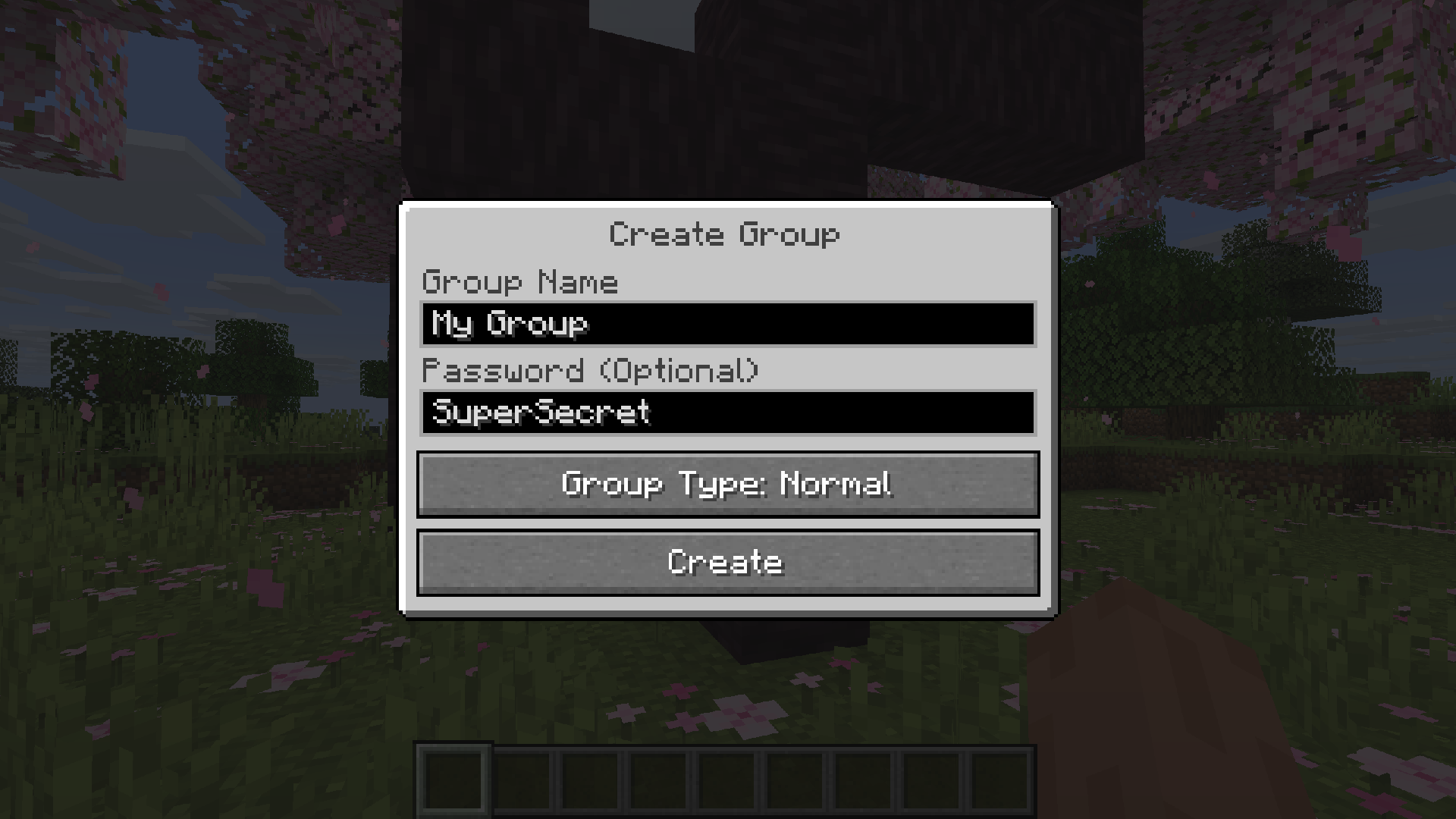
Group chats allow you to talk to players that are not in your vicinity. To open the group chat interface, either press the group button in the voice chat GUI or just press the group key.
To create a new group, just type a name in the text field and press the button at the bottom.
Creating or joining a group will bring you into the group chat interface. You will also see the heads of the group members in the top left corner of your screen. Talking players will be outlined. You can disable these icons by pressing the third button from the left.
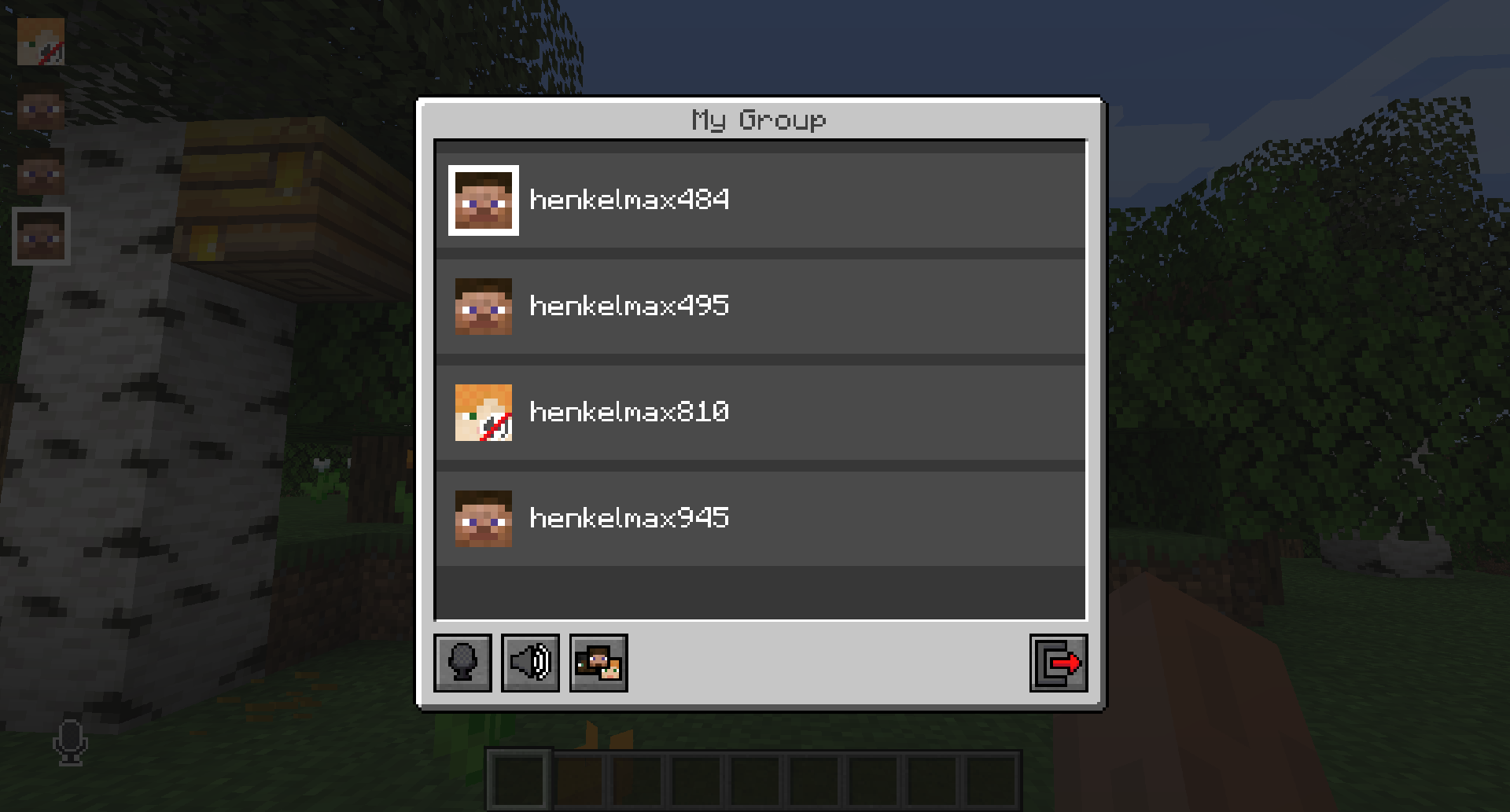
Players that are not in a group will see a group icon next to your head, indicating that you are in a group.
You can invite players to your group chat by entering the command /voicechat invite or from the social interactions screen.
Settings
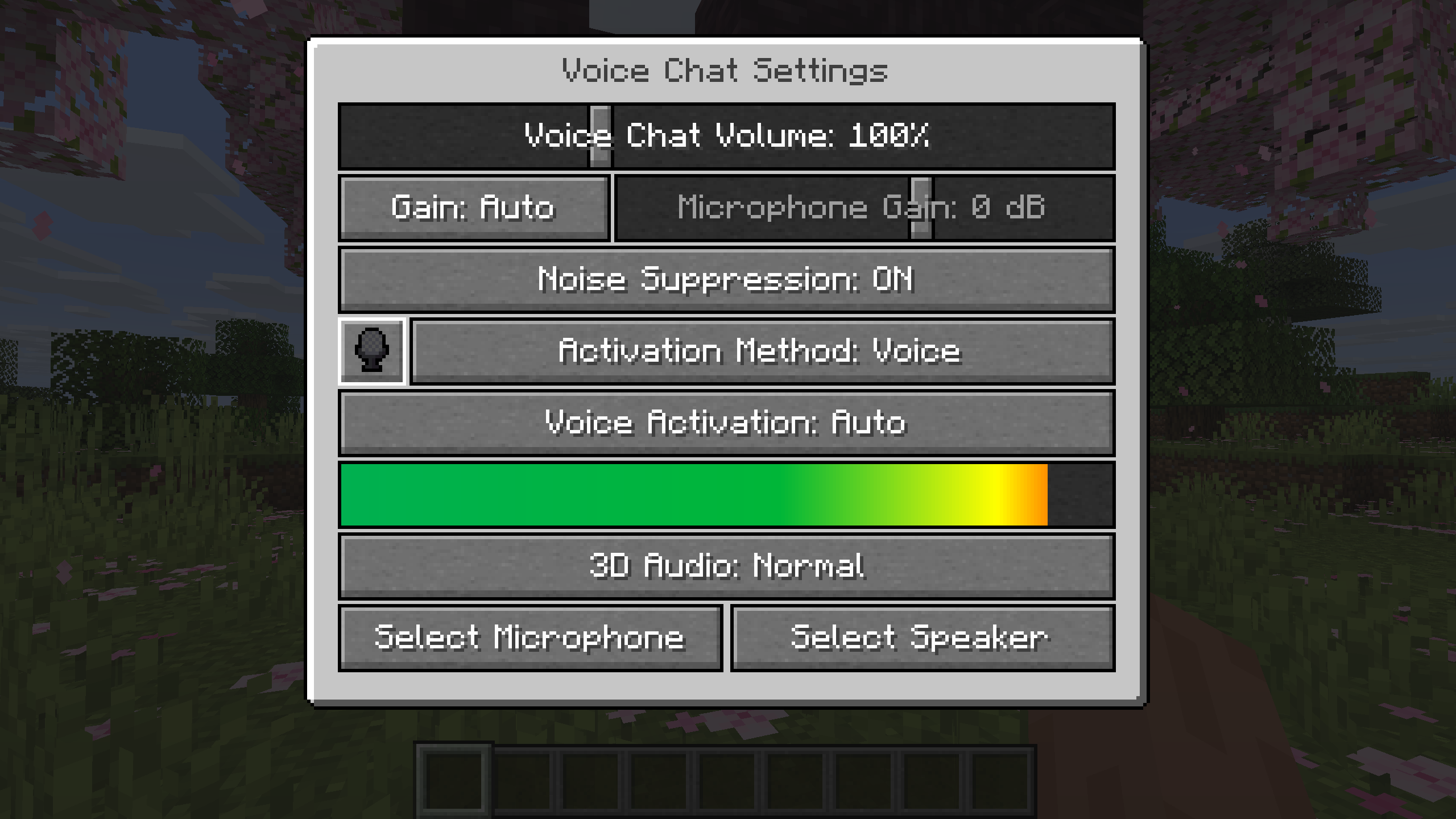
You can access the voice chat settings by pressing the V key and pressing the settings button.
This menu offers the ability to set up your voice chat audio settings.
By clicking the microphone button, you can test your microphone activation.
Important Notes
You need to open a port on the server. This is port 24454 UDP by default.
Without opening this port, the voice chat will not work.
This port can be changed in the server config.
More information here.
The voice chat is encrypted, but we don't guarantee the security of it. Use at your own risk!
AI-summarized from the mod's own pages · reviewed by our team
Reviewed for fabric-2.6.27+26.4-snapshot-7
Machine translated
Source: Modrinth project pageGuide
Summary
Simple Voice Chat ajoute à Minecraft une communication vocale de proximité qui vous permet de parler avec les joueurs près de vous. Le mod propose aussi des salons de groupe pour discuter à plus grande distance, des commandes audio et l’enregistrement. Le serveur nécessite une configuration spécifique pour que le chat vocal fonctionne.
Getting started
- Installez le téléchargement adapté — Choisissez le téléchargement correspondant à votre chargeur de mods ou à votre plateforme serveur. Le projet propose des téléchargements pour Fabric, Forge, NeoForge et Quilt, ainsi que pour plusieurs plateformes serveur et proxy.
- Vérifiez la configuration du serveur — L’administrateur du serveur doit ouvrir un port UDP pour le chat vocal. Le port par défaut est 24454, mais la configuration du serveur peut le modifier.
- Ouvrez les paramètres vocaux — Appuyez sur V, puis sélectionnez le bouton des paramètres. Utilisez le bouton du microphone pour tester son activation, et les tests de lecture du microphone et des haut-parleurs disponibles pour vérifier votre audio.
- Choisissez votre mode de parole — Utilisez le push-to-talk ou la détection vocale, selon votre préférence. Vous pouvez modifier la touche du push-to-talk.
Key features
Conversations de proximité
Le chat de proximité vous permet de parler avec les joueurs autour de vous. La portée vocale est configurable, et le mod prend également en charge les chuchotements et le son 3D.
Salons de groupe
Les groupes vous permettent de parler avec des membres éloignés et peuvent être protégés par un mot de passe. Ouvrez l’interface des groupes depuis le menu V ou avec la touche des groupes.
Commandes audio
Réglez le volume de chaque joueur ou amplifiez votre microphone. La détection vocale automatique, le réglage du gain et la suppression du bruit sont également disponibles.
Enregistrement
Démarrez ou arrêtez un enregistrement depuis le menu du chat vocal. Les enregistrements prennent en charge des pistes audio séparées.
Compatibility
Fabric, Forge, NeoForge, Quilt
Tips
- Pour créer un groupe, ouvrez son interface, saisissez un nom et utilisez le bouton en bas. Invitez des joueurs depuis l’écran des interactions sociales ou avec /voicechat invite.
- Les membres du groupe apparaissent sous forme de têtes dans le coin supérieur gauche, entourées d’un contour lorsqu’ils parlent. Le troisième bouton en partant de la gauche dans l’interface du groupe masque ces icônes.
- Le menu V permet aussi de vous mettre en sourdine, de désactiver le chat vocal ou de masquer toutes les icônes du chat vocal. En cas de problème, vérifiez si vous êtes en sourdine ou si le chat vocal est désactivé.
- Le chat vocal utilise le chiffrement, mais le projet ne garantit pas sa sécurité. Tenez-en compte pour les conversations sensibles.
FAQ
- Pourquoi le chat vocal n’est-il pas connecté ?
- Vérifiez l’icône d’état du chat vocal et demandez à l’administrateur du serveur de vérifier la configuration du port UDP. Le chat vocal ne fonctionnera pas si le port requis n’est pas ouvert.
- Les joueurs sur différentes plateformes peuvent-ils jouer ensemble ?
- Le projet indique une compatibilité croisée entre Fabric, NeoForge, Forge, Quilt, Bukkit, Spigot et Paper. Il indique également la prise en charge de Velocity, BungeeCord et Waterfall.
- Puis-je améliorer l’interface de configuration ?
- Le mod prend en charge ModMenu, et le projet recommande ClothConfig pour améliorer l’interface de configuration.
Modrinth modrinth
indexable