
Sodium
jellysquid3
255,093,619 downloads · 42,990 followers
Minecraft: Minecraft 1.16.3 – 26.3
Runs on: Client
カテゴリー: optimization
Compatibility by loader
- neoforge1.21.1 – 1.21.11, 26.1 – 26.3· Latest mc26.3-0.9.3-neoforge (2026年11月21日)
- fabric1.16 – 1.21, 26.1 – 26.3· Latest mc26.3-0.9.3-fabric (2026年11月21日)
- quilt1.18 – 1.20· Latest mc1.20.1-0.5.13-fabric (2025年3月3日)
Overview
This mod is the result of thousands of hours of development, and is made possible thanks to players like you. If you would like to show a token of your appreciation for my work, and help support the development of Sodium in the process, then consider buying me a coffee.


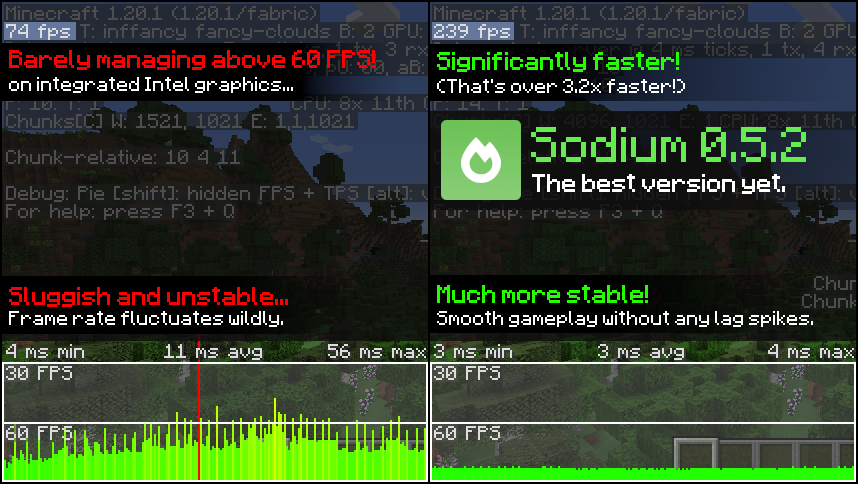
Sodium is a powerful optimization mod for the Minecraft client, which greatly improves frame rates and micro-stutter, while fixing many graphical issues in Minecraft.
Unlike other rendering-focused mods, it boasts wide compatibility with the wider modding ecosystem. And it does so without compromising on how the game looks, giving you that authentic block game feel.


📥 Installation Guide
Sodium is available for multiple mod loaders, but we recommend using Fabric Loader for the most simple and lightweight experience. If you are using a third-party launcher, it probably has built-in functionality to automatically install mod loaders. Once you have installed your mod loader, you can simply place Sodium into your mods folder like anything else.
Not sure if you installed the mod correctly? Check your Video Settings screen in Minecraft, which should show our new and improved user interface for changing settings.
Not sure how to configure the mod? Don't worry, you probably don't need to. By default, Sodium will enable all optimizations which are supported on your system, giving you the best experience possible. You should generally only change video settings related to performance and other advanced features if you are experiencing issues.
Need even more performance? By design, Sodium only optimizes the rendering code of Minecraft. You should also install our other mods, such as Lithium (for MC 1.15+) and Phosphor (for MC <1.19), to optimize the other parts of your game. This is done so that players can pick and choose which mods they want to use, but we generally recommend using our entire collection.
✅ Hardware Compatibility
Android devices (and some Windows-on-ARM devices) which use OpenGL translation layers (such as GL4ES, ANGLE, GLonD3D12 etc) are not supported and will have severe performance issues.
We only provide official support for desktop graphics cards which have up-to-date drivers compatible with OpenGL 4.5 or newer. Most graphics cards released in the past 12 years will meet these requirements, including the following:
- INTEL HD Graphics 500 Series (Skylake) or newer
- NVIDIA GeForce 400 Series (Fermi) or newer
- AMD Radeon HD 7000 Series (GCN 1) or newer
Nearly all desktop graphics cards that are already compatible with Minecraft (which requires OpenGL 3.3) should also work with Sodium. But our team cannot ensure compatibility or provide support for older graphics cards, and they may not work with future versions of Sodium.
If you are running into problems, you should make sure that your graphics drivers are up-to-date. Out-of-date graphics drivers are often the reason for most crashes, rendering bugs, and performance issues.
🐛 How to Report Issues
Please use the issue tracker linked at the top of the page to report bugs, crashes, and other issues. Make sure you include information about the mods you are using, and attach any crash/log files you have.
Note: The level of performance you see while using the Sodium mod will vary depending on exact hardware and software configuration. For all performance comparisons provided on this page, we used a computer with integrated graphics which we believe to be representative of the casual player.
Hardware configuration: Intel Core i7-1165G7 (4c/8t, up to 4.70 GHz) with Intel Xe Graphics (96 EUs, up to 1.30 GHz), 2x16 GB DDR4-3200. Software configuration: Fedora 41, Linux 6.12.4, Mesa 24.3.4, Prism Launcher 9.1, OpenJDK 21.0.7 runtime (as packaged by distribution), Fabric Loader 0.16.10.

AI-summarized from the mod's own pages · reviewed by our team
Reviewed for mc26.3-0.9.3-beta.1-fabric
Machine translated
Source: Modrinth project pageGuide
Summary
SodiumはMinecraftのクライアント描画エンジンを置き換え、ゲームの見慣れた外観を保ちながらフレームレートを向上させ、小さなカクつきを軽減します。また、グラフィック上の問題にも対処しますが、効果はハードウェアやソフトウェアによって異なります。
Getting started
- ローダーをインストールする — Minecraftクライアント用にFabric、Quilt、NeoForgeのいずれかを選びます。プロジェクトでは、シンプルで軽量な構成としてFabricを推奨しています。
- Sodiumを追加する — 使用するローダーとMinecraftのバージョンに合ったSodiumのリリースを選び、modsフォルダーに入れます。一部のサードパーティ製ランチャーでは、ローダーを自動でインストールできます。
- 設定画面を確認する — Minecraftを起動して「ビデオ設定」を開きます。Sodiumによって設定画面が再設計されていれば、正しくインストールされた目印になります。
- まずはデフォルト設定を試す — Sodiumは、お使いのシステムで利用できる最適化を自動的に有効にします。問題が起きない限り、通常はパフォーマンス設定や高度なビデオ設定を変更する必要はありません。
Key features
描画の最適化
Sodiumはゲームの描画を担うコードに重点を置いています。Minecraftのほかのすべての部分を最適化するわけではありません。
見慣れたビジュアル
Minecraftらしい外観を変えずにパフォーマンスを向上させることを目指し、一部のグラフィック上の問題も修正します。
ビデオ設定画面
Sodiumはビデオ設定画面を置き換えます。デフォルト設定で問題が起きた場合は、この画面で設定を確認または変更してください。
Compatibility
fabric, neoforge, quilt · Minecraft 1.16.3から1.20.6までのバージョンが記載されており、ほかのバージョンも掲載されています。お使いのローダーとゲームバージョンに対応するリリースを確認してください。
- OpenGL変換レイヤーを使用するAndroid端末や一部のWindows on ARM端末はサポート対象外で、深刻なパフォーマンス問題が発生する場合があります。
Tips
- クラッシュ、描画エラー、パフォーマンス低下が起きた場合は、グラフィックドライバーを更新してください。古いドライバーは、こうした問題のよくある原因です。
- 公式にサポートされるのは、最新のドライバーでOpenGL 4.5以降に対応するデスクトップ用グラフィックカードです。古いMinecraft対応カードでも動作する場合がありますが、公式サポート対象外であり、今後のSodiumのバージョンで動作しなくなる可能性があります。
- バグやクラッシュを報告する場合は、使用しているMODを記載し、該当するクラッシュレポートやログファイルを添付してください。
FAQ
- Sodiumはサーバーでも動かす必要がありますか?
- Sodiumはクライアント側のMODです。提供されたプロジェクト情報では、サーバー側での使用はサポート対象外とされています。
- あらゆるパフォーマンス問題が改善しますか?
- いいえ。Sodiumは描画に重点を置いているため、ゲームのほかの部分には別の最適化が必要な場合があります。プロジェクトではLithium、またMinecraft 1.19未満ではPhosphorを推奨しています。
- ほかの人と改善の度合いが違うのはなぜですか?
- パフォーマンスは、ハードウェアとソフトウェアの具体的な構成によって異なります。プロジェクトで紹介されている結果は特定の内蔵グラフィックス搭載システムで得られたものであり、ほかのコンピューターで同じ結果が得られる保証はありません。
Modrinth modrinth
indexable