
Simple Voice Chat
henkelmax
77 149 835 downloads · 14 857 followers
Minecraft: Minecraft 1.12.2 – 26.2
Runs on: Client & server
Категория: adventure, bukkit, bungeecord, folia, paper, purpur, social, spigot, utility, velocity, waterfall
Compatibility by loader
- fabric1.16 – 1.21, 26.1 – 26.2· Latest fabric-2.6.22+26.2 (8 авг. 2026 г.)
- neoforge1.20 – 1.21, 26.1 – 26.2· Latest neoforge-2.6.22+26.2 (8 авг. 2026 г.)
- forge1.12.2, 1.16 – 1.21, 26.1 – 26.2· Latest forge-2.6.22+26.2 (8 авг. 2026 г.)
- quilt1.18 – 1.21, 26.1 – 26.2· Latest quilt-2.6.22+26.2 (8 авг. 2026 г.)
Overview
Modrinth | CurseForge | Discord | Wiki | FAQ | Credits | API
Simple Voice Chat
A proximity voice chat for Minecraft with a variety of addons that offer additional features and functionalities.
⚠️ NOTE This mod requires special setup on the server in order to work. Please read the wiki for more information.
[
](https://discord.gg/4dH2zwTmyX)
*Please join the Discord if you have questions!*
Downloads
Features
- Push to talk
- Voice activation
- Proximity voice chat
- Password protected groups
- Automatic voice activity detection
- Automatic microphone gain adjustment
- Opus codec
- RNNoise recurrent neural network noise suppression
- OpenAL audio
- Cross compatibility between Fabric, NeoForge, Forge, Quilt, Bukkit, Spigot and Paper
- Support for Velocity, BungeeCord and Waterfall
- Compatibility with ModMenu (Use ClothConfig for a better configuration UI)
- Configurable push to talk key
- Microphone and speaker test playback
- Configurable voice distance
- Whispering
- Individual player volume adjustment
- Microphone amplification
- 3D sound
- AES encryption
- Audio recording with separate audio tracks
- A powerful API
- Many addons
Icons
| Icon | Description |
|---|---|
 | You are talking |
 | You are whispering |
 | Player is talking |
 | Player is whispering |
 | Microphone muted |
 | Voice chat disabled |
 | Voice chat not connected |
| Voice chat not installed |
The GUI
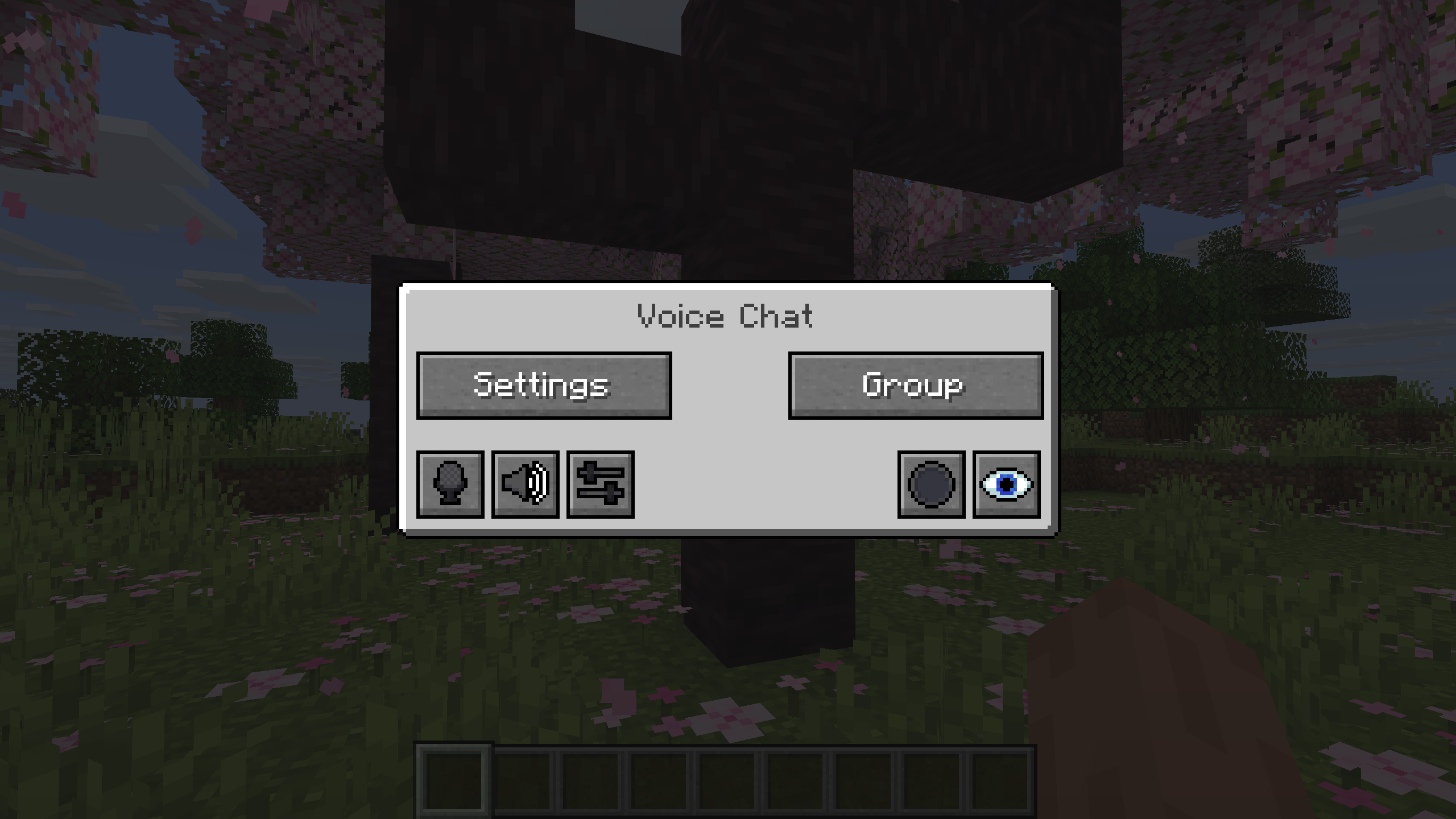
You can open the voice chat GUI by pressing the V key.
This allows you to open the settings, group chats, mute yourself, disable the voice chat, start/stop a recording and hide all icons.
Group Chats
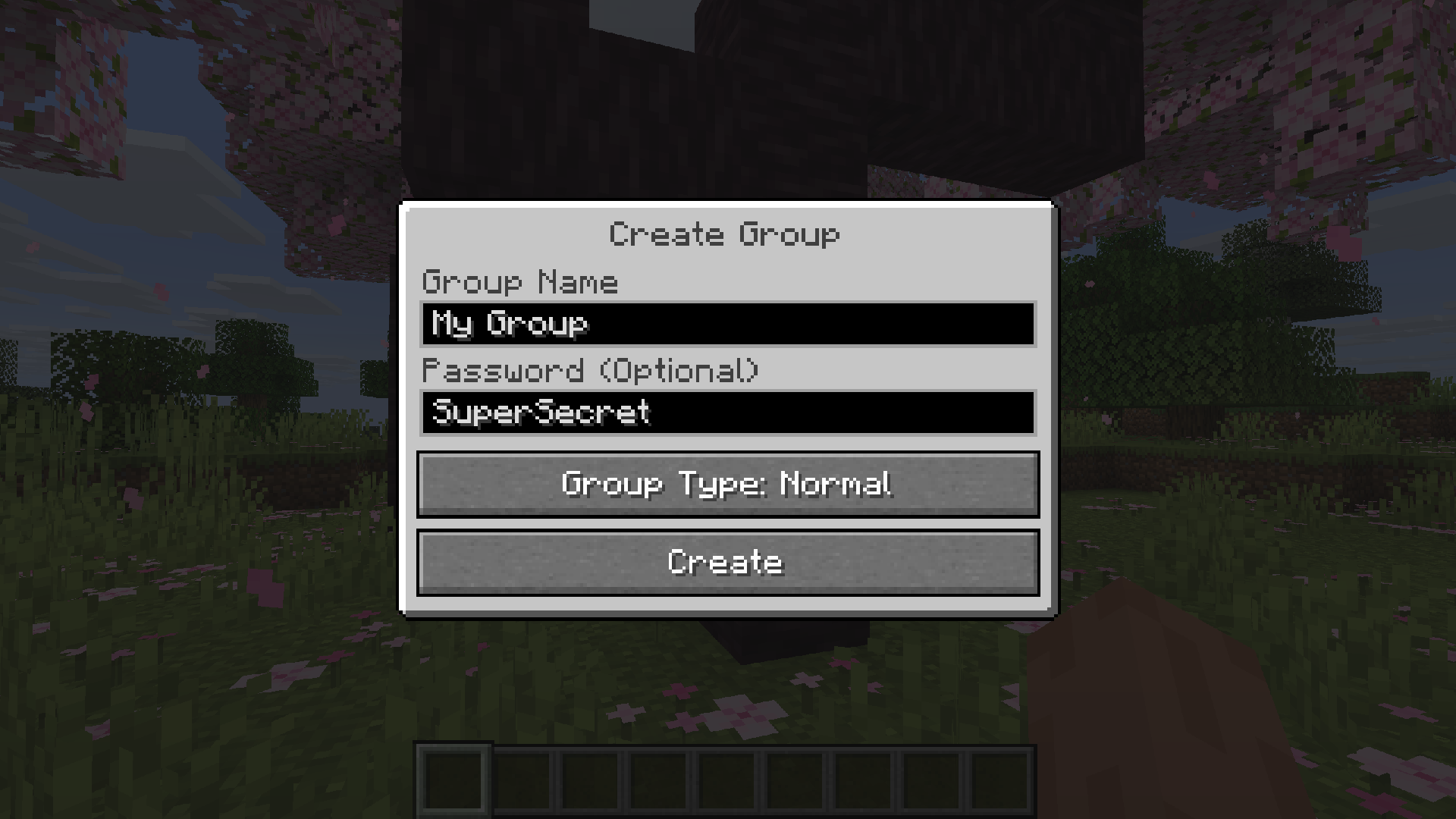
Group chats allow you to talk to players that are not in your vicinity. To open the group chat interface, either press the group button in the voice chat GUI or just press the group key.
To create a new group, just type a name in the text field and press the button at the bottom.
Creating or joining a group will bring you into the group chat interface. You will also see the heads of the group members in the top left corner of your screen. Talking players will be outlined. You can disable these icons by pressing the third button from the left.
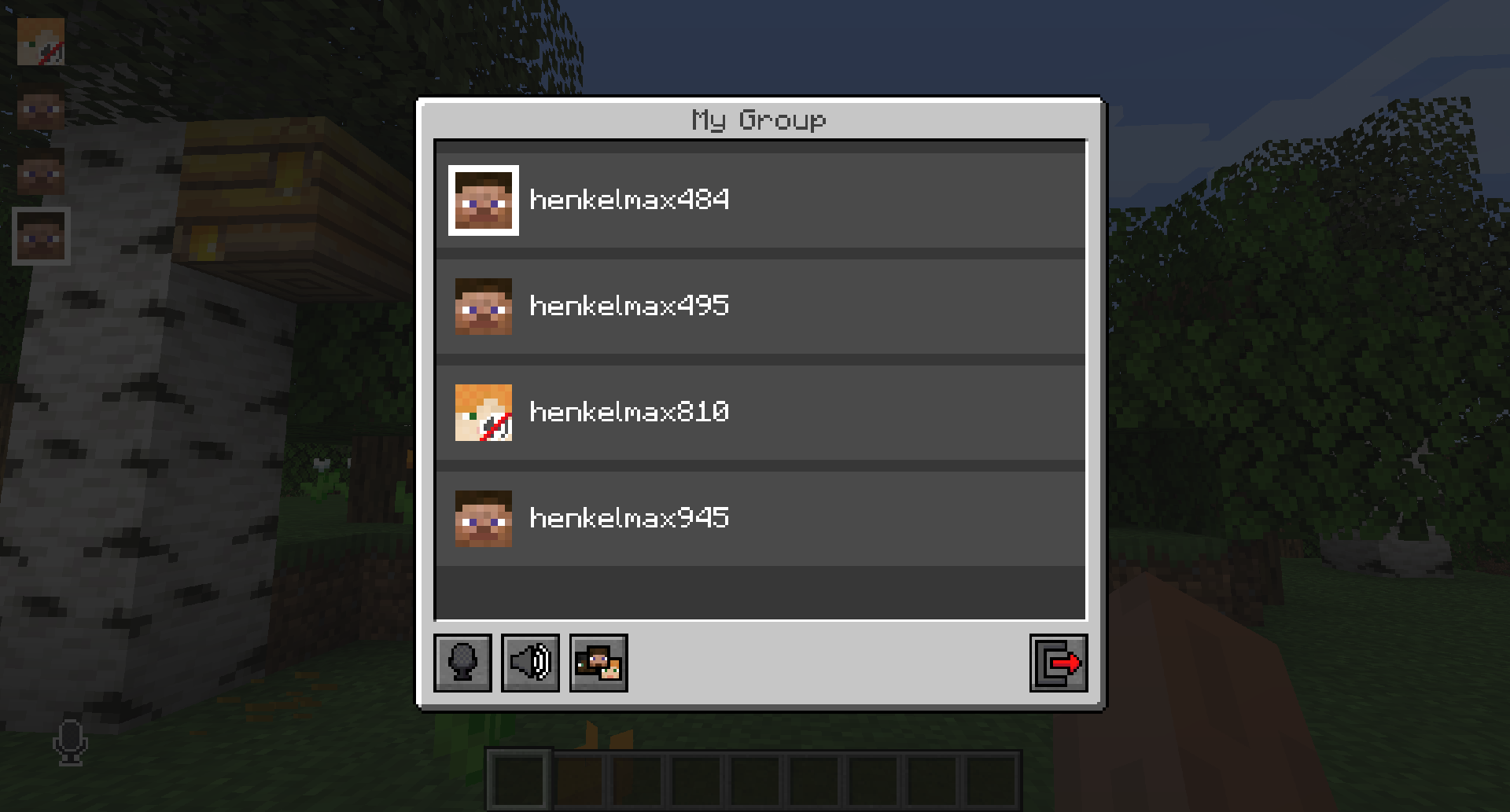
Players that are not in a group will see a group icon next to your head, indicating that you are in a group.
You can invite players to your group chat by entering the command /voicechat invite or from the social interactions screen.
Settings
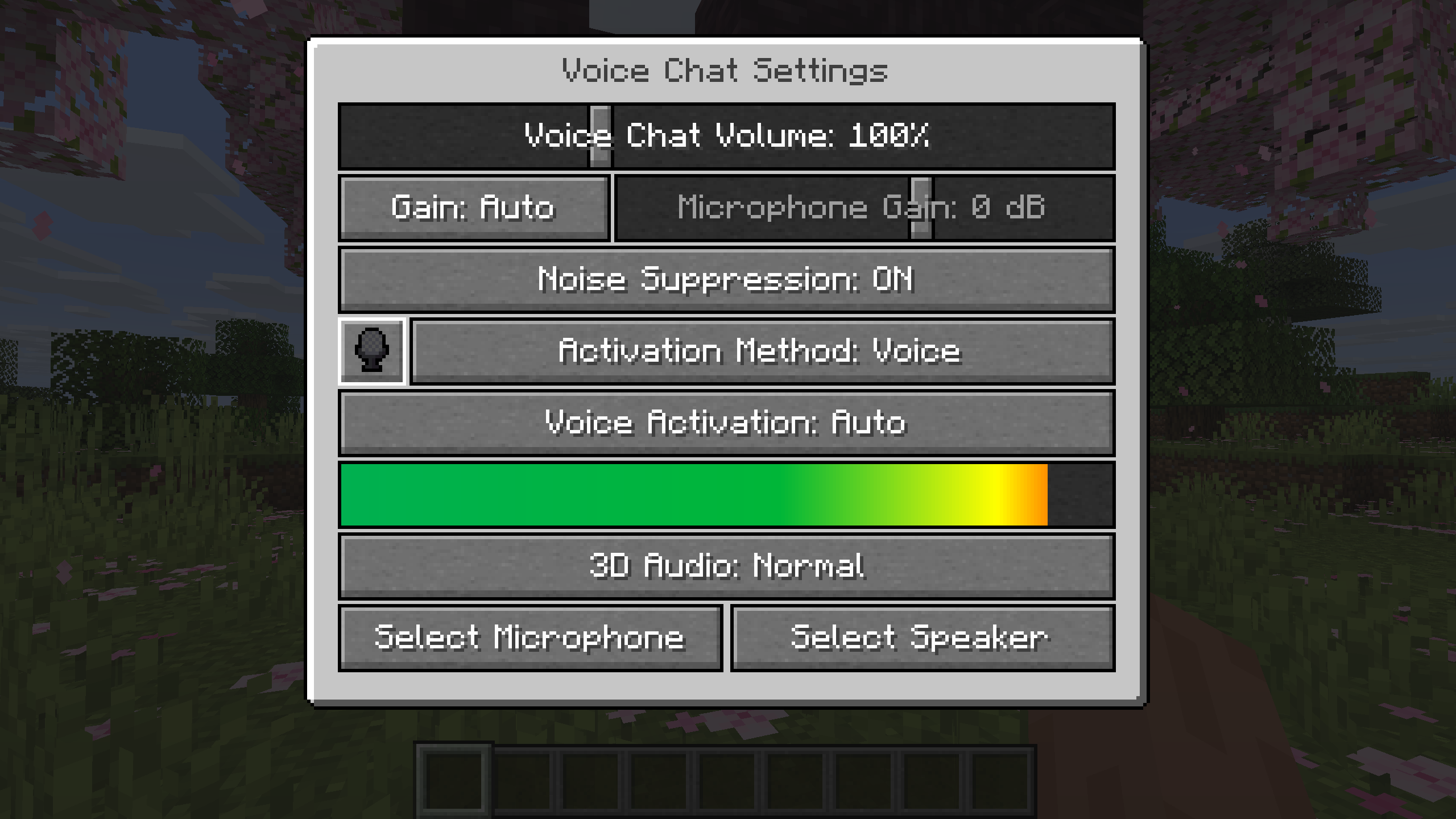
You can access the voice chat settings by pressing the V key and pressing the settings button.
This menu offers the ability to set up your voice chat audio settings.
By clicking the microphone button, you can test your microphone activation.
Important Notes
You need to open a port on the server. This is port 24454 UDP by default.
Without opening this port, the voice chat will not work.
This port can be changed in the server config.
More information here.
The voice chat is encrypted, but we don't guarantee the security of it. Use at your own risk!
AI-summarized from the mod's own pages · reviewed by our team
Reviewed for fabric-2.6.27+26.4-snapshot-7
Machine translated
Source: Modrinth project pageGuide
Summary
Simple Voice Chat добавляет в Minecraft голосовое общение с игроками поблизости. Также доступны групповые чаты для разговоров на большем расстоянии, настройки звука и запись. Для работы голосового чата сервер нужно предварительно настроить.
Getting started
- Установите подходящую версию — Выберите загрузку для своего загрузчика или серверной платформы. Проект предлагает моды для Fabric, Forge, NeoForge и Quilt, а также загрузки для нескольких серверных и прокси-платформ.
- Проверьте настройки сервера — Администратор сервера должен открыть UDP-порт для голосового чата. По умолчанию это порт 24454, но его можно изменить в настройках сервера.
- Откройте настройки голоса — Нажмите V, затем выберите кнопку настроек. Нажмите кнопку микрофона, чтобы проверить его работу, а также воспользуйтесь тестами воспроизведения через микрофон и динамики, чтобы проверить звук.
- Выберите способ общения — По своему предпочтению используйте режим «нажми, чтобы говорить» или голосовую активацию. Клавишу для режима «нажми, чтобы говорить» можно изменить.
Key features
Разговоры поблизости
Голосовой чат по близости позволяет общаться с игроками рядом с вами. Дальность слышимости настраивается; также доступны шёпот и 3D-звук.
Групповые чаты
В группах можно разговаривать с участниками, даже если они находятся далеко. Группу можно защитить паролем. Откройте интерфейс группы через меню V или клавишу группы.
Настройки звука
Настраивайте громкость отдельных игроков или усиливайте микрофон. Также доступны автоматическое определение голоса, регулировка усиления и шумоподавление.
Запись
Запускайте и останавливайте запись в меню голосового чата. Записи поддерживают отдельные аудиодорожки.
Compatibility
Fabric, Forge, NeoForge, Quilt
Tips
- Чтобы создать группу, откройте её интерфейс, введите название и нажмите кнопку внизу. Приглашайте игроков через экран социальных взаимодействий или командой /voicechat invite.
- Участники группы отображаются в виде голов в левом верхнем углу; когда они говорят, вокруг головы появляется контур. Третья кнопка слева в интерфейсе группы скрывает эти значки.
- В меню V можно отключить микрофон, выключить голосовой чат или скрыть все его значки. При устранении неполадок проверьте, не отключён ли микрофон и не выключен ли голосовой чат.
- Голосовой чат использует шифрование, но проект не гарантирует его безопасность. Учитывайте это при обсуждении конфиденциальной информации.
FAQ
- Почему голосовой чат не подключается?
- Проверьте значок состояния голосового чата и попросите администратора сервера проверить настройки UDP-порта. Голосовой чат не будет работать, если необходимый порт закрыт.
- Могут ли игроки с разными платформами играть вместе?
- В проекте указана совместимость между Fabric, NeoForge, Forge, Quilt, Bukkit, Spigot и Paper. Также заявлена поддержка Velocity, BungeeCord и Waterfall.
- Можно ли улучшить интерфейс настроек?
- Мод поддерживает ModMenu, а для улучшенного интерфейса настроек проект рекомендует ClothConfig.
Modrinth modrinth
indexable