
Sodium
jellysquid3
255 093 619 downloads · 42 990 followers
Minecraft: Minecraft 1.16.3 – 26.3
Runs on: Client
Категория: optimization
Compatibility by loader
- neoforge1.21.1 – 1.21.11, 26.1 – 26.3· Latest mc26.3-0.9.3-neoforge (21 нояб. 2026 г.)
- fabric1.16 – 1.21, 26.1 – 26.3· Latest mc26.3-0.9.3-fabric (21 нояб. 2026 г.)
- quilt1.18 – 1.20· Latest mc1.20.1-0.5.13-fabric (3 мар. 2025 г.)
Overview
This mod is the result of thousands of hours of development, and is made possible thanks to players like you. If you would like to show a token of your appreciation for my work, and help support the development of Sodium in the process, then consider buying me a coffee.


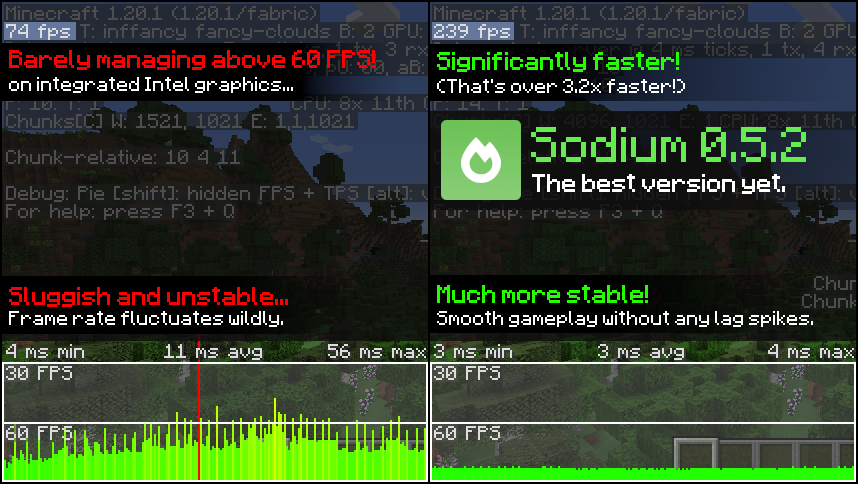
Sodium is a powerful optimization mod for the Minecraft client, which greatly improves frame rates and micro-stutter, while fixing many graphical issues in Minecraft.
Unlike other rendering-focused mods, it boasts wide compatibility with the wider modding ecosystem. And it does so without compromising on how the game looks, giving you that authentic block game feel.


📥 Installation Guide
Sodium is available for multiple mod loaders, but we recommend using Fabric Loader for the most simple and lightweight experience. If you are using a third-party launcher, it probably has built-in functionality to automatically install mod loaders. Once you have installed your mod loader, you can simply place Sodium into your mods folder like anything else.
Not sure if you installed the mod correctly? Check your Video Settings screen in Minecraft, which should show our new and improved user interface for changing settings.
Not sure how to configure the mod? Don't worry, you probably don't need to. By default, Sodium will enable all optimizations which are supported on your system, giving you the best experience possible. You should generally only change video settings related to performance and other advanced features if you are experiencing issues.
Need even more performance? By design, Sodium only optimizes the rendering code of Minecraft. You should also install our other mods, such as Lithium (for MC 1.15+) and Phosphor (for MC <1.19), to optimize the other parts of your game. This is done so that players can pick and choose which mods they want to use, but we generally recommend using our entire collection.
✅ Hardware Compatibility
Android devices (and some Windows-on-ARM devices) which use OpenGL translation layers (such as GL4ES, ANGLE, GLonD3D12 etc) are not supported and will have severe performance issues.
We only provide official support for desktop graphics cards which have up-to-date drivers compatible with OpenGL 4.5 or newer. Most graphics cards released in the past 12 years will meet these requirements, including the following:
- INTEL HD Graphics 500 Series (Skylake) or newer
- NVIDIA GeForce 400 Series (Fermi) or newer
- AMD Radeon HD 7000 Series (GCN 1) or newer
Nearly all desktop graphics cards that are already compatible with Minecraft (which requires OpenGL 3.3) should also work with Sodium. But our team cannot ensure compatibility or provide support for older graphics cards, and they may not work with future versions of Sodium.
If you are running into problems, you should make sure that your graphics drivers are up-to-date. Out-of-date graphics drivers are often the reason for most crashes, rendering bugs, and performance issues.
🐛 How to Report Issues
Please use the issue tracker linked at the top of the page to report bugs, crashes, and other issues. Make sure you include information about the mods you are using, and attach any crash/log files you have.
Note: The level of performance you see while using the Sodium mod will vary depending on exact hardware and software configuration. For all performance comparisons provided on this page, we used a computer with integrated graphics which we believe to be representative of the casual player.
Hardware configuration: Intel Core i7-1165G7 (4c/8t, up to 4.70 GHz) with Intel Xe Graphics (96 EUs, up to 1.30 GHz), 2x16 GB DDR4-3200. Software configuration: Fedora 41, Linux 6.12.4, Mesa 24.3.4, Prism Launcher 9.1, OpenJDK 21.0.7 runtime (as packaged by distribution), Fabric Loader 0.16.10.

AI-summarized from the mod's own pages · reviewed by our team
Reviewed for mc26.3-0.9.3-beta.1-fabric
Machine translated
Source: Modrinth project pageGuide
Summary
Sodium заменяет клиентский движок рендеринга Minecraft, повышая частоту кадров и уменьшая небольшие подёргивания, сохраняя привычный вид игры. Мод также устраняет некоторые графические проблемы, однако результат зависит от вашего оборудования и программного обеспечения.
Getting started
- Установите загрузчик — Выберите Fabric, Quilt или NeoForge для клиента Minecraft. Для простой и лёгкой сборки разработчики рекомендуют Fabric.
- Добавьте Sodium — Выберите версию Sodium для своего загрузчика и версии Minecraft, затем поместите её в папку mods. Некоторые сторонние лаунчеры могут установить загрузчик за вас.
- Проверьте экран настроек — Запустите Minecraft и откройте «Настройки графики». Обновлённый интерфейс настроек Sodium — хороший признак того, что мод установлен правильно.
- Сначала попробуйте настройки по умолчанию — Sodium автоматически включает оптимизации, поддерживаемые вашей системой. Обычно менять настройки производительности или расширенные настройки графики нужно только при возникновении проблем.
Key features
Оптимизация рендеринга
Sodium оптимизирует код, отвечающий за отрисовку игры. Он не оптимизирует все остальные компоненты Minecraft.
Привычный внешний вид
Мод призван повысить производительность, не меняя узнаваемый облик Minecraft, а также устраняет некоторые графические проблемы.
Интерфейс настроек графики
Sodium заменяет интерфейс настроек графики. Используйте его, чтобы проверить или изменить настройки, если конфигурация по умолчанию вызывает проблемы.
Compatibility
fabric, neoforge, quilt · Среди указанных версий Minecraft есть версии от 1.16.3 до 1.20.6, а также дополнительные версии. Проверьте наличие выпуска для вашего загрузчика и версии игры.
- Устройства Android и некоторые устройства с Windows на ARM, использующие уровни трансляции OpenGL, не поддерживаются и могут работать с серьёзными проблемами производительности.
Tips
- Обновите драйверы видеокарты, если сталкиваетесь с вылетами, ошибками рендеринга или низкой производительностью: устаревшие драйверы часто становятся причиной таких проблем.
- Официальная поддержка оборудования распространяется на дискретные видеокарты с актуальными драйверами, поддерживающими OpenGL 4.5 или новее. Старые видеокарты, совместимые с Minecraft, могут работать, но официально не поддерживаются и могут перестать работать в будущих версиях Sodium.
- Если сообщаете об ошибке или вылете, укажите используемые моды и приложите соответствующий отчёт о сбое или файлы журналов.
FAQ
- Нужно ли запускать Sodium на сервере?
- Sodium — клиентский мод. В предоставленной информации проекта указано, что использование на сервере не поддерживается.
- Устранит ли он все проблемы с производительностью?
- Нет. Sodium сосредоточен на рендеринге, поэтому для оптимизации других компонентов игры могут потребоваться отдельные моды. Разработчики рекомендуют Lithium, а для версий Minecraft ниже 1.19 — Phosphor.
- Почему у меня прирост производительности отличается от результатов других игроков?
- Производительность зависит от конкретной конфигурации оборудования и программного обеспечения. В опубликованных проектом результатах использовалась определённая система со встроенной графикой, поэтому они не гарантируют таких же результатов на других компьютерах.
Modrinth modrinth
indexable