Emoji Type
Norbiros
3.887.003 downloads · 861 followers
Minecraft: Minecraft 1.16.5 – 26.2
Runs on: Client
Kategori: social, utility
Compatibility by loader
- fabric1.16 – 1.21, 26.1 – 26.2· Latest 3.1.0-26.2-fabric (25 Haz 2026)
- quilt1.19 – 1.21, 26.1 – 26.2· Latest 3.1.0-26.2-fabric (25 Haz 2026)
- neoforge1.20 – 1.21, 26.1 – 26.2· Latest 3.1.0-26.2-neoforge (25 Haz 2026)
- forge1.18.2, 1.20 – 1.20.4· Latest 2.2.3+1.20.4 (15 Ara 2023)
Overview
🙂 Emoji Type
Type Minecraft emojis and symbols with simple shortcodes.
Emoji Type allows you to instantly insert 200+ emojis into your game using intuitive keywords. Type :skull: and get ☠️ instantly. Works in chat, signs, books, anvils - everywhere text appears. No resource packs or texture changes needed.
🚀 Key Features
- Seamless Integration: Works in chat, signs, books, and even anvils.
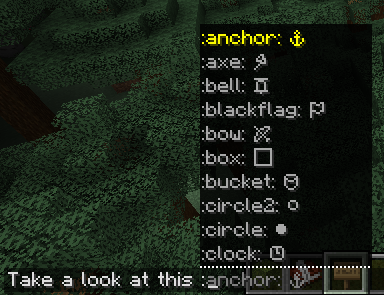
- Smart Autocomplete: Type a colon (
:) in chat to see a real-time list of suggestions. - Vanilla Compatible: Emojis are standard Unicode. Other players can see your emojis even if they don't have the mod installed!
- Emoji Pack: Create, edit your own emoji packs via a built-in visual editor.
Bundled Emoji Packs
| Pack | Description | Examples |
|---|---|---|
| Minecraft Essentials | Tools, weapons, and status icons. | ⚔️ ⛏️ 🏹 ☀️ ❄️ |
| Text Art (Kaomoji) | Classic ASCII and Japanese emoticons. | ¯\_(ツ)_/¯ (╯°□°)╯ |
| Letter Emojis | Stylized circled alphabets. | ⓐ Ⓑ ⓒ Ⓓ |
🛠️ How to Use
- Install: Drop the mod into your
modsfolder (Client-side only!). - Trigger: Press
:in any text field. - Search: Start typing (e.g.,
:sw...) and use your arrow keys or mouse to select. - Anywhere Else: On signs or anvils, simply type the full code (e.g.,
:heart:) and watch it transform.
Customizing: Access the config via Mod Menu (Fabric) or the Mods setting (NeoForge) to enable/disable emoji packs or build your own from scratch!
❓ Frequently Asked Questions
Do I need this on my server?
Nope! It’s 100% client-side. It won’t do anything if installed on a server.
Can my friends see the emojis?
Yes! Since these are native Unicode characters, anyone on a modern Minecraft client can see them perfectly.
How do I share my custom packs?
Just send the .yaml file found in config/emojitype/emoji_packs/. Your friends can just drop it in their folder and they're good to go.
Why no autocomplete on signs?
Minecraft’s sign and anvil interfaces are a bit more restrictive than chat. For now, just type the full keyword (like :check:) and it will convert automatically.
🖼️ Gallery
| Chat Suggestions | Config Screen | Emoji Packs |
|---|---|---|
 |  |  |
Modrinth modrinth
indexable