
Simple Voice Chat
henkelmax
77.149.835 downloads · 14.857 followers
Minecraft: Minecraft 1.12.2 – 26.2
Runs on: Client & server
Kategori: adventure, bukkit, bungeecord, folia, paper, purpur, social, spigot, utility, velocity, waterfall
Compatibility by loader
- fabric1.16 – 1.21, 26.1 – 26.2· Latest fabric-2.6.22+26.2 (8 Ağu 2026)
- neoforge1.20 – 1.21, 26.1 – 26.2· Latest neoforge-2.6.22+26.2 (8 Ağu 2026)
- forge1.12.2, 1.16 – 1.21, 26.1 – 26.2· Latest forge-2.6.22+26.2 (8 Ağu 2026)
- quilt1.18 – 1.21, 26.1 – 26.2· Latest quilt-2.6.22+26.2 (8 Ağu 2026)
Overview
Modrinth | CurseForge | Discord | Wiki | FAQ | Credits | API
Simple Voice Chat
A proximity voice chat for Minecraft with a variety of addons that offer additional features and functionalities.
⚠️ NOTE This mod requires special setup on the server in order to work. Please read the wiki for more information.
[
](https://discord.gg/4dH2zwTmyX)
*Please join the Discord if you have questions!*
Downloads
Features
- Push to talk
- Voice activation
- Proximity voice chat
- Password protected groups
- Automatic voice activity detection
- Automatic microphone gain adjustment
- Opus codec
- RNNoise recurrent neural network noise suppression
- OpenAL audio
- Cross compatibility between Fabric, NeoForge, Forge, Quilt, Bukkit, Spigot and Paper
- Support for Velocity, BungeeCord and Waterfall
- Compatibility with ModMenu (Use ClothConfig for a better configuration UI)
- Configurable push to talk key
- Microphone and speaker test playback
- Configurable voice distance
- Whispering
- Individual player volume adjustment
- Microphone amplification
- 3D sound
- AES encryption
- Audio recording with separate audio tracks
- A powerful API
- Many addons
Icons
| Icon | Description |
|---|---|
 | You are talking |
 | You are whispering |
 | Player is talking |
 | Player is whispering |
 | Microphone muted |
 | Voice chat disabled |
 | Voice chat not connected |
| Voice chat not installed |
The GUI
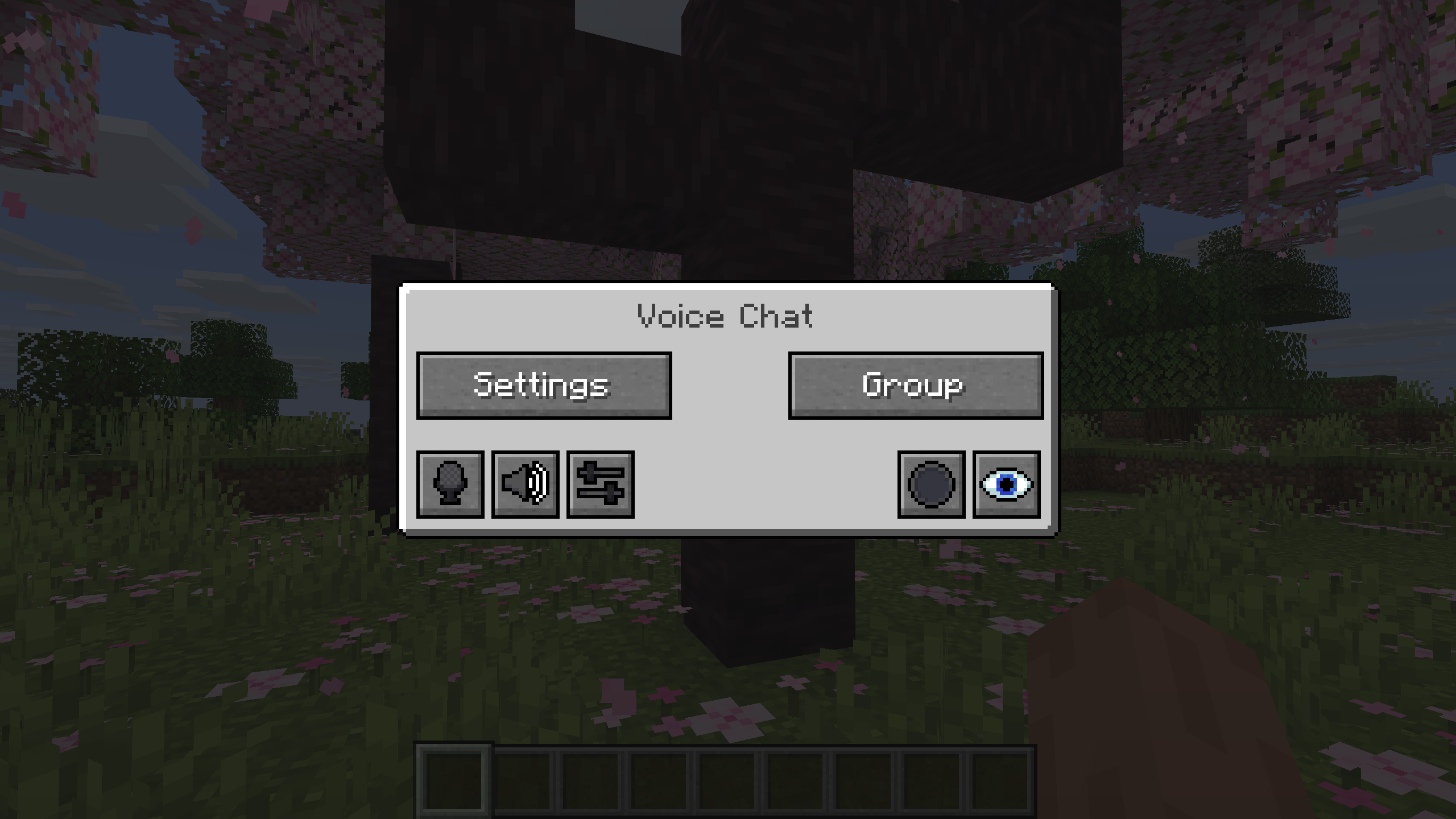
You can open the voice chat GUI by pressing the V key.
This allows you to open the settings, group chats, mute yourself, disable the voice chat, start/stop a recording and hide all icons.
Group Chats
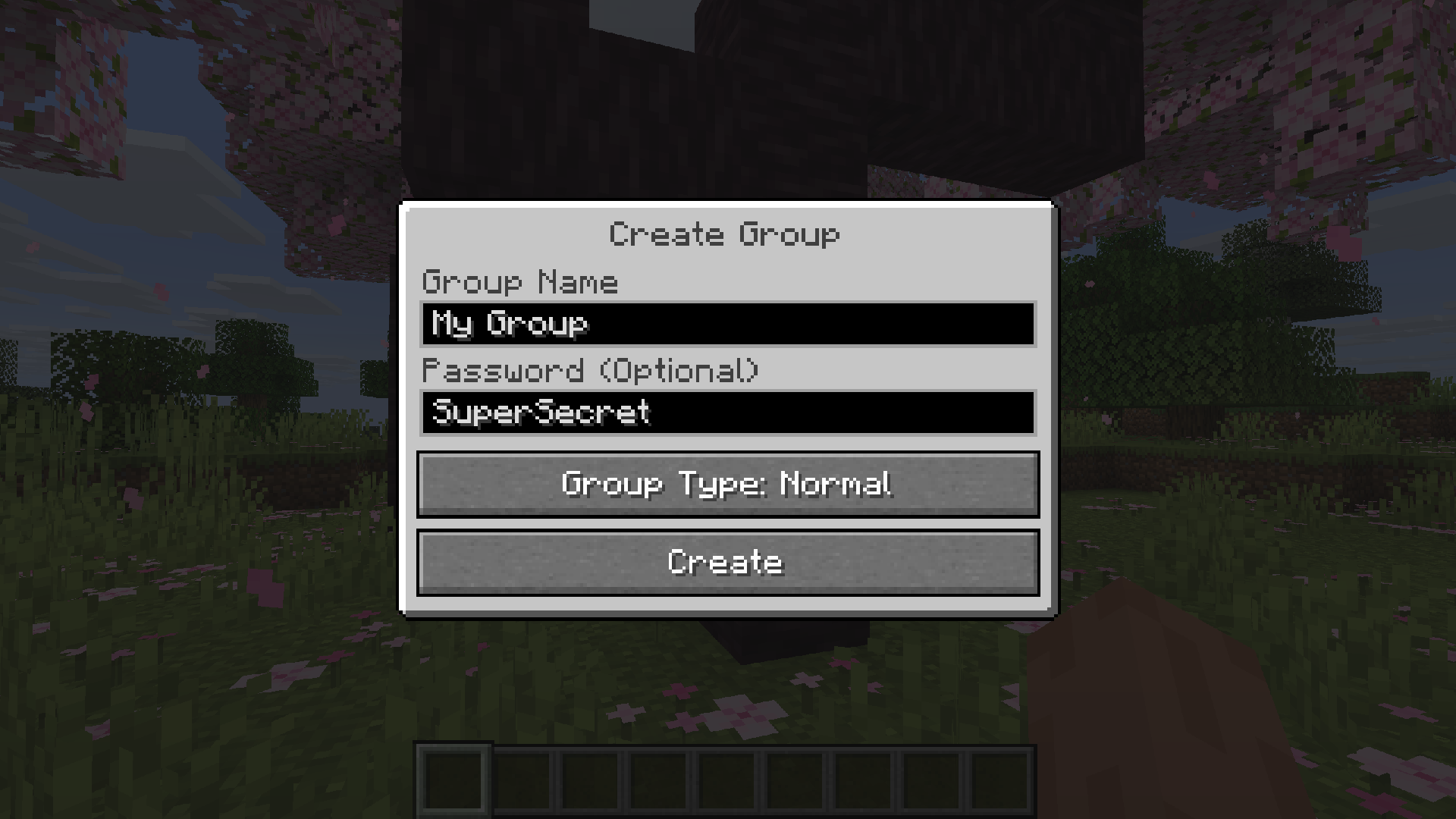
Group chats allow you to talk to players that are not in your vicinity. To open the group chat interface, either press the group button in the voice chat GUI or just press the group key.
To create a new group, just type a name in the text field and press the button at the bottom.
Creating or joining a group will bring you into the group chat interface. You will also see the heads of the group members in the top left corner of your screen. Talking players will be outlined. You can disable these icons by pressing the third button from the left.
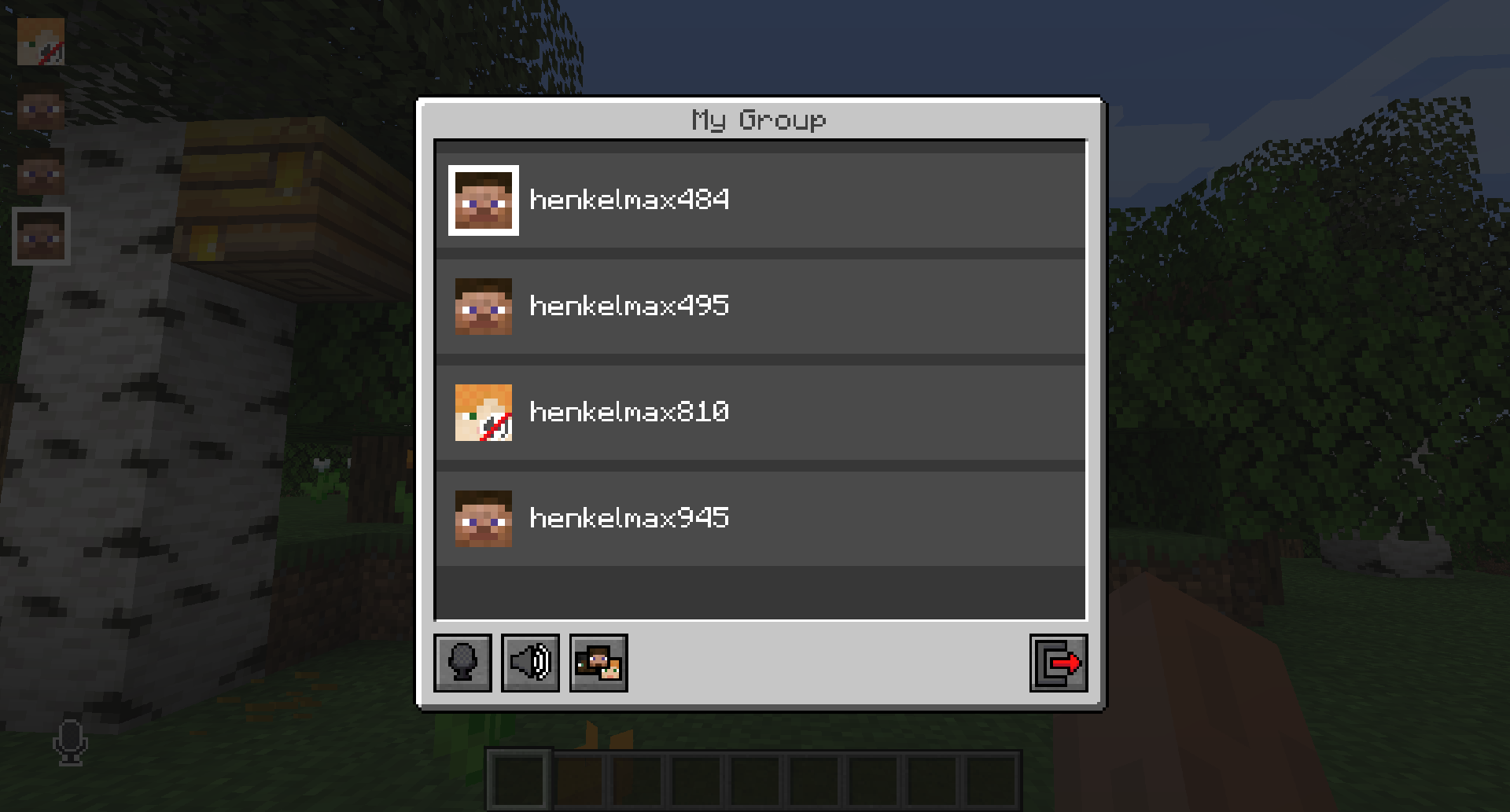
Players that are not in a group will see a group icon next to your head, indicating that you are in a group.
You can invite players to your group chat by entering the command /voicechat invite or from the social interactions screen.
Settings
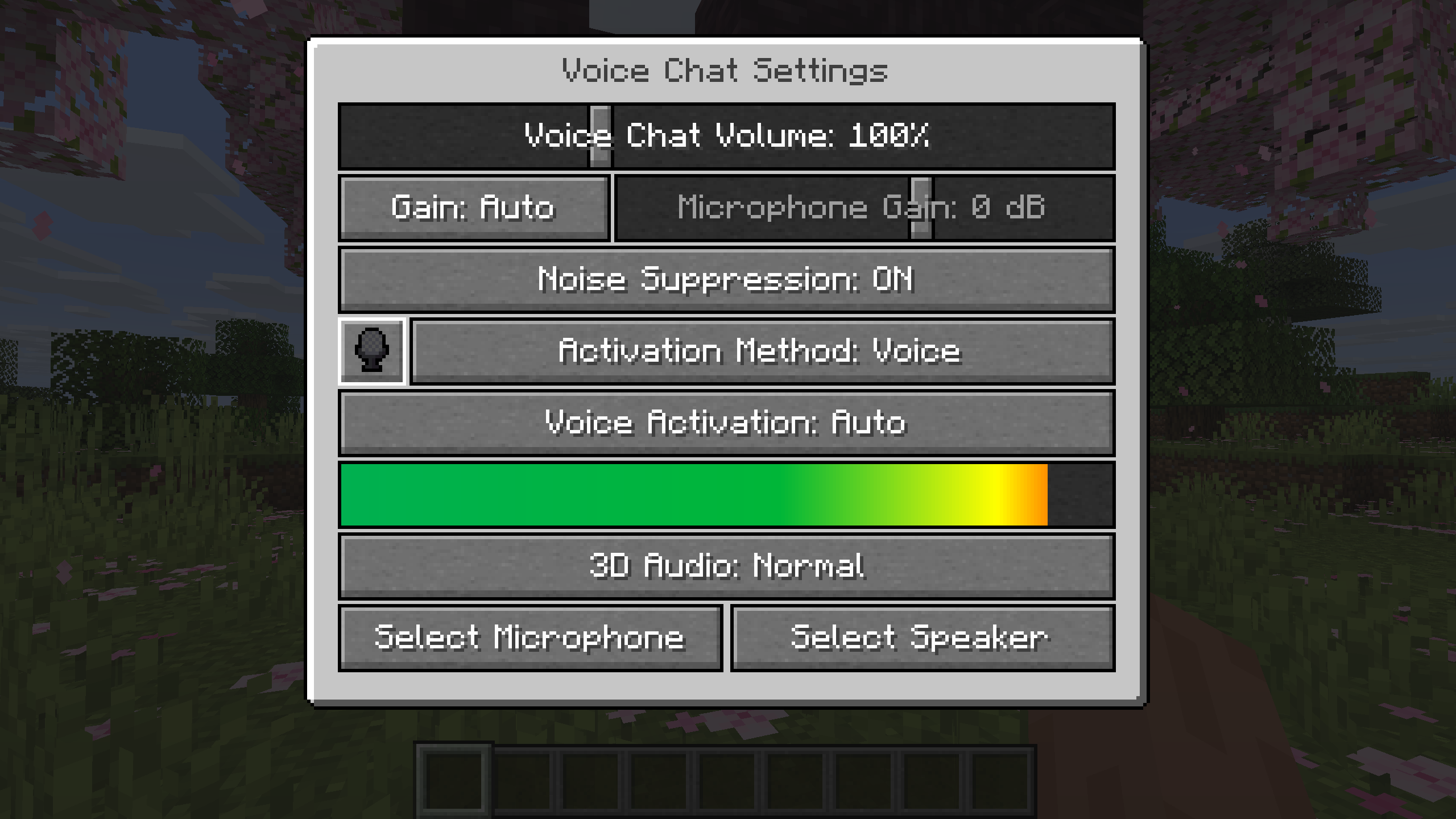
You can access the voice chat settings by pressing the V key and pressing the settings button.
This menu offers the ability to set up your voice chat audio settings.
By clicking the microphone button, you can test your microphone activation.
Important Notes
You need to open a port on the server. This is port 24454 UDP by default.
Without opening this port, the voice chat will not work.
This port can be changed in the server config.
More information here.
The voice chat is encrypted, but we don't guarantee the security of it. Use at your own risk!
AI-summarized from the mod's own pages · reviewed by our team
Reviewed for fabric-2.6.27+26.4-snapshot-7
Machine translated
Source: Modrinth project pageGuide
Summary
Simple Voice Chat, Minecraft'a yakındaki oyuncularla konuşmanızı sağlayan mesafe tabanlı sesli iletişim ekler. Ayrıca daha uzak mesafelerdeki sohbetler için grup sohbetleri, ses kontrolleri ve kayıt özelliği sunar. Sesli sohbetin çalışması için sunucuda özel bir kurulum gerekir.
Getting started
- Uygun indirmeyi seçin — Kullandığınız mod yükleyicisine veya sunucu platformuna uygun indirmeyi seçin. Projede Fabric, Forge, NeoForge ve Quilt için mod indirmelerinin yanı sıra çeşitli sunucu ve proxy platformları için indirmeler de bulunur.
- Sunucu kurulumunu kontrol edin — Sunucu yöneticisi sesli sohbet için bir UDP bağlantı noktası açmalıdır. Varsayılan bağlantı noktası 24454'tür ancak sunucu yapılandırmasından değiştirilebilir.
- Ses ayarlarını açın — V tuşuna basıp ayarlar düğmesini seçin. Mikrofonun çalıştığını kontrol etmek için mikrofon düğmesini, sesinizi kontrol etmek için kullanılabilir mikrofon ve hoparlör testlerini kullanın.
- Konuşma şeklini seçin — Tercihinize göre bas-konuş veya ses etkinleştirme modunu kullanın. Bas-konuş tuşu değiştirilebilir.
Key features
Yakındaki oyuncularla sohbet
Mesafe tabanlı sohbet, yakınınızdaki oyuncularla konuşmanızı sağlar. Ses mesafesi ayarlanabilir; mod fısıldamayı ve 3D sesi de destekler.
Grup sohbetleri
Gruplar, yakında olmayan üyelerle konuşmanızı sağlar ve parola ile korunabilir. Grup arayüzünü V menüsünden veya grup tuşuyla açın.
Ses kontrolleri
Oyuncuların ses düzeyini ayrı ayrı ayarlayabilir veya mikrofonunuzun sesini yükseltebilirsiniz. Otomatik ses algılama, kazanç ayarı ve gürültü bastırma da kullanılabilir.
Kayıt
Sesli sohbet menüsünden kayıt başlatabilir veya durdurabilirsiniz. Kayıtlar ayrı ses kanallarını destekler.
Compatibility
Fabric, Forge, NeoForge, Quilt
Tips
- Grup oluşturmak için grup arayüzünü açın, bir ad girin ve alttaki düğmeyi kullanın. Oyuncuları sosyal etkileşimler ekranından veya /voicechat invite komutuyla davet edin.
- Grup üyeleri sol üst köşede kafa simgeleri olarak görünür; konuşurken simgelerinin çevresinde bir çerçeve belirir. Grup arayüzündeki soldan üçüncü düğme bu simgeleri gizler.
- V menüsünden kendinizi sessize alabilir, sesli sohbeti devre dışı bırakabilir veya tüm sesli sohbet simgelerini gizleyebilirsiniz. Sorun giderirken sessizde olup olmadığınızı veya sesli sohbetin devre dışı bırakılıp bırakılmadığını kontrol edin.
- Sesli sohbette şifreleme kullanılır ancak proje güvenliğini garanti etmez. Hassas konuşmalar yaparken bunu göz önünde bulundurun.
FAQ
- Sesli sohbet neden bağlanmıyor?
- Sesli sohbet durum simgesini kontrol edin ve sunucu yöneticisinden UDP bağlantı noktası ayarlarını doğrulamasını isteyin. Gerekli bağlantı noktası açık değilse sesli sohbet çalışmaz.
- Oyuncular farklı platformlarda birlikte oynayabilir mi?
- Proje, Fabric, NeoForge, Forge, Quilt, Bukkit, Spigot ve Paper arasında çapraz uyumluluk listeliyor. Ayrıca Velocity, BungeeCord ve Waterfall desteği de bulunuyor.
- Yapılandırma arayüzünü geliştirebilir miyim?
- Mod, ModMenu'yu destekler ve proje, yapılandırma arayüzünü geliştirmek için ClothConfig kullanılmasını önerir.
Modrinth modrinth
indexable