
Sodium
jellysquid3
255.093.619 downloads · 42.990 followers
Minecraft: Minecraft 1.16.3 – 26.3
Runs on: Client
Kategori: optimization
Compatibility by loader
- neoforge1.21.1 – 1.21.11, 26.1 – 26.3· Latest mc26.3-0.9.3-neoforge (21 Kas 2026)
- fabric1.16 – 1.21, 26.1 – 26.3· Latest mc26.3-0.9.3-fabric (21 Kas 2026)
- quilt1.18 – 1.20· Latest mc1.20.1-0.5.13-fabric (3 Mar 2025)
Overview
This mod is the result of thousands of hours of development, and is made possible thanks to players like you. If you would like to show a token of your appreciation for my work, and help support the development of Sodium in the process, then consider buying me a coffee.


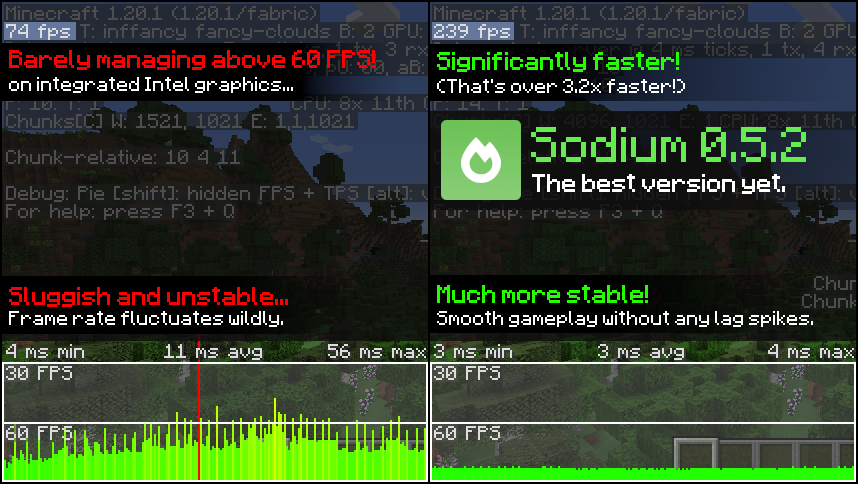
Sodium is a powerful optimization mod for the Minecraft client, which greatly improves frame rates and micro-stutter, while fixing many graphical issues in Minecraft.
Unlike other rendering-focused mods, it boasts wide compatibility with the wider modding ecosystem. And it does so without compromising on how the game looks, giving you that authentic block game feel.


📥 Installation Guide
Sodium is available for multiple mod loaders, but we recommend using Fabric Loader for the most simple and lightweight experience. If you are using a third-party launcher, it probably has built-in functionality to automatically install mod loaders. Once you have installed your mod loader, you can simply place Sodium into your mods folder like anything else.
Not sure if you installed the mod correctly? Check your Video Settings screen in Minecraft, which should show our new and improved user interface for changing settings.
Not sure how to configure the mod? Don't worry, you probably don't need to. By default, Sodium will enable all optimizations which are supported on your system, giving you the best experience possible. You should generally only change video settings related to performance and other advanced features if you are experiencing issues.
Need even more performance? By design, Sodium only optimizes the rendering code of Minecraft. You should also install our other mods, such as Lithium (for MC 1.15+) and Phosphor (for MC <1.19), to optimize the other parts of your game. This is done so that players can pick and choose which mods they want to use, but we generally recommend using our entire collection.
✅ Hardware Compatibility
Android devices (and some Windows-on-ARM devices) which use OpenGL translation layers (such as GL4ES, ANGLE, GLonD3D12 etc) are not supported and will have severe performance issues.
We only provide official support for desktop graphics cards which have up-to-date drivers compatible with OpenGL 4.5 or newer. Most graphics cards released in the past 12 years will meet these requirements, including the following:
- INTEL HD Graphics 500 Series (Skylake) or newer
- NVIDIA GeForce 400 Series (Fermi) or newer
- AMD Radeon HD 7000 Series (GCN 1) or newer
Nearly all desktop graphics cards that are already compatible with Minecraft (which requires OpenGL 3.3) should also work with Sodium. But our team cannot ensure compatibility or provide support for older graphics cards, and they may not work with future versions of Sodium.
If you are running into problems, you should make sure that your graphics drivers are up-to-date. Out-of-date graphics drivers are often the reason for most crashes, rendering bugs, and performance issues.
🐛 How to Report Issues
Please use the issue tracker linked at the top of the page to report bugs, crashes, and other issues. Make sure you include information about the mods you are using, and attach any crash/log files you have.
Note: The level of performance you see while using the Sodium mod will vary depending on exact hardware and software configuration. For all performance comparisons provided on this page, we used a computer with integrated graphics which we believe to be representative of the casual player.
Hardware configuration: Intel Core i7-1165G7 (4c/8t, up to 4.70 GHz) with Intel Xe Graphics (96 EUs, up to 1.30 GHz), 2x16 GB DDR4-3200. Software configuration: Fedora 41, Linux 6.12.4, Mesa 24.3.4, Prism Launcher 9.1, OpenJDK 21.0.7 runtime (as packaged by distribution), Fabric Loader 0.16.10.

AI-summarized from the mod's own pages · reviewed by our team
Reviewed for mc26.3-0.9.3-beta.1-fabric
Machine translated
Source: Modrinth project pageGuide
Summary
Sodium, Minecraft'ın istemci render motorunun yerine geçerek oyunun alışılmış görünümünü korurken kare hızını artırır ve küçük takılmaları azaltır. Ayrıca grafik sorunlarını giderir; ancak elde edeceğiniz iyileşme donanımınıza ve yazılımınıza bağlıdır.
Getting started
- Bir yükleyici kurun — Minecraft istemciniz için Fabric, Quilt veya NeoForge'u seçin. Proje, basit ve hafif bir kurulum için Fabric'i öneriyor.
- Sodium'u ekleyin — Yükleyicinize ve Minecraft sürümünüze uygun bir Sodium sürümü seçip mods klasörüne yerleştirin. Bazı üçüncü taraf başlatıcılar yükleyiciyi sizin yerinize kurabilir.
- Ayarlar ekranını kontrol edin — Minecraft'ı başlatıp Video Ayarları'nı açın. Sodium'un yeniden tasarlanan ayarlar arayüzü, modun doğru kurulduğunu gösteren iyi bir işarettir.
- Önce varsayılan ayarları deneyin — Sodium, sisteminizin desteklediği iyileştirmeleri otomatik olarak etkinleştirir. Genellikle yalnızca bir sorunla karşılaşırsanız performans veya gelişmiş video ayarlarını değiştirmeniz gerekir.
Key features
Render optimizasyonu
Sodium, oyunun çiziminden sorumlu koda odaklanır. Minecraft'ın diğer tüm bölümlerini optimize etmez.
Alışılmış görünüm
Mod, Minecraft'ın tanınabilir görünümünü değiştirmeden performansı artırmayı amaçlar ve bazı grafik sorunlarını giderir.
Video ayarları arayüzü
Sodium, video ayarları arayüzünün yerine geçer. Varsayılan yapılandırma sorun çıkarırsa ayarları incelemek veya değiştirmek için bu arayüzü kullanın.
Compatibility
fabric, neoforge, quilt · Listelenen Minecraft sürümleri 1.16.3 ile 1.20.6 arasını ve ayrıca başka sürümleri kapsıyor. Kullandığınız yükleyiciye ve oyun sürümüne uygun sürümü kontrol edin.
- OpenGL çeviri katmanlarını kullanan Android cihazlar ve bazı Windows-on-ARM cihazları desteklenmez; bu cihazlarda ciddi performans sorunları yaşanabilir.
Tips
- Çökme, render hataları veya düşük performans yaşıyorsanız grafik sürücülerinizi güncelleyin; bu sorunların yaygın nedenlerinden biri eski sürücülerdir.
- Resmî donanım desteği, güncel sürücüleri OpenGL 4.5 veya daha yenisini destekleyen masaüstü ekran kartlarını kapsar. Minecraft ile uyumlu daha eski ekran kartları çalışabilir, ancak resmî olarak desteklenmez ve gelecekteki Sodium sürümleriyle çalışmayabilir.
- Bir hata veya çökme bildirirken kullandığınız modları belirtin ve ilgili çökme raporlarını ya da günlük dosyalarını ekleyin.
FAQ
- Sodium'un sunucuda çalışması gerekir mi?
- Sodium istemci tarafı bir moddur. Proje bilgilerinde sunucu tarafında kullanımın desteklenmediği belirtiliyor.
- Her performans sorununu iyileştirir mi?
- Hayır. Sodium render işlemine odaklanır; bu nedenle oyunun diğer bölümleri için ayrıca optimizasyon gerekebilir. Proje, Lithium'u ve Minecraft'ın 1.19'dan eski sürümleri için Phosphor'u öneriyor.
- İyileşme neden başkalarınınkinden farklı?
- Performans, kullanılan donanım ve yazılım yapılandırmasına bağlıdır. Projenin gösterdiği sonuçlar belirli bir tümleşik grafik sisteminde elde edilmiştir ve diğer bilgisayarlar için garanti değildir.
Modrinth modrinth
indexable