
Quick Skin
ThePlum
699.060 lượt tải · 332 theo dõi
Minecraft: Minecraft 1.20.1 – 26.3
Chạy trên: Client & server
Nhóm: utility
Tương thích theo loader
- neoforge1.21.1 – 1.21.11, 26.1 – 26.3· Mới nhất mc26.3-v3.1.1-neoforge-26.3 (12 thg 10, 2026)
- forge1.20.1· Mới nhất mc1.20.1-v3.1.1-forge-1.20.1 (12 thg 10, 2026)
- fabric1.20 – 1.21, 26.1 – 26.3· Mới nhất mc26.3-v3.1.1-fabric-26.3 (12 thg 10, 2026)
Cần cài kèm
Tổng quan
Changing your skin in vanilla Minecraft means closing the game or tabbing out to the launcher, sticking to 64x64 textures, and settling for static capes. Quick Skin lets you swap skins, load high-resolution textures, and equip animated GIF capes directly from the title or pause screen, in both singleplayer and multiplayer.

In-Game Skin Manager
Open the Quick Skin menu from the title or pause screen to change your appearance without restarting or leaving your world.
- Skin Library: Fetch skins from other players by username or import local files from your computer.
- Model Swapping: Toggle between Classic (wide) and Slim player models on the fly.
- Drag & Drop: Drag skin files straight into the game window to add them to your local library.
- Cape Selector: Pick from built-in capes or import your own static and animated designs.

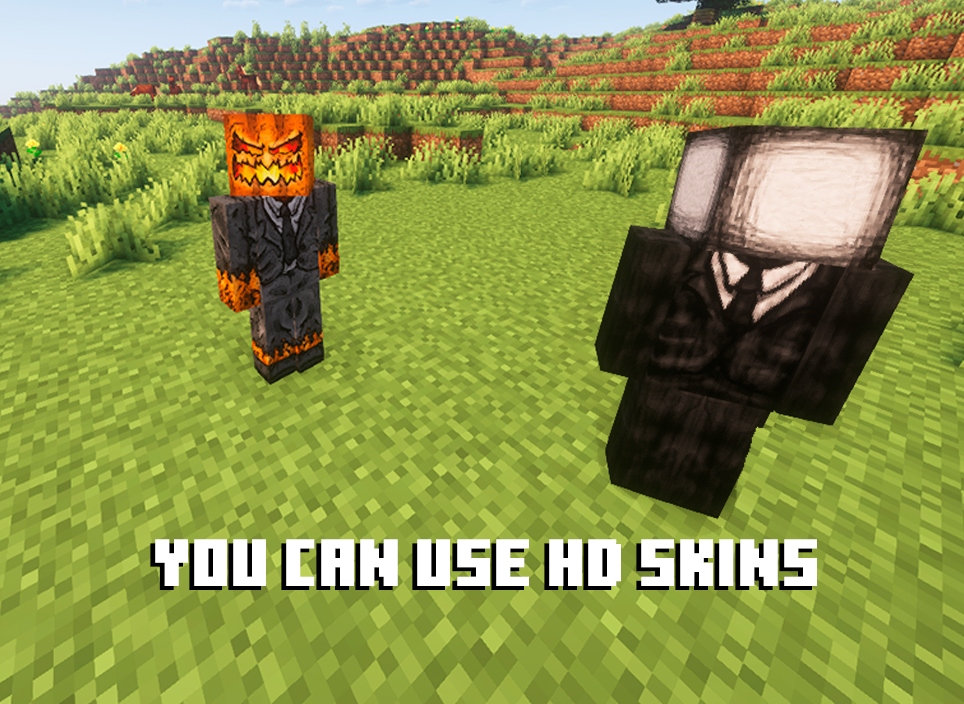
High-Resolution Skin Support
Go beyond the standard 64x64 pixel limit with built-in HD texture handling.
- Legacy Skin Conversion: Older 64x32 skins are automatically converted to the modern 64x64 layout on import.
- UI Downsampling: High-res skins are scaled down in menu thumbnails so the UI stays fast and responsive, with quality options in the config.
- Full In-Game Detail: Skins render at their native resolution while you play.
Animated GIF Capes
Use standard GIF files as animated in-game capes.
- Automatic Atlas Packing: GIFs are packed into an optimized texture atlas on import for smooth frame playback.
- Performance Limits: Cap maximum FPS, memory usage, and concurrent animations so crowded servers don't tank your framerate.
- Playback Speed: Adjust cape animation speed directly in the selection menu.

Quick Skin Switching
Swap between the skins in your library in seconds, right in the middle of a session.
- Instant Apply: Your new skin shows up immediately, with no restart, relog, or world reload.
- On-Screen Skin Name: The name of the skin you just switched to appears above your hotbar, so you always know which one is active.
- Singleplayer & Multiplayer: Works the same way in your own worlds and on servers.

Hide Armor Pieces
Show off your skin without giving up your protection. Toggle armor visibility straight from the Quick Skin menu.
- Per-Piece Toggles: Hide your helmet, chestplate, leggings, or boots individually, or keep the ones you like on display.
- Purely Visual: Hidden armor stays equipped in your inventory and keeps all of its stats and enchantments.
- Live Preview: See the result on your player model in the menu before you confirm.

Mod Compatibility
Quick Skin works out of the box alongside popular rendering, camera, and player customization mods:
Found a bug or mod conflict? Let us know on Discord!
❤ Discord ➜ https://discord.gg/EeQgres2Fz
Thư viện ảnh
Modrinth modrinth
indexable