
Sodium
jellysquid3
255.093.619 lượt tải · 42.990 theo dõi
Minecraft: Minecraft 1.16.3 – 26.3
Chạy trên: Client
Nhóm: optimization
Tương thích theo loader
- neoforge1.21.1 – 1.21.11, 26.1 – 26.3· Mới nhất mc26.3-0.9.3-neoforge (21 thg 11, 2026)
- fabric1.16 – 1.21, 26.1 – 26.3· Mới nhất mc26.3-0.9.3-fabric (21 thg 11, 2026)
- quilt1.18 – 1.20· Mới nhất mc1.20.1-0.5.13-fabric (3 thg 3, 2025)
Tổng quan
This mod is the result of thousands of hours of development, and is made possible thanks to players like you. If you would like to show a token of your appreciation for my work, and help support the development of Sodium in the process, then consider buying me a coffee.


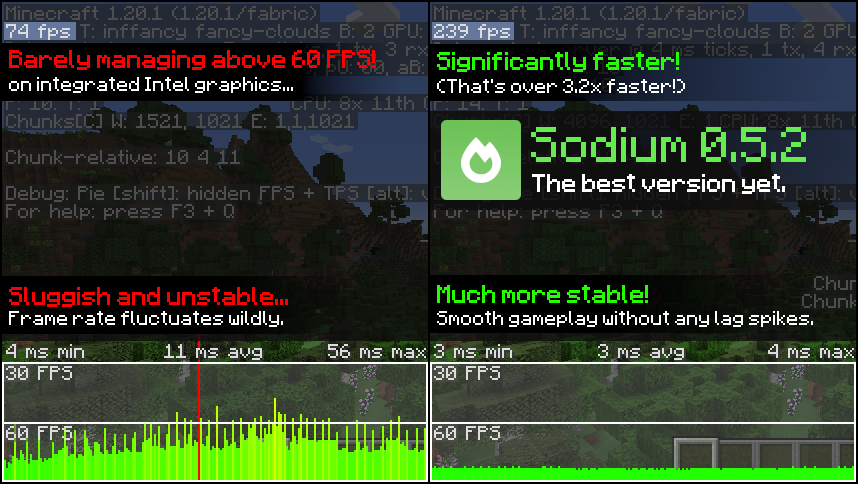
Sodium is a powerful optimization mod for the Minecraft client, which greatly improves frame rates and micro-stutter, while fixing many graphical issues in Minecraft.
Unlike other rendering-focused mods, it boasts wide compatibility with the wider modding ecosystem. And it does so without compromising on how the game looks, giving you that authentic block game feel.


📥 Installation Guide
Sodium is available for multiple mod loaders, but we recommend using Fabric Loader for the most simple and lightweight experience. If you are using a third-party launcher, it probably has built-in functionality to automatically install mod loaders. Once you have installed your mod loader, you can simply place Sodium into your mods folder like anything else.
Not sure if you installed the mod correctly? Check your Video Settings screen in Minecraft, which should show our new and improved user interface for changing settings.
Not sure how to configure the mod? Don't worry, you probably don't need to. By default, Sodium will enable all optimizations which are supported on your system, giving you the best experience possible. You should generally only change video settings related to performance and other advanced features if you are experiencing issues.
Need even more performance? By design, Sodium only optimizes the rendering code of Minecraft. You should also install our other mods, such as Lithium (for MC 1.15+) and Phosphor (for MC <1.19), to optimize the other parts of your game. This is done so that players can pick and choose which mods they want to use, but we generally recommend using our entire collection.
✅ Hardware Compatibility
Android devices (and some Windows-on-ARM devices) which use OpenGL translation layers (such as GL4ES, ANGLE, GLonD3D12 etc) are not supported and will have severe performance issues.
We only provide official support for desktop graphics cards which have up-to-date drivers compatible with OpenGL 4.5 or newer. Most graphics cards released in the past 12 years will meet these requirements, including the following:
- INTEL HD Graphics 500 Series (Skylake) or newer
- NVIDIA GeForce 400 Series (Fermi) or newer
- AMD Radeon HD 7000 Series (GCN 1) or newer
Nearly all desktop graphics cards that are already compatible with Minecraft (which requires OpenGL 3.3) should also work with Sodium. But our team cannot ensure compatibility or provide support for older graphics cards, and they may not work with future versions of Sodium.
If you are running into problems, you should make sure that your graphics drivers are up-to-date. Out-of-date graphics drivers are often the reason for most crashes, rendering bugs, and performance issues.
🐛 How to Report Issues
Please use the issue tracker linked at the top of the page to report bugs, crashes, and other issues. Make sure you include information about the mods you are using, and attach any crash/log files you have.
Note: The level of performance you see while using the Sodium mod will vary depending on exact hardware and software configuration. For all performance comparisons provided on this page, we used a computer with integrated graphics which we believe to be representative of the casual player.
Hardware configuration: Intel Core i7-1165G7 (4c/8t, up to 4.70 GHz) with Intel Xe Graphics (96 EUs, up to 1.30 GHz), 2x16 GB DDR4-3200. Software configuration: Fedora 41, Linux 6.12.4, Mesa 24.3.4, Prism Launcher 9.1, OpenJDK 21.0.7 runtime (as packaged by distribution), Fabric Loader 0.16.10.

Tóm tắt AI từ trang chính thức của mod · đội ngũ đã rà soát
Rà soát cho mc26.3-0.9.3-beta.1-fabric
Bản dịch máy
Nguồn: trang dự án ModrinthGuide
Tóm tắt
Sodium thay thế engine kết xuất phía máy khách của Minecraft để cải thiện tốc độ khung hình và giảm tình trạng khựng nhẹ, đồng thời giữ nguyên giao diện quen thuộc của trò chơi. Mod cũng khắc phục một số vấn đề đồ họa, nhưng mức cải thiện bạn nhận được tùy thuộc vào phần cứng và phần mềm.
Bắt đầu
- Cài đặt loader — Chọn Fabric, Quilt hoặc NeoForge cho Minecraft trên máy khách. Dự án khuyến nghị Fabric để có thiết lập đơn giản, gọn nhẹ.
- Thêm Sodium — Chọn bản Sodium phù hợp với loader và phiên bản Minecraft, sau đó đặt tệp mod vào thư mục mods. Một số trình khởi chạy bên thứ ba có thể tự cài loader cho bạn.
- Kiểm tra màn hình cài đặt — Khởi chạy Minecraft và mở Cài đặt video. Giao diện cài đặt được thiết kế lại của Sodium là dấu hiệu hữu ích cho thấy mod đã được cài đặt đúng cách.
- Thử thiết lập mặc định trước — Sodium tự động bật các tối ưu hóa mà hệ thống của bạn hỗ trợ. Thông thường, bạn chỉ cần điều chỉnh cài đặt hiệu năng hoặc video nâng cao nếu gặp sự cố.
Tính năng chính
Tối ưu hóa kết xuất
Sodium tập trung vào mã chịu trách nhiệm vẽ trò chơi. Mod không tối ưu hóa mọi phần khác của Minecraft.
Hình ảnh quen thuộc
Mod hướng đến cải thiện hiệu năng mà không thay đổi diện mạo dễ nhận biết của Minecraft, đồng thời khắc phục một số vấn đề đồ họa.
Giao diện cài đặt video
Sodium thay thế giao diện cài đặt video. Hãy dùng giao diện này để xem hoặc thay đổi cài đặt nếu cấu hình mặc định gây ra sự cố.
Tương thích
fabric, neoforge, quilt · Các phiên bản Minecraft được liệt kê gồm từ 1.16.3 đến 1.20.6, cùng một số phiên bản khác. Hãy kiểm tra bản phát hành dành cho loader và phiên bản trò chơi cụ thể của bạn.
- Các thiết bị Android và một số thiết bị Windows-on-ARM sử dụng lớp dịch OpenGL không được hỗ trợ và có thể gặp vấn đề hiệu năng nghiêm trọng.
Mẹo
- Hãy cập nhật trình điều khiển đồ họa nếu bạn gặp sự cố, lỗi kết xuất hoặc hiệu năng kém; trình điều khiển lỗi thời thường là nguyên nhân gây ra những vấn đề này.
- Hỗ trợ phần cứng chính thức áp dụng cho card đồ họa máy tính để bàn có trình điều khiển hiện tại hỗ trợ OpenGL 4.5 trở lên. Các card cũ hơn tương thích với Minecraft vẫn có thể hoạt động, nhưng không được hỗ trợ chính thức và có thể ngừng hoạt động trong các phiên bản Sodium tương lai.
- Khi báo lỗi hoặc sự cố, hãy liệt kê các mod bạn sử dụng và đính kèm báo cáo sự cố hoặc tệp nhật ký có liên quan.
Hỏi đáp
- Sodium có cần chạy trên máy chủ không?
- Sodium là mod phía máy khách. Thông tin dự án được cung cấp cho biết mod không hỗ trợ sử dụng phía máy chủ.
- Mod có cải thiện mọi vấn đề hiệu năng không?
- Không. Sodium tập trung vào kết xuất, nên các phần khác của trò chơi có thể cần được tối ưu hóa riêng. Dự án gợi ý Lithium và, với các phiên bản Minecraft thấp hơn 1.19, Phosphor.
- Vì sao mức cải thiện của tôi khác người khác?
- Hiệu năng phụ thuộc vào cấu hình phần cứng và phần mềm cụ thể. Kết quả dự án đưa ra sử dụng một hệ thống đồ họa tích hợp nhất định và không đảm bảo tương tự trên các máy tính khác.
Modrinth modrinth
indexable