
3D Skin Layers
tr7zw
86.745.952 downloads · 11.996 followers
Minecraft: Minecraft 1.8.8 – 26.3
Runs on: Client
Kategori: adventure, decoration
Compatibility by loader
- neoforge1.20 – 1.21, 26.1.2 – 26.3· Latest 1.11.4 (18 Okt 2026)
- fabric1.16 – 1.21, 26.1 – 26.3· Latest 1.11.4 (18 Okt 2026)
- forge1.8.8 – 1.8.9, 1.12.2, 1.16 – 1.21· Latest 1.11.4 (18 Okt 2026)
- quilt1.20 – 1.20.1· Latest 1.5.4-1.20 (7 Jul 2023)
Required with
Overview




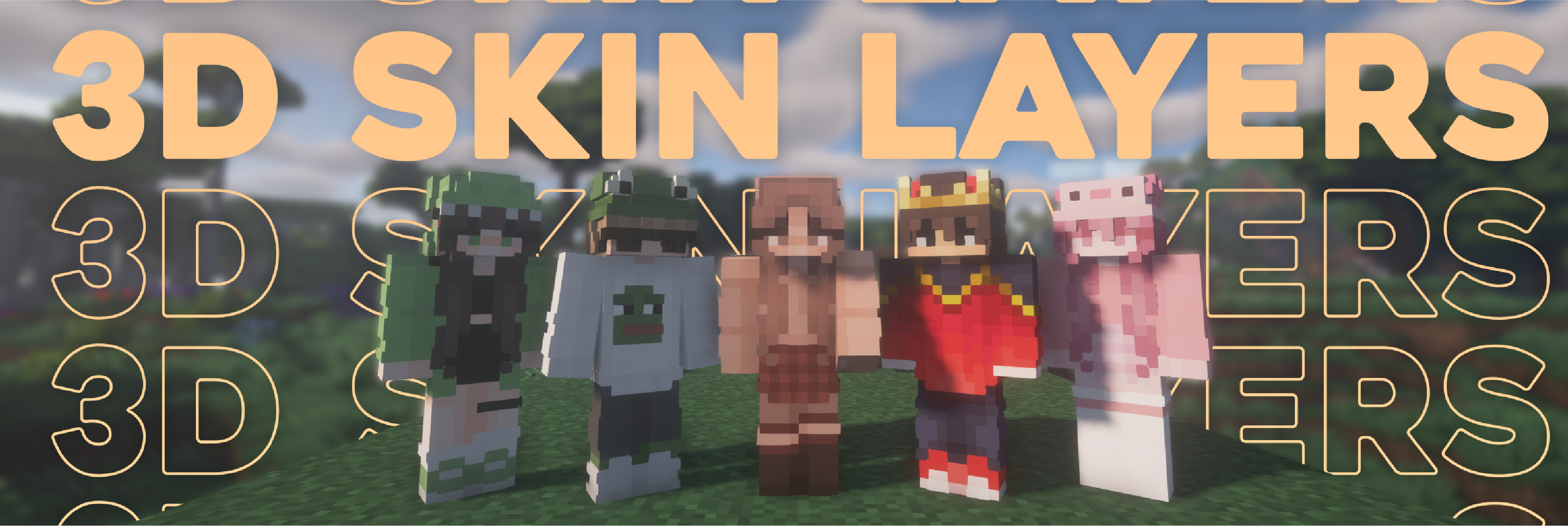
Replaces the normally flat second layer of player skins with a fully 3D-modeled version. The mod automatically switches back to vanilla-style 2D rendering when players are more than 12 blocks away, helping maintain high framerates. It also supports transparent elements - perfect for glasses, visors, or other cosmetic details!
Since this mod is purely visual and entirely client-side, it doesn't need to be installed on servers and works seamlessly in any environment.

Give your player skin the depth it deserves—with style and performance in mind.
3D Extruded Skin Layer
- Replaces the flat second skin layer with a full 3D model
- Adds visual depth to cosmetic details like jackets, sleeves, or hats
- Fully supports transparency for glasses, visors, etc.
- Also applies to player head items
Performance-Aware Rendering
- Automatically switches to vanilla 2D rendering beyond 12 blocks
- Maintains FPS even in multiplayer or crowded areas
- Fully client-side and requires no server installation


| Minecraft | Loader | Status | Version | Note |
|---|---|---|---|---|
| 1.16.5+ | Fabric/Forge*/NeoForge | ✅ Supported | Latest | |
| *1.16.5 | Forge | ⚠️ Unsupported | Outdated | Unsupported, until it gets support for JarInJar mods |
| 1.12.2/1.8.9 | Forge | ❌ Not supported | Outdated | Might get new updates at some point |
| Mod | Status | Note |
|---|---|---|
| Essential | ✅ Supported | |
| Shoulder Surfing Reloaded | ✅ Supported | |
| Player Animator | ✅ Supported | This means mods that use it like Better Combat and Emotecraft |
| CustomSkinLoader | ⚠️ Partial support | Requires this helper mod |
| Lunar Client | ❌ Not supported | Will never get support! |


- Because the outer layer is slightly larger than the player model, some skins may not align perfectly in 3D.
- ZigZag patterns around corners will join up. This down to the math of making it 3d, but it can be somewhat prevented by placing slightly transparent pixels into the holes.
- With shaders, some body part layer sides have weird shadows. I am trying to get this resolved.

Does this need to be installed on the server?
No. This is a fully client-side mod and does not need to be installed on the server.
Does this work with HD Skins?
No. Since the pixels wouldn't have the correct shape, this is not possible.
The layers stick through the modded armor
Some modded armor is closer to the body than vanilla. Turn down the 3d size in the mod settings till it fits.
The layers are flying offset to the body
You are probably using a ETF/EMF resourcepack. Make sure you update it, fitting to the Minecraft version.
Help the layers are gone! / The mod doesn't work!
A few things to check before asking for help:
- Check under Options > Skin Customization that you didn't accidentally disable your skin layers.
- Check in the mod settings, that the features are turned on.
- Does the mod show up in the modlist at all?
- The skin should be loaded via Mojang, other skin loaders might not be supported.
- Make sure your skin actually has things on the second layer. The mod can't magically invent layers.
I'm having issues with my cracked version of Minecraft
Please buy the game, illegal copies of the game are not supported.

👤 Thanks to the awesome translators and contributors on Github!

📄 License: tr7zw Protective License
Feel free to use this mod in your Modrinth/Curseforge hosted modpacks without asking for permission. Do not redistribute the jar files anywhere else!
AI-summarized from the mod's own pages · reviewed by our team
Reviewed for 1.11.4
Machine translated
Source: Modrinth project pageGuide
Summary
3D Skin Layers membuat lapisan luar skin pemain tampak memiliki bentuk tiga dimensi. Ini adalah mod visual sisi klien, jadi server tidak perlu memasangnya.
Getting started
- Periksa skin Anda — Gunakan skin dengan detail pada lapisan luarnya, seperti jaket, lengan baju, atau topi. Mod ini menambahkan kedalaman pada detail yang sudah ada; mod ini tidak membuat detail untuk skin yang tidak memiliki lapisan luar.
- Aktifkan lapisan — Jika efeknya tidak muncul, buka Options, lalu Skin Customization, dan pastikan lapisan skin yang relevan sudah diaktifkan. Periksa juga apakah mod ini muncul dalam daftar mod dan fitur-fiturnya aktif di pengaturan.
- Lihat dari dekat — Periksa pemain di dekat Anda untuk melihat lapisan yang dimodelkan. Pada jarak lebih dari 12 blok, mod ini otomatis mengembalikan lapisan ke tampilan datar demi membantu kinerja.
Key features
Lapisan luar yang dimodelkan
Lapisan skin kedua memiliki kedalaman, sehingga pakaian dan detail kosmetik lainnya tampak menonjol. Efek ini juga berlaku pada item kepala pemain.
Detail transparan
Elemen skin transparan tetap didukung, sehingga detail seperti kacamata dan visor dapat terlihat pada lapisan yang dimodelkan.
Rendering berdasarkan jarak
Pemain yang jauh otomatis menggunakan rendering datar. Hal ini dirancang untuk mengurangi beban kinerja, termasuk di area multipemain yang ramai.
Compatibility
Fabric, Forge, NeoForge · Tabel kompatibilitas mencantumkan dukungan saat ini untuk Minecraft 1.16.5 dan versi lebih baru di Fabric, Forge, dan NeoForge, kecuali Forge pada 1.16.5. Rilis Forge untuk 1.12.2 dan 1.8.9 ditandai sudah usang dan tidak didukung.
- Skin HD tidak didukung.
- Lunar Client tidak didukung.
- CustomSkinLoader mendapat dukungan parsial dan memerlukan mod bridge terpisah.
Tips
- Jika lapisan yang dimodelkan menembus armor dari mod lain, kurangi ukuran 3D-nya di pengaturan mod.
- Beberapa skin mungkin tidak sejajar sempurna karena model luarnya sedikit lebih besar daripada model pemain.
- Pola zigzag dapat menyatu di sudut. Piksel yang sedikit transparan pada celahnya mungkin dapat mengurangi efek ini.
- Shader dapat menghasilkan bayangan yang tidak biasa pada sisi beberapa lapisan bagian tubuh.
FAQ
- Mengapa skin saya masih terlihat datar?
- Periksa pengaturan lapisan skin dan pengaturan mod, lalu pastikan skin Anda benar-benar memiliki detail lapisan luar. Mod ini menggunakan rendering datar saat pemain berada lebih dari 12 blok jauhnya.
- Mengapa lapisannya bergeser dari tubuh?
- Jika Anda menggunakan resource pack ETF atau EMF, perbarui ke versi yang sesuai dengan versi Minecraft Anda. Mod versi 1.11.4 juga menyertakan perbaikan untuk resource pack EMF di Forge, terutama pada Minecraft 1.20.1.
- Bisakah saya menggunakan mod animasi pemain lainnya?
- Tabel kompatibilitas mencantumkan Essential, Shoulder Surfing Reloaded, dan Player Animator sebagai mod yang didukung. Tabel tersebut juga menyebutkan dukungan untuk mod yang menggunakan Player Animator, termasuk Better Combat dan Emotecraft.
Modrinth modrinth
indexable