
Simple Voice Chat
henkelmax
77.149.835 downloads · 14.857 followers
Minecraft: Minecraft 1.12.2 – 26.2
Runs on: Client & server
Kategori: adventure, bukkit, bungeecord, folia, paper, purpur, social, spigot, utility, velocity, waterfall
Compatibility by loader
- fabric1.16 – 1.21, 26.1 – 26.2· Latest fabric-2.6.22+26.2 (8 Agu 2026)
- neoforge1.20 – 1.21, 26.1 – 26.2· Latest neoforge-2.6.22+26.2 (8 Agu 2026)
- forge1.12.2, 1.16 – 1.21, 26.1 – 26.2· Latest forge-2.6.22+26.2 (8 Agu 2026)
- quilt1.18 – 1.21, 26.1 – 26.2· Latest quilt-2.6.22+26.2 (8 Agu 2026)
Overview
Modrinth | CurseForge | Discord | Wiki | FAQ | Credits | API
Simple Voice Chat
A proximity voice chat for Minecraft with a variety of addons that offer additional features and functionalities.
⚠️ NOTE This mod requires special setup on the server in order to work. Please read the wiki for more information.
[
](https://discord.gg/4dH2zwTmyX)
*Please join the Discord if you have questions!*
Downloads
Features
- Push to talk
- Voice activation
- Proximity voice chat
- Password protected groups
- Automatic voice activity detection
- Automatic microphone gain adjustment
- Opus codec
- RNNoise recurrent neural network noise suppression
- OpenAL audio
- Cross compatibility between Fabric, NeoForge, Forge, Quilt, Bukkit, Spigot and Paper
- Support for Velocity, BungeeCord and Waterfall
- Compatibility with ModMenu (Use ClothConfig for a better configuration UI)
- Configurable push to talk key
- Microphone and speaker test playback
- Configurable voice distance
- Whispering
- Individual player volume adjustment
- Microphone amplification
- 3D sound
- AES encryption
- Audio recording with separate audio tracks
- A powerful API
- Many addons
Icons
| Icon | Description |
|---|---|
 | You are talking |
 | You are whispering |
 | Player is talking |
 | Player is whispering |
 | Microphone muted |
 | Voice chat disabled |
 | Voice chat not connected |
| Voice chat not installed |
The GUI
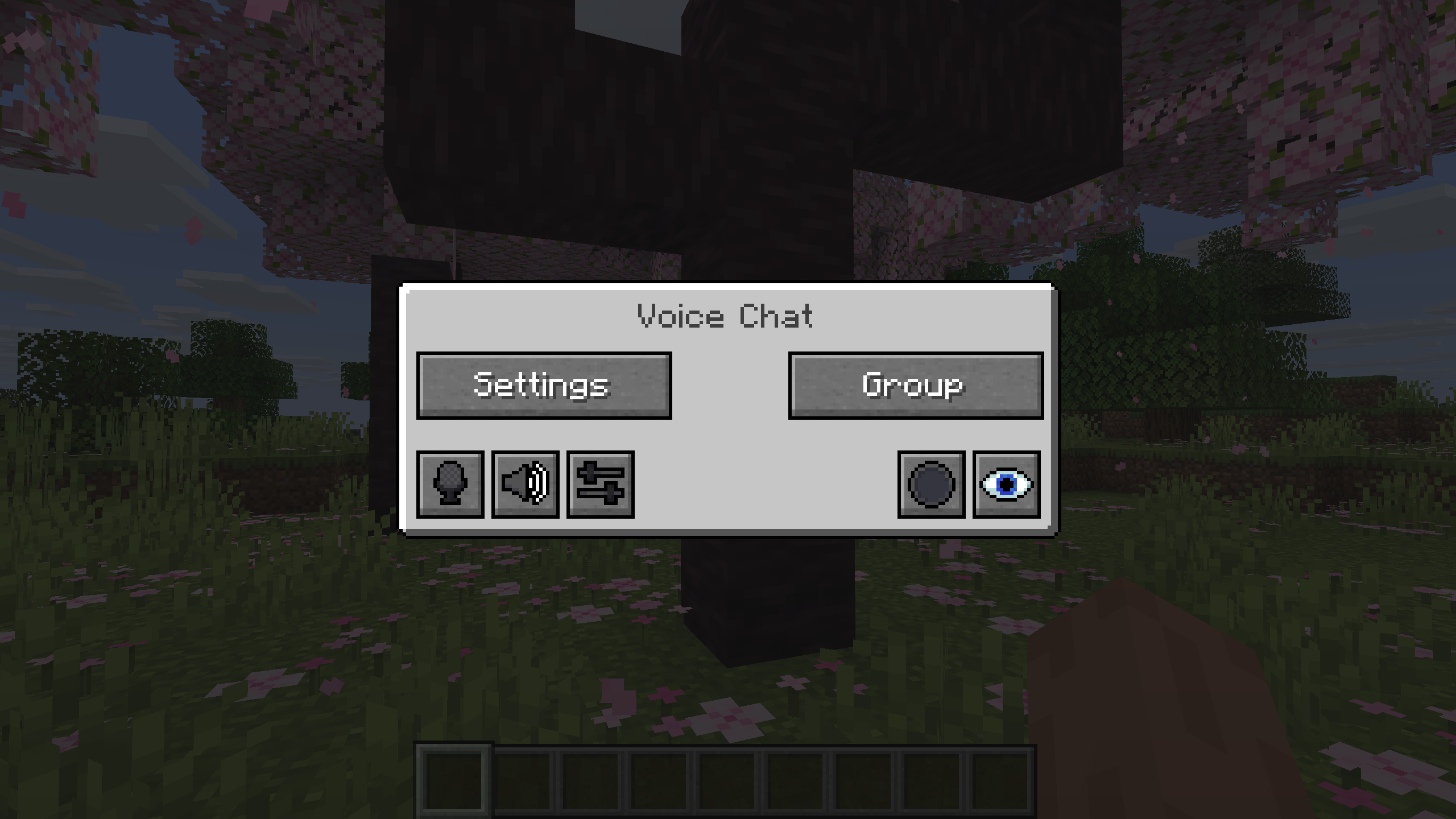
You can open the voice chat GUI by pressing the V key.
This allows you to open the settings, group chats, mute yourself, disable the voice chat, start/stop a recording and hide all icons.
Group Chats
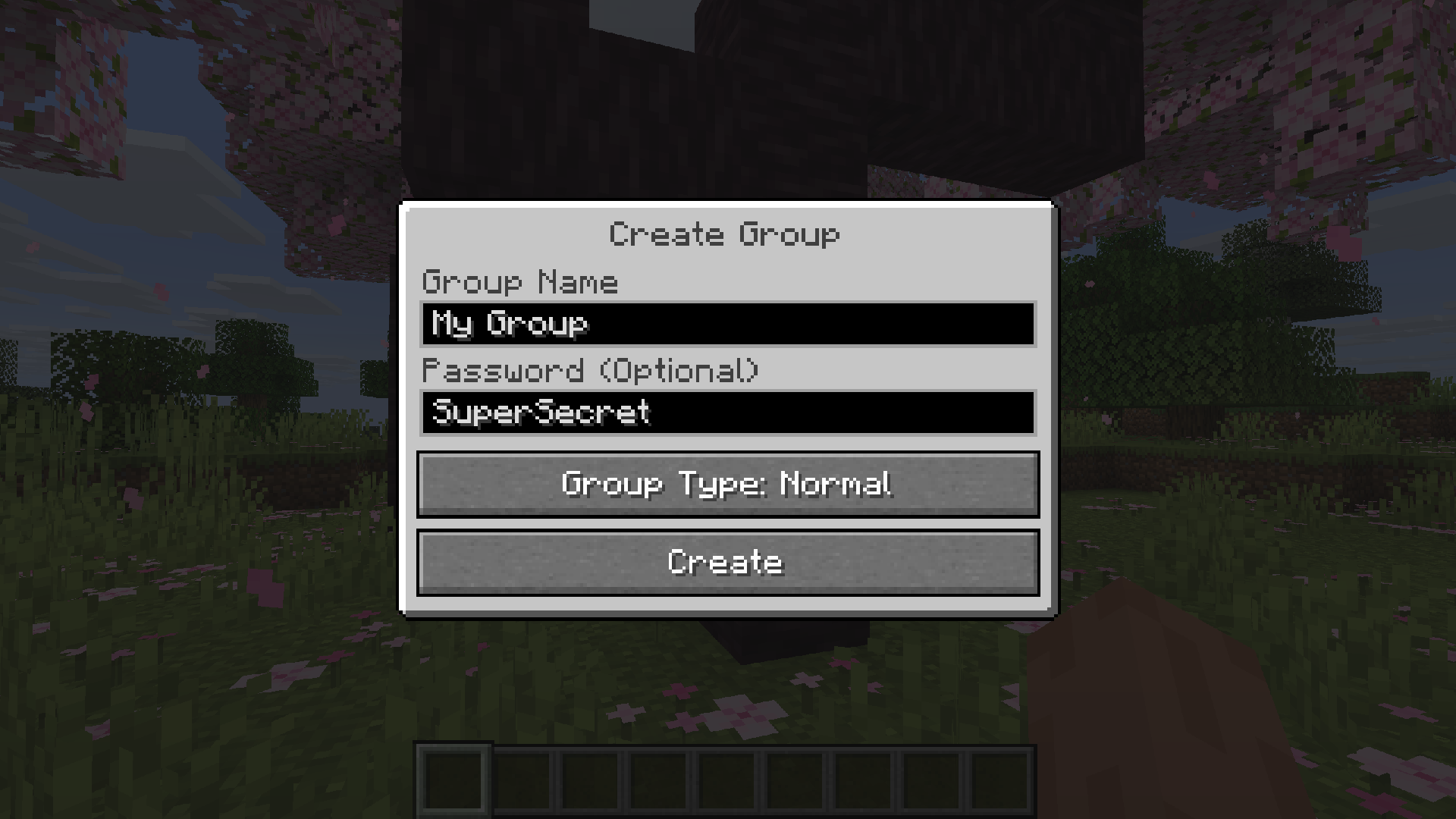
Group chats allow you to talk to players that are not in your vicinity. To open the group chat interface, either press the group button in the voice chat GUI or just press the group key.
To create a new group, just type a name in the text field and press the button at the bottom.
Creating or joining a group will bring you into the group chat interface. You will also see the heads of the group members in the top left corner of your screen. Talking players will be outlined. You can disable these icons by pressing the third button from the left.
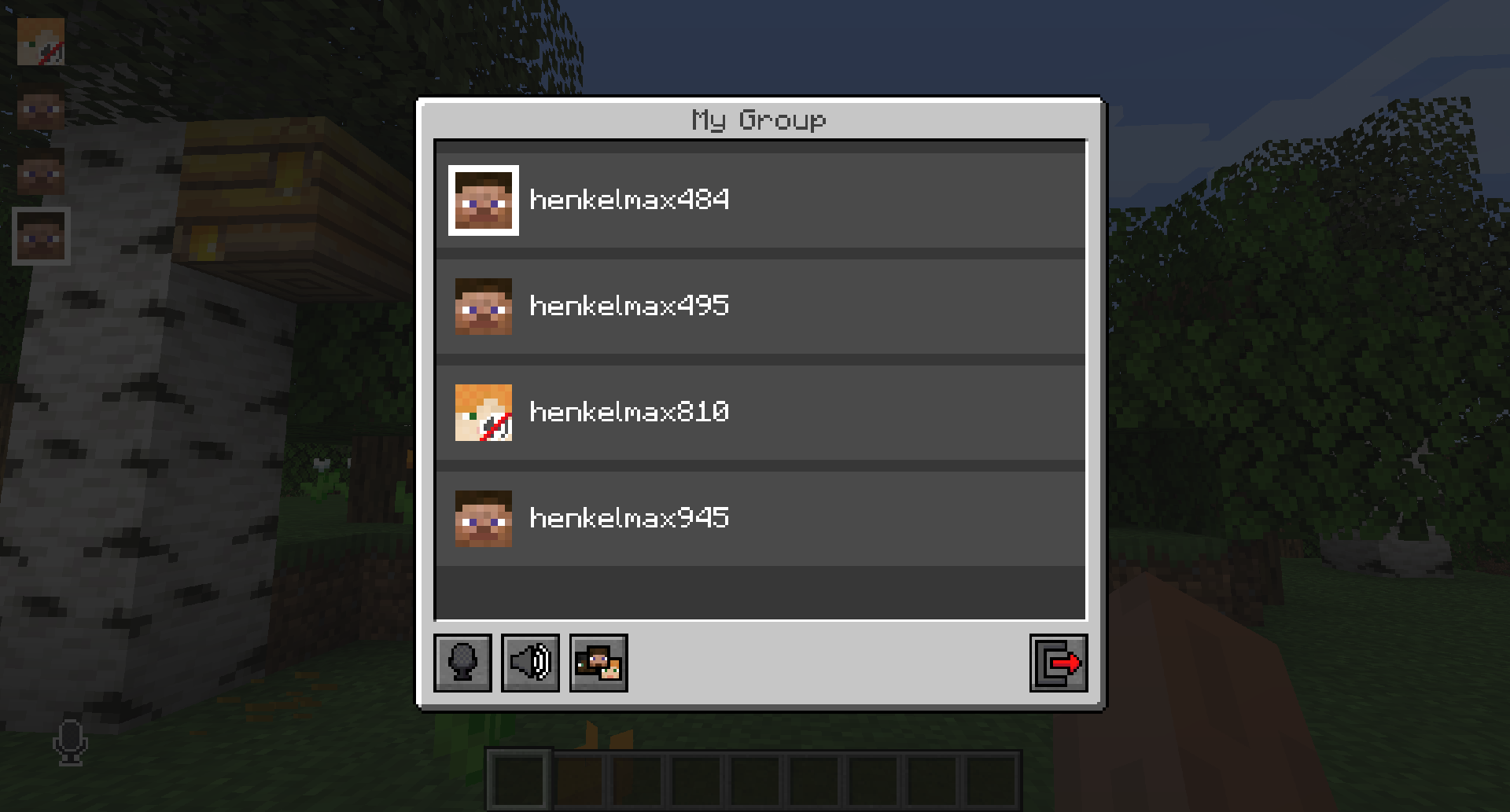
Players that are not in a group will see a group icon next to your head, indicating that you are in a group.
You can invite players to your group chat by entering the command /voicechat invite or from the social interactions screen.
Settings
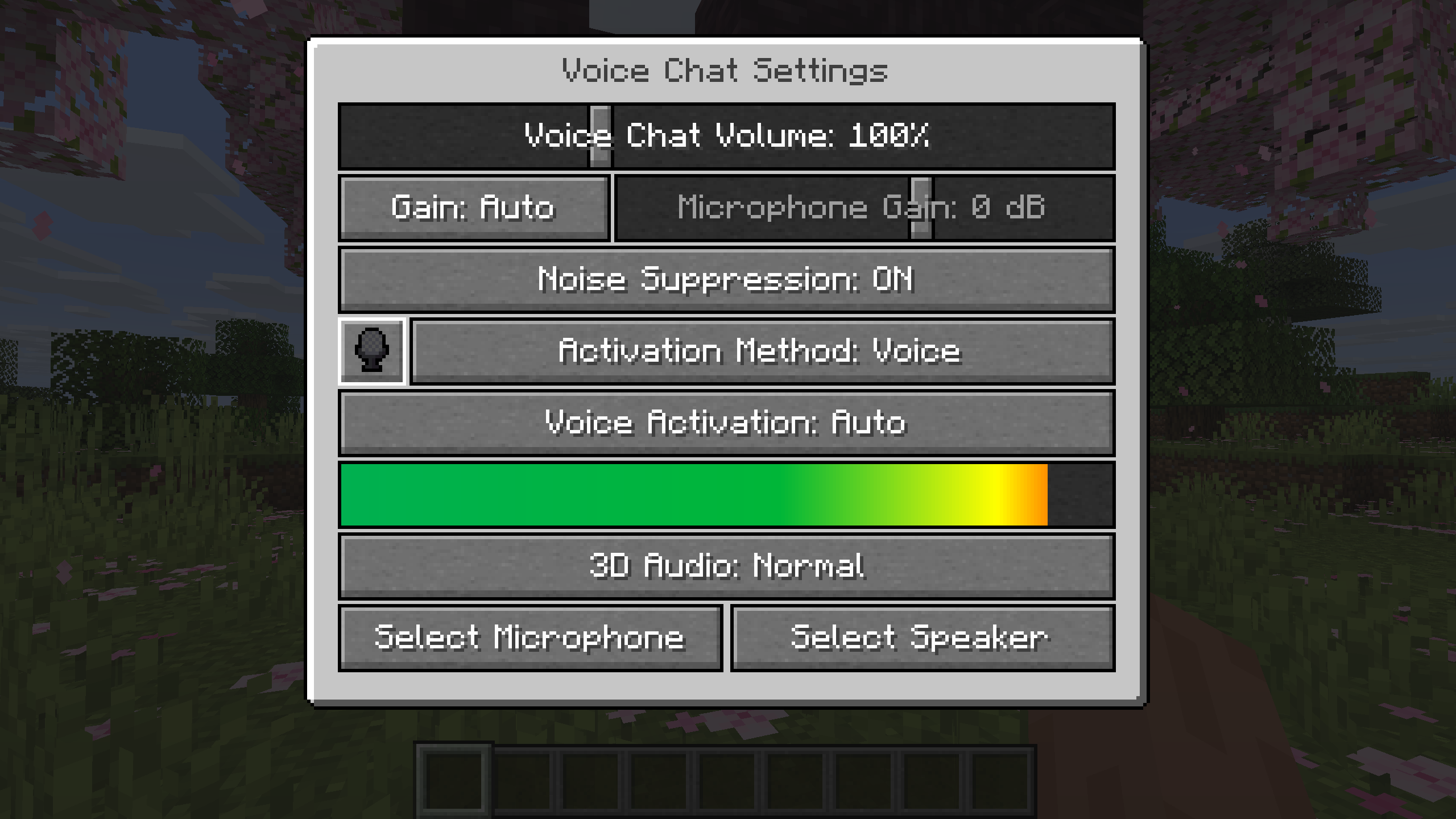
You can access the voice chat settings by pressing the V key and pressing the settings button.
This menu offers the ability to set up your voice chat audio settings.
By clicking the microphone button, you can test your microphone activation.
Important Notes
You need to open a port on the server. This is port 24454 UDP by default.
Without opening this port, the voice chat will not work.
This port can be changed in the server config.
More information here.
The voice chat is encrypted, but we don't guarantee the security of it. Use at your own risk!
AI-summarized from the mod's own pages · reviewed by our team
Reviewed for fabric-2.6.27+26.4-snapshot-7
Machine translated
Source: Modrinth project pageGuide
Summary
Simple Voice Chat menambahkan komunikasi suara berbasis jarak ke Minecraft, sehingga Anda dapat berbicara dengan pemain di sekitar. Mod ini juga menyediakan obrolan grup untuk percakapan jarak jauh, kontrol audio, dan perekaman. Server memerlukan pengaturan khusus agar obrolan suara dapat berfungsi.
Getting started
- Pasang unduhan yang sesuai — Pilih unduhan untuk loader atau platform server Anda. Proyek ini menyediakan unduhan mod untuk Fabric, Forge, NeoForge, dan Quilt, serta unduhan untuk beberapa platform server dan proxy.
- Periksa pengaturan server — Administrator server harus membuka port UDP untuk obrolan suara. Port bawaan adalah 24454, tetapi konfigurasi server dapat mengubahnya.
- Buka pengaturan suara — Tekan V, lalu pilih tombol pengaturan. Gunakan tombol mikrofon untuk menguji aktivasi mikrofon, dan gunakan uji pemutaran mikrofon serta speaker yang tersedia untuk memeriksa audio Anda.
- Pilih cara berbicara — Gunakan tekan-untuk-berbicara atau aktivasi suara, sesuai preferensi Anda. Tombol tekan-untuk-berbicara dapat diubah.
Key features
Percakapan dengan pemain di sekitar
Obrolan jarak dekat memungkinkan Anda berbicara dengan pemain di sekitar. Jarak suara dapat dikonfigurasi, dan mod ini juga mendukung berbisik serta suara 3D.
Obrolan grup
Grup memungkinkan Anda berbicara dengan anggota yang tidak berada di dekat Anda, dan dapat dilindungi dengan kata sandi. Buka antarmuka grup dari menu V atau dengan tombol grup.
Kontrol audio
Sesuaikan volume masing-masing pemain atau perkuat mikrofon Anda. Deteksi suara otomatis, penyesuaian gain, dan peredam kebisingan juga tersedia.
Perekaman
Mulai atau hentikan perekaman dari menu obrolan suara. Perekaman mendukung trek audio terpisah.
Compatibility
Fabric, Forge, NeoForge, Quilt
Tips
- Untuk membuat grup, buka antarmuka grup, masukkan nama, lalu gunakan tombol di bagian bawah. Undang pemain melalui layar interaksi sosial atau dengan /voicechat invite.
- Anggota grup ditampilkan sebagai kepala di pojok kiri atas, dengan garis tepi saat mereka berbicara. Tombol ketiga dari kiri di antarmuka grup menyembunyikan ikon-ikon ini.
- Menu V juga memungkinkan Anda membisukan diri sendiri, menonaktifkan obrolan suara, atau menyembunyikan semua ikon obrolan suara. Saat mencari penyebab masalah, periksa apakah Anda sedang dibisukan atau obrolan suara dinonaktifkan.
- Obrolan suara menggunakan enkripsi, tetapi proyek ini tidak menjamin keamanannya. Berhati-hatilah saat membicarakan hal sensitif.
FAQ
- Mengapa obrolan suara tidak tersambung?
- Periksa ikon status obrolan suara dan minta administrator server memastikan pengaturan port UDP sudah benar. Obrolan suara tidak akan berfungsi jika port yang diperlukan belum dibuka.
- Bisakah pemain menggunakan platform yang berbeda bersama-sama?
- Proyek ini mencantumkan kompatibilitas lintas platform antara Fabric, NeoForge, Forge, Quilt, Bukkit, Spigot, dan Paper. Proyek ini juga mencantumkan dukungan untuk Velocity, BungeeCord, dan Waterfall.
- Bisakah saya menyempurnakan antarmuka konfigurasi?
- Mod ini mendukung ModMenu, dan proyek ini merekomendasikan ClothConfig untuk antarmuka konfigurasi yang lebih baik.
Modrinth modrinth
indexable