
Sodium
jellysquid3
255.093.619 downloads · 42.990 followers
Minecraft: Minecraft 1.16.3 – 26.3
Runs on: Client
Kategori: optimization
Compatibility by loader
- neoforge1.21.1 – 1.21.11, 26.1 – 26.3· Latest mc26.3-0.9.3-neoforge (21 Nov 2026)
- fabric1.16 – 1.21, 26.1 – 26.3· Latest mc26.3-0.9.3-fabric (21 Nov 2026)
- quilt1.18 – 1.20· Latest mc1.20.1-0.5.13-fabric (3 Mar 2025)
Overview
This mod is the result of thousands of hours of development, and is made possible thanks to players like you. If you would like to show a token of your appreciation for my work, and help support the development of Sodium in the process, then consider buying me a coffee.


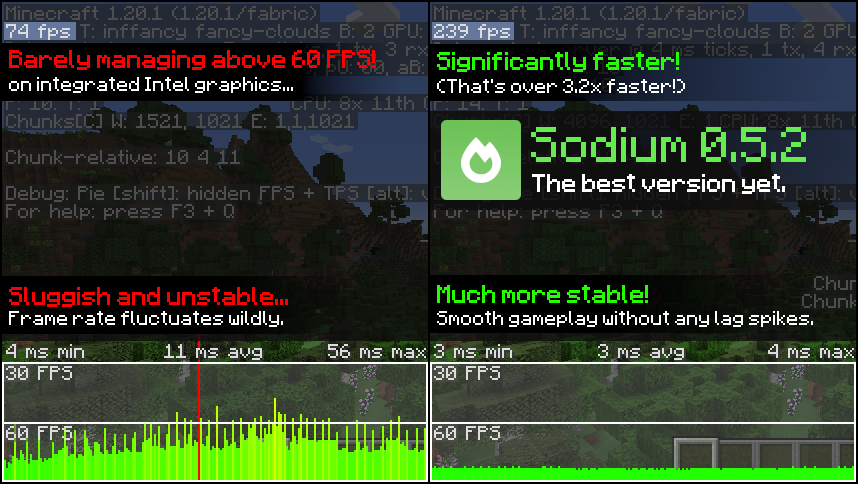
Sodium is a powerful optimization mod for the Minecraft client, which greatly improves frame rates and micro-stutter, while fixing many graphical issues in Minecraft.
Unlike other rendering-focused mods, it boasts wide compatibility with the wider modding ecosystem. And it does so without compromising on how the game looks, giving you that authentic block game feel.


📥 Installation Guide
Sodium is available for multiple mod loaders, but we recommend using Fabric Loader for the most simple and lightweight experience. If you are using a third-party launcher, it probably has built-in functionality to automatically install mod loaders. Once you have installed your mod loader, you can simply place Sodium into your mods folder like anything else.
Not sure if you installed the mod correctly? Check your Video Settings screen in Minecraft, which should show our new and improved user interface for changing settings.
Not sure how to configure the mod? Don't worry, you probably don't need to. By default, Sodium will enable all optimizations which are supported on your system, giving you the best experience possible. You should generally only change video settings related to performance and other advanced features if you are experiencing issues.
Need even more performance? By design, Sodium only optimizes the rendering code of Minecraft. You should also install our other mods, such as Lithium (for MC 1.15+) and Phosphor (for MC <1.19), to optimize the other parts of your game. This is done so that players can pick and choose which mods they want to use, but we generally recommend using our entire collection.
✅ Hardware Compatibility
Android devices (and some Windows-on-ARM devices) which use OpenGL translation layers (such as GL4ES, ANGLE, GLonD3D12 etc) are not supported and will have severe performance issues.
We only provide official support for desktop graphics cards which have up-to-date drivers compatible with OpenGL 4.5 or newer. Most graphics cards released in the past 12 years will meet these requirements, including the following:
- INTEL HD Graphics 500 Series (Skylake) or newer
- NVIDIA GeForce 400 Series (Fermi) or newer
- AMD Radeon HD 7000 Series (GCN 1) or newer
Nearly all desktop graphics cards that are already compatible with Minecraft (which requires OpenGL 3.3) should also work with Sodium. But our team cannot ensure compatibility or provide support for older graphics cards, and they may not work with future versions of Sodium.
If you are running into problems, you should make sure that your graphics drivers are up-to-date. Out-of-date graphics drivers are often the reason for most crashes, rendering bugs, and performance issues.
🐛 How to Report Issues
Please use the issue tracker linked at the top of the page to report bugs, crashes, and other issues. Make sure you include information about the mods you are using, and attach any crash/log files you have.
Note: The level of performance you see while using the Sodium mod will vary depending on exact hardware and software configuration. For all performance comparisons provided on this page, we used a computer with integrated graphics which we believe to be representative of the casual player.
Hardware configuration: Intel Core i7-1165G7 (4c/8t, up to 4.70 GHz) with Intel Xe Graphics (96 EUs, up to 1.30 GHz), 2x16 GB DDR4-3200. Software configuration: Fedora 41, Linux 6.12.4, Mesa 24.3.4, Prism Launcher 9.1, OpenJDK 21.0.7 runtime (as packaged by distribution), Fabric Loader 0.16.10.

AI-summarized from the mod's own pages · reviewed by our team
Reviewed for mc26.3-0.9.3-beta.1-fabric
Machine translated
Source: Modrinth project pageGuide
Summary
Sodium mengganti mesin render klien Minecraft untuk meningkatkan frame rate dan mengurangi stutter kecil, sekaligus mempertahankan tampilan permainan yang familier. Mod ini juga mengatasi sejumlah masalah grafis, meski peningkatan yang Anda rasakan bergantung pada perangkat keras dan perangkat lunak yang digunakan.
Getting started
- Pasang loader — Pilih Fabric, Quilt, atau NeoForge untuk klien Minecraft Anda. Proyek ini merekomendasikan Fabric untuk penyiapan yang sederhana dan ringan.
- Tambahkan Sodium — Pilih rilis Sodium yang sesuai dengan loader dan versi Minecraft Anda, lalu letakkan di folder mods. Beberapa launcher pihak ketiga dapat memasang loader untuk Anda.
- Periksa layar pengaturan — Jalankan Minecraft dan buka Pengaturan Video. Antarmuka pengaturan Sodium yang didesain ulang adalah tanda yang berguna bahwa mod sudah terpasang dengan benar.
- Coba pengaturan bawaan terlebih dahulu — Sodium secara otomatis mengaktifkan optimasi yang didukung sistem Anda. Biasanya, Anda hanya perlu menyesuaikan pengaturan performa atau video lanjutan jika mengalami masalah.
Key features
Optimasi rendering
Sodium berfokus pada kode yang bertanggung jawab untuk menggambar permainan. Mod ini tidak mengoptimalkan setiap bagian lain dari Minecraft.
Visual yang familier
Mod ini bertujuan meningkatkan performa tanpa mengubah tampilan Minecraft yang mudah dikenali, serta memperbaiki sejumlah masalah grafis.
Antarmuka pengaturan video
Sodium mengganti antarmuka pengaturan video. Gunakan antarmuka ini untuk memeriksa atau mengubah pengaturan jika konfigurasi bawaan menimbulkan masalah.
Compatibility
fabric, neoforge, quilt · Versi Minecraft yang tercantum mencakup 1.16.3 hingga 1.20.6, dan ada juga versi lainnya. Periksa rilis yang sesuai dengan loader dan versi permainan Anda.
- Perangkat Android dan beberapa perangkat Windows berbasis ARM yang menggunakan lapisan penerjemah OpenGL tidak didukung dan dapat mengalami masalah performa yang parah.
Tips
- Perbarui driver grafis jika Anda mengalami crash, kesalahan rendering, atau performa buruk; driver usang sering menjadi penyebab masalah ini.
- Dukungan perangkat keras resmi mencakup kartu grafis desktop dengan driver terkini yang mendukung OpenGL 4.5 atau lebih baru. Kartu lama yang kompatibel dengan Minecraft mungkin dapat digunakan, tetapi tidak didukung secara resmi dan bisa berhenti berfungsi pada versi Sodium mendatang.
- Jika melaporkan bug atau crash, sertakan mod yang Anda gunakan dan lampirkan laporan crash atau berkas log yang relevan.
FAQ
- Apakah Sodium perlu dijalankan di server?
- Sodium adalah mod sisi klien. Informasi proyek yang tersedia menyebutkan bahwa penggunaan di sisi server tidak didukung.
- Apakah mod ini akan memperbaiki semua masalah performa?
- Tidak. Sodium berfokus pada rendering, jadi bagian permainan lainnya mungkin memerlukan optimasi terpisah. Proyek ini menyarankan Lithium dan, untuk versi Minecraft di bawah 1.19, Phosphor.
- Mengapa peningkatan yang saya rasakan berbeda dari orang lain?
- Performa bergantung pada konfigurasi perangkat keras dan perangkat lunak yang digunakan. Hasil yang ditampilkan proyek ini menggunakan sistem grafis terintegrasi tertentu dan bukan jaminan untuk komputer lain.
Modrinth modrinth
indexable