
Simple Voice Chat
henkelmax
77.149.835 downloads · 14.857 followers
Minecraft: Minecraft 1.12.2 – 26.2
Runs on: Client & server
Categoria: adventure, bukkit, bungeecord, folia, paper, purpur, social, spigot, utility, velocity, waterfall
Compatibility by loader
- fabric1.16 – 1.21, 26.1 – 26.2· Latest fabric-2.6.22+26.2 (8 de ago. de 2026)
- neoforge1.20 – 1.21, 26.1 – 26.2· Latest neoforge-2.6.22+26.2 (8 de ago. de 2026)
- forge1.12.2, 1.16 – 1.21, 26.1 – 26.2· Latest forge-2.6.22+26.2 (8 de ago. de 2026)
- quilt1.18 – 1.21, 26.1 – 26.2· Latest quilt-2.6.22+26.2 (8 de ago. de 2026)
Overview
Modrinth | CurseForge | Discord | Wiki | FAQ | Credits | API
Simple Voice Chat
A proximity voice chat for Minecraft with a variety of addons that offer additional features and functionalities.
⚠️ NOTE This mod requires special setup on the server in order to work. Please read the wiki for more information.
[
](https://discord.gg/4dH2zwTmyX)
*Please join the Discord if you have questions!*
Downloads
Features
- Push to talk
- Voice activation
- Proximity voice chat
- Password protected groups
- Automatic voice activity detection
- Automatic microphone gain adjustment
- Opus codec
- RNNoise recurrent neural network noise suppression
- OpenAL audio
- Cross compatibility between Fabric, NeoForge, Forge, Quilt, Bukkit, Spigot and Paper
- Support for Velocity, BungeeCord and Waterfall
- Compatibility with ModMenu (Use ClothConfig for a better configuration UI)
- Configurable push to talk key
- Microphone and speaker test playback
- Configurable voice distance
- Whispering
- Individual player volume adjustment
- Microphone amplification
- 3D sound
- AES encryption
- Audio recording with separate audio tracks
- A powerful API
- Many addons
Icons
| Icon | Description |
|---|---|
 | You are talking |
 | You are whispering |
 | Player is talking |
 | Player is whispering |
 | Microphone muted |
 | Voice chat disabled |
 | Voice chat not connected |
| Voice chat not installed |
The GUI
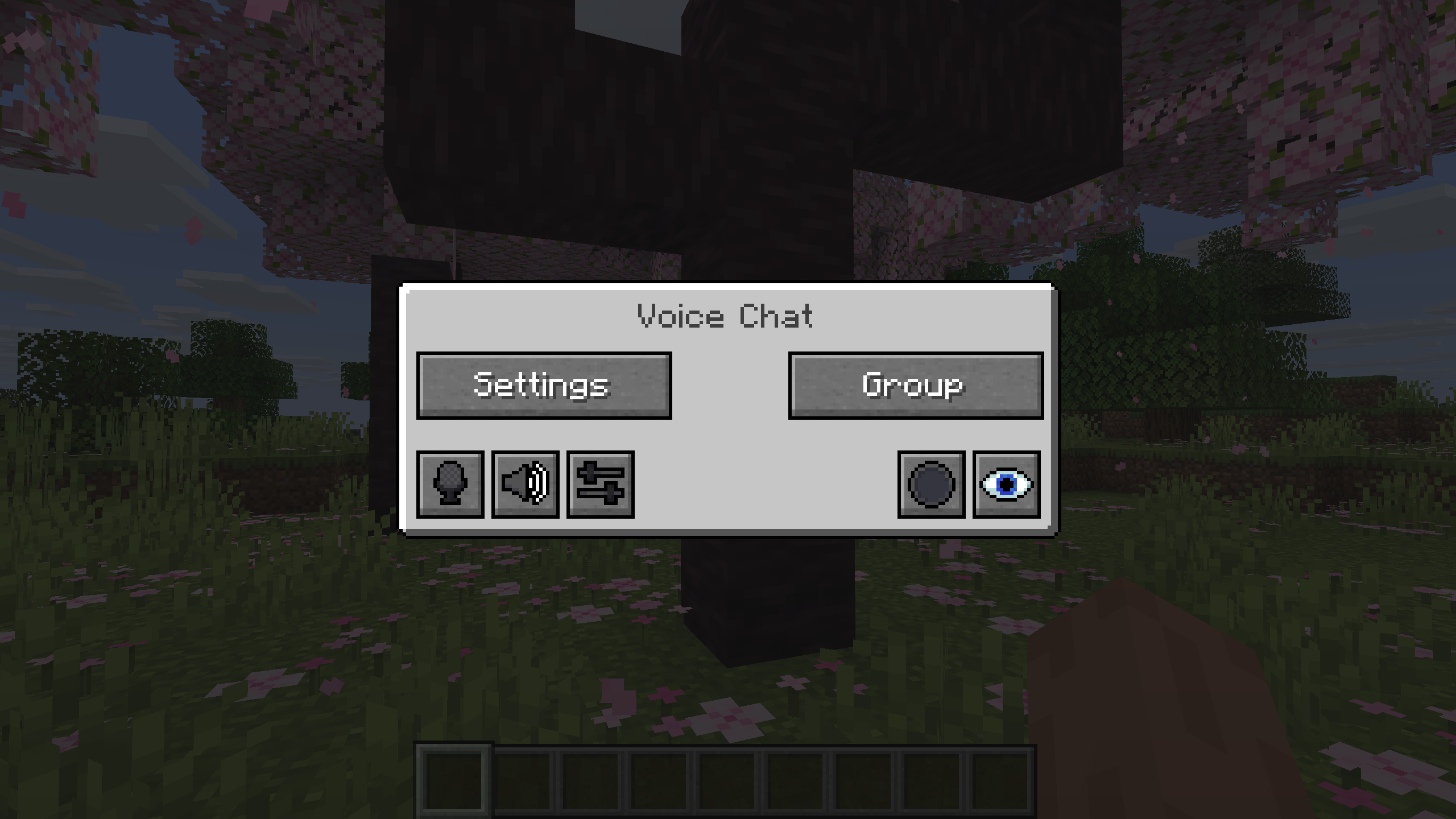
You can open the voice chat GUI by pressing the V key.
This allows you to open the settings, group chats, mute yourself, disable the voice chat, start/stop a recording and hide all icons.
Group Chats
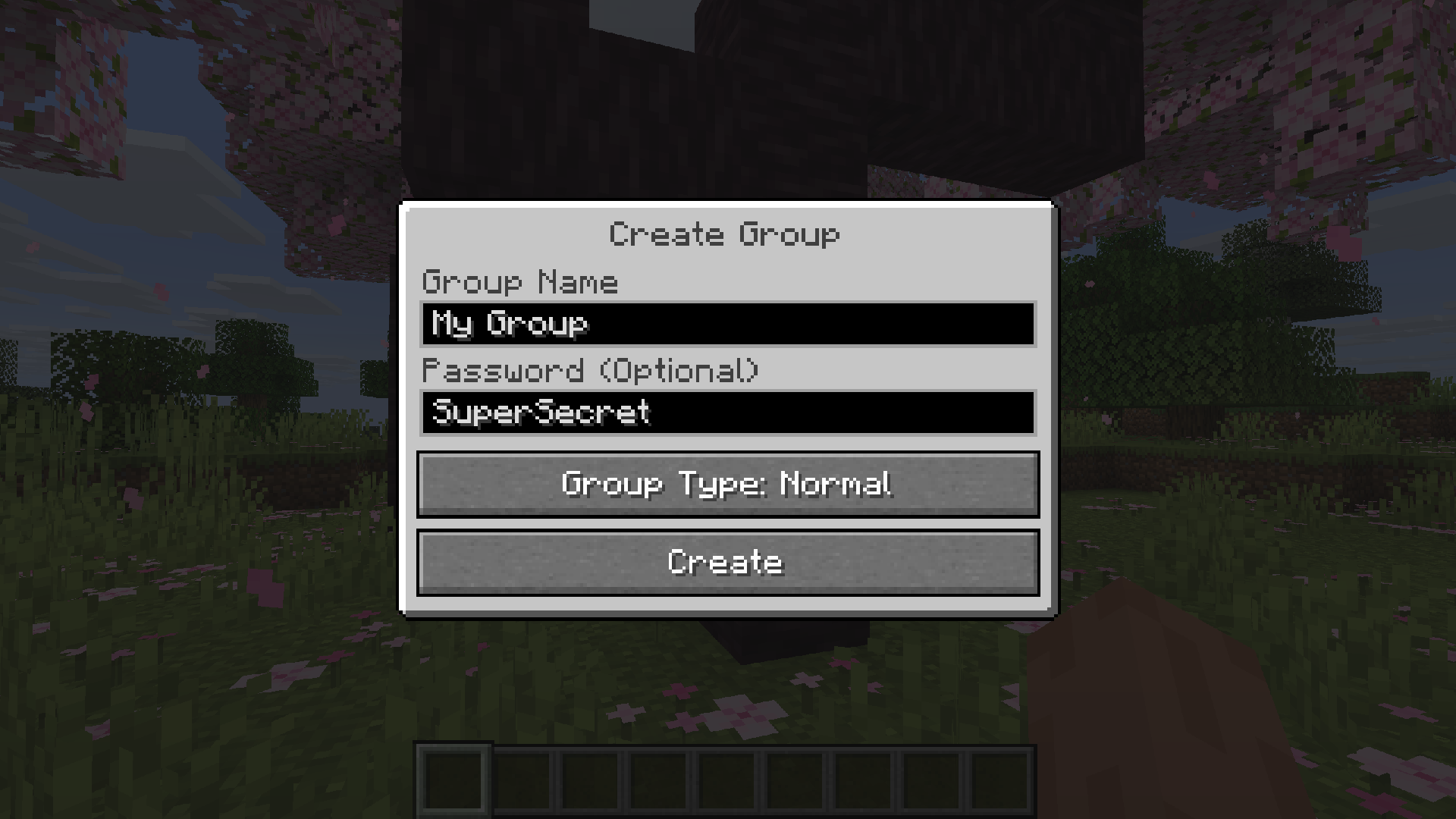
Group chats allow you to talk to players that are not in your vicinity. To open the group chat interface, either press the group button in the voice chat GUI or just press the group key.
To create a new group, just type a name in the text field and press the button at the bottom.
Creating or joining a group will bring you into the group chat interface. You will also see the heads of the group members in the top left corner of your screen. Talking players will be outlined. You can disable these icons by pressing the third button from the left.
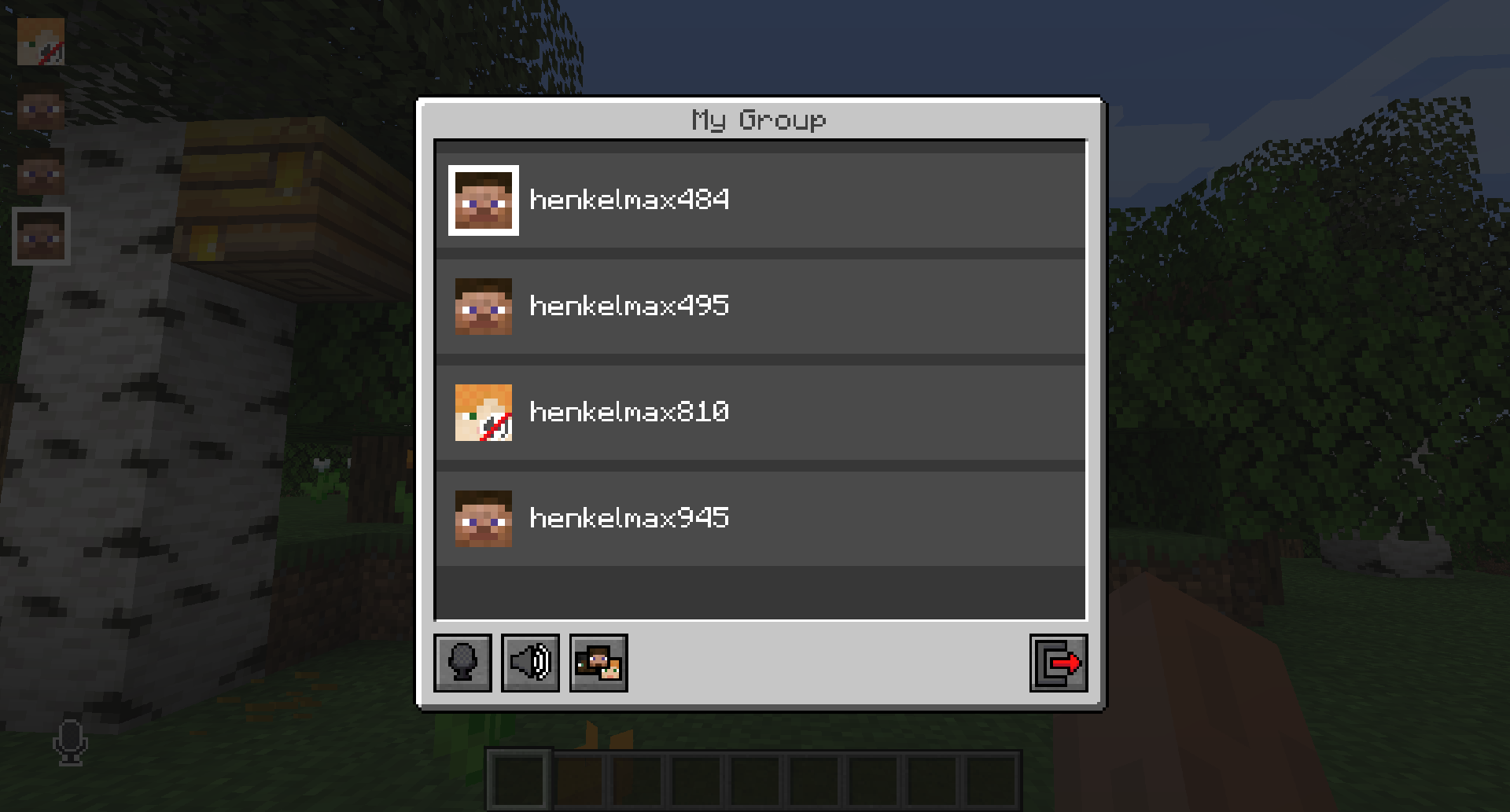
Players that are not in a group will see a group icon next to your head, indicating that you are in a group.
You can invite players to your group chat by entering the command /voicechat invite or from the social interactions screen.
Settings
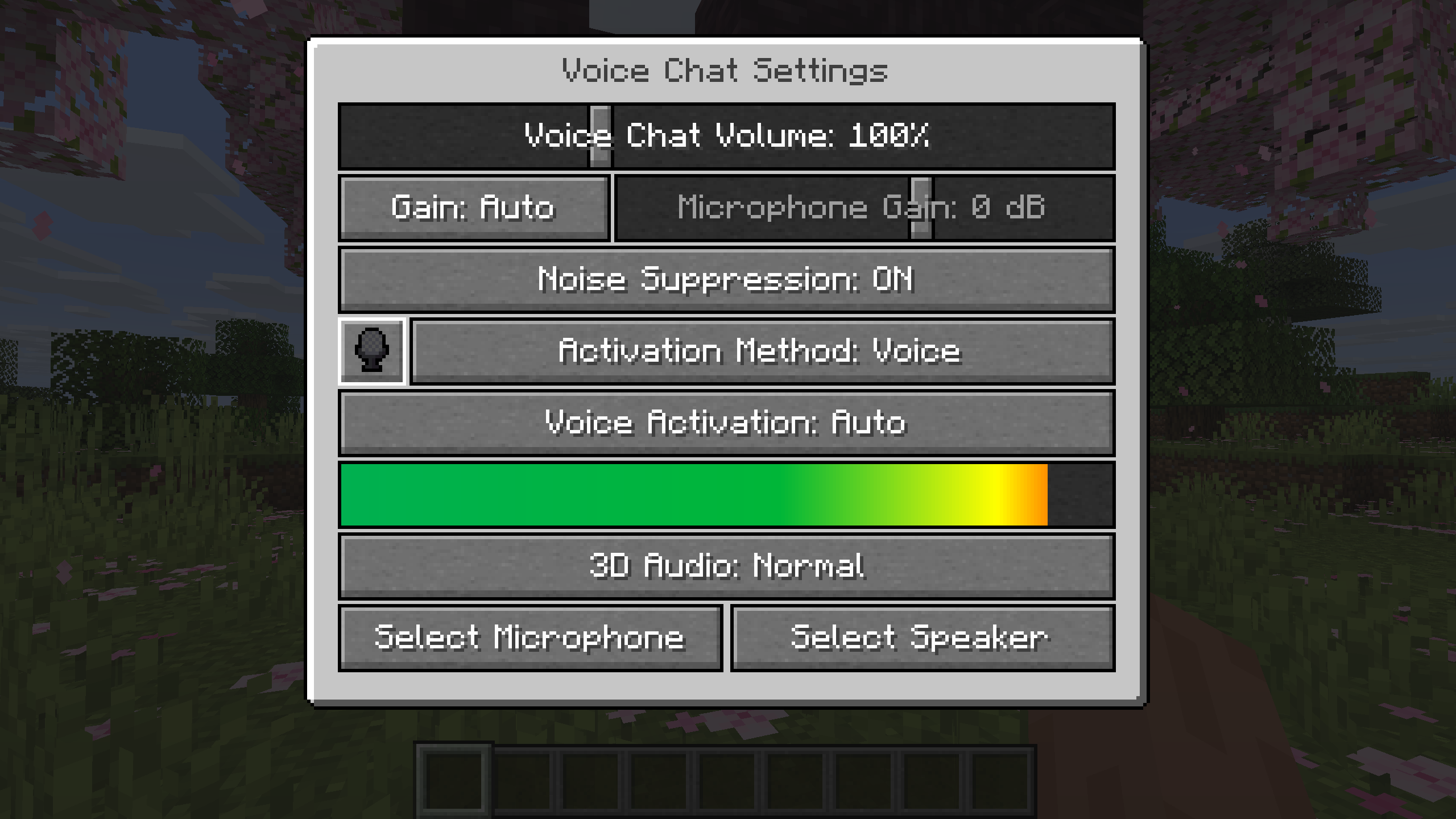
You can access the voice chat settings by pressing the V key and pressing the settings button.
This menu offers the ability to set up your voice chat audio settings.
By clicking the microphone button, you can test your microphone activation.
Important Notes
You need to open a port on the server. This is port 24454 UDP by default.
Without opening this port, the voice chat will not work.
This port can be changed in the server config.
More information here.
The voice chat is encrypted, but we don't guarantee the security of it. Use at your own risk!
AI-summarized from the mod's own pages · reviewed by our team
Reviewed for fabric-2.6.27+26.4-snapshot-7
Machine translated
Source: Modrinth project pageGuide
Summary
Simple Voice Chat adiciona comunicação por voz baseada em proximidade ao Minecraft, permitindo conversar com jogadores próximos. Também oferece conversas em grupo a distâncias maiores, controles de áudio e gravação. O servidor precisa de uma configuração especial para que o chat de voz funcione.
Getting started
- Instale o download adequado — Escolha o download para seu loader ou plataforma de servidor. O projeto oferece downloads do mod para Fabric, Forge, NeoForge e Quilt, além de downloads para várias plataformas de servidor e proxy.
- Verifique a configuração do servidor — O administrador do servidor precisa abrir uma porta UDP para o chat de voz. A porta padrão é 24454, mas a configuração do servidor pode alterá-la.
- Abra as configurações de voz — Pressione V e selecione o botão de configurações. Use o botão do microfone para testar a ativação dele e os testes de reprodução disponíveis para microfone e alto-falante para verificar o áudio.
- Escolha como falar — Use pressionar para falar ou ativação por voz, conforme sua preferência. A tecla para pressionar e falar pode ser alterada.
Key features
Conversas próximas
O chat por proximidade permite conversar com jogadores próximos. A distância de voz é configurável, e o mod também oferece sussurros e som 3D.
Conversas em grupo
Os grupos permitem conversar com membros que não estão por perto e podem ser protegidos por senha. Abra a interface de grupos pelo menu V ou pela tecla de grupo.
Controles de áudio
Ajuste o volume de cada jogador ou amplifique seu microfone. Detecção automática de voz, ajuste de ganho e supressão de ruído também estão disponíveis.
Gravação
Inicie ou pare uma gravação pelo menu do chat de voz. As gravações permitem faixas de áudio separadas.
Compatibility
Fabric, Forge, NeoForge, Quilt
Tips
- Para criar um grupo, abra a interface de grupos, digite um nome e use o botão na parte inferior. Convide jogadores pela tela de interações sociais ou com /voicechat invite.
- Os membros do grupo aparecem como cabeças no canto superior esquerdo, contornadas quando estão falando. O terceiro botão da esquerda na interface de grupos oculta esses ícones.
- O menu V também permite silenciar seu microfone, desativar o chat de voz ou ocultar todos os ícones do chat de voz. Ao solucionar problemas, verifique se você está com o microfone silenciado ou se o chat de voz está desativado.
- O chat de voz usa criptografia, mas o projeto não garante sua segurança. Tenha isso em mente ao conversar sobre assuntos sensíveis.
FAQ
- Por que o chat de voz não está conectado?
- Confira o ícone de status do chat de voz e peça ao administrador do servidor para verificar a configuração da porta UDP. O chat de voz não funcionará sem a porta necessária aberta.
- Jogadores em plataformas diferentes podem jogar juntos?
- O projeto lista compatibilidade entre Fabric, NeoForge, Forge, Quilt, Bukkit, Spigot e Paper. Também lista suporte para Velocity, BungeeCord e Waterfall.
- Posso melhorar a interface de configuração?
- O mod é compatível com ModMenu, e o projeto recomenda ClothConfig para uma interface de configuração aprimorada.
Modrinth modrinth
indexable